EasyManua.ls Logo

Sony CFD-21 - Page 8

Sony CFD-21
30 pages
Print Icon
To Next Page IconTo Next Page
To Previous Page IconTo Previous Page
Loading...
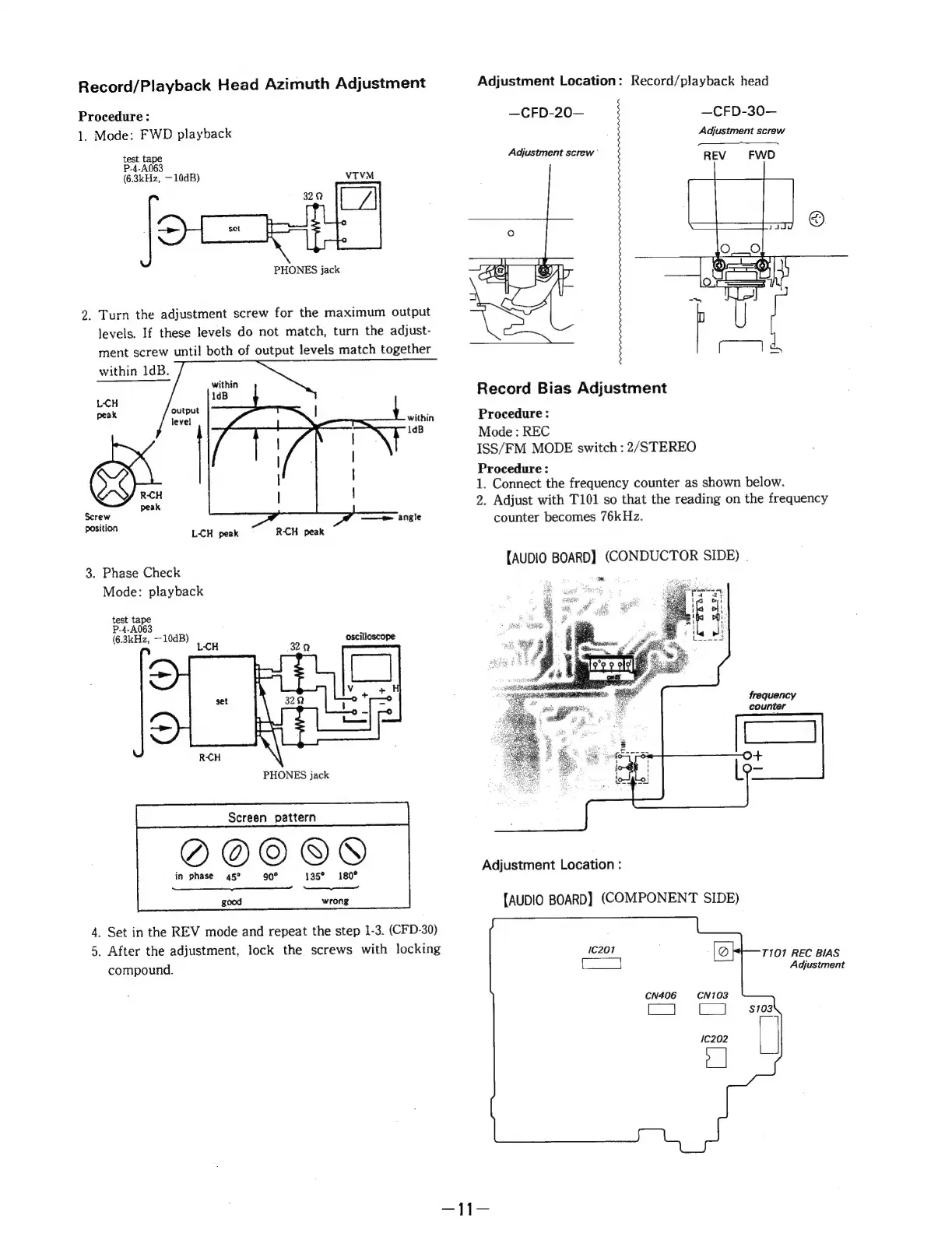
Record/Playback
Head
Azimuth
Adjustment
Procedure:
1.
Mode:
FWD
playback
test
tape
P-4-A063
(6.3kHz,
—10dB)
VTVM
=
PHONES
jack
2.
Turn
the
adjustment
screw
for
the
maximum
output
levels.
If
these
levels
do
not
match,
turn
the
adjust-
ment
screw
until
both
of
output
levels
match
together
within
1dB.
LH
peak
R-CH
peak
Screw
position
RCH
peak
L-CH
peak
3.
Phase
Check
Mode:
playback
test
tape
P-4-A063
(6.3kHz,
—10dB)
Le
oscilloscope
H
32.9
PHONES
jack
QO@OOQ@Y
in
phase
45°
90°
135°
180°
Peake
cake,
wrong
good
4.
Set
in
the
REV
mode
and
repeat
the
step
1-3.
(CFD-30)
5.
After
the
adjustment,
lock
the
screws
with
locking
compound.
Adjustment
Location:
Record/playback
head
—CFD-20— —CFD-30—
Adjustment
screw
SS:
Adjustment
screw’
REV
FWD
Record
Bias
Adjustment
Procedure:
Mode
:
REC
ISS/FM
MODE
switch
:
2/STEREO
Procedure:
1.
Connect
the
frequency
counter
as
shown
below.
2.
Adjust
with
T101
so
that
the
reading
on
the
frequency
counter
becomes
76kHz.
{AUDIO
BOARD)
(CONDUCTOR
SIDE)
.
frequency
counter
Adjustment
Location
:
[AUDIO
BOARD]
(COMPONENT
SIDE)
7101
REC
BIAS
Adjustment
cN406

Related product manuals