24
Creating your own
program (Program play)
You can arrange the playing order of up to
20 tracks or files on a CD.
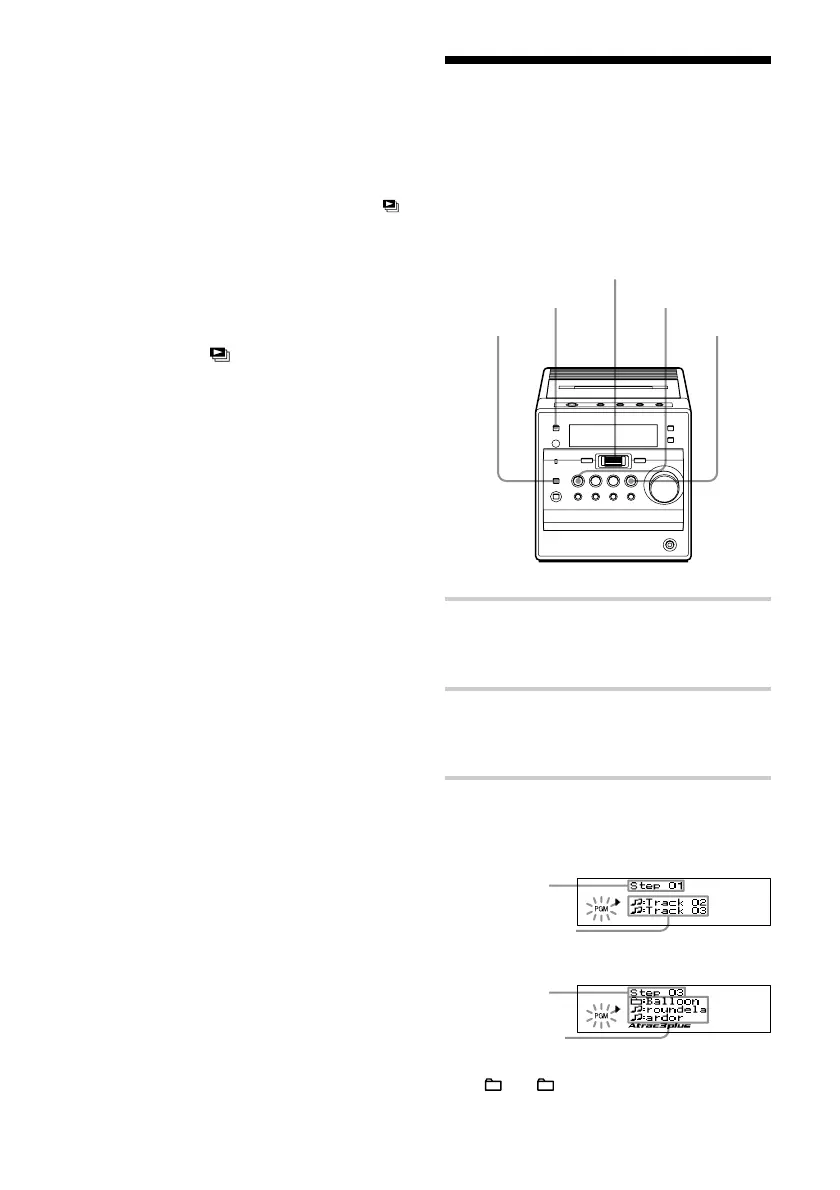
1 Press FUNCTION repeatedly until
“CD” appears on the display when the
player is not in CD mode.
2 Press MODE/DIR repeatedly in stop
mode until “PGM” flashes on the
display.
3 Turn the jog dial upward or downward
then press it for the tracks or files you
want to program in the order you want.
Audio CD
ATRAC CD/
MP3 CD*
*You can also select another group pressing
+ or –.
Playing order
Programed track
Playing order
Programed file
CD u
MODE/DIR
Jog dial
(PUSH ENTER/
MEMORY)
FUNCTION
Playing your favorite play lists
(m3u play list play) (MP3 CD
only)
(continued)
On the remote
1 Press FUNCTION repeatedly until “CD”
appears on the display.
2 Press MODE repeatedly in stop mode until “ ”
appears on the display.
3 Press ./m or M/> to start a play list
you want then press u.
To cancel m3u play list play
Stop playing first. Press MODE/DIR
repeatedly until “
” disappears from the
display.
Note
You can only play the top two play lists when two
or more play lists are stored.
STOP x



 To Next Page