Setting Up
37
Connecting optional
components
You can record an audio CD on a MiniDisc
or enjoy the sound from a VCR, TV, or
MiniDisc player/recorder through the
speakers of this player.
Be sure to turn off the power of each
component before making any connections.
For details, refer to the instruction manual of
the component to be connected.
FUNCTION
Recording an audio CD on a
MiniDisc or DAT recorder
* Select a connecting cable to match the type of
digital input jack on the recorder to be
connected. For details, refer to the instruction
manual of the component to be connected. The
OPTICAL DIGITAL OUT (CD) jack of this unit
is a square-shaped jack.
to OPTICAL
DIGITAL OUT
(CD) jack
POC-15AB
Digital
Connecting
cable*
(not supplied)
to digital
input jack
MiniDisc
recorder, DAT
recorder, etc.
LINE IN
OPTICAL
DIGITAL
OUT (CD)
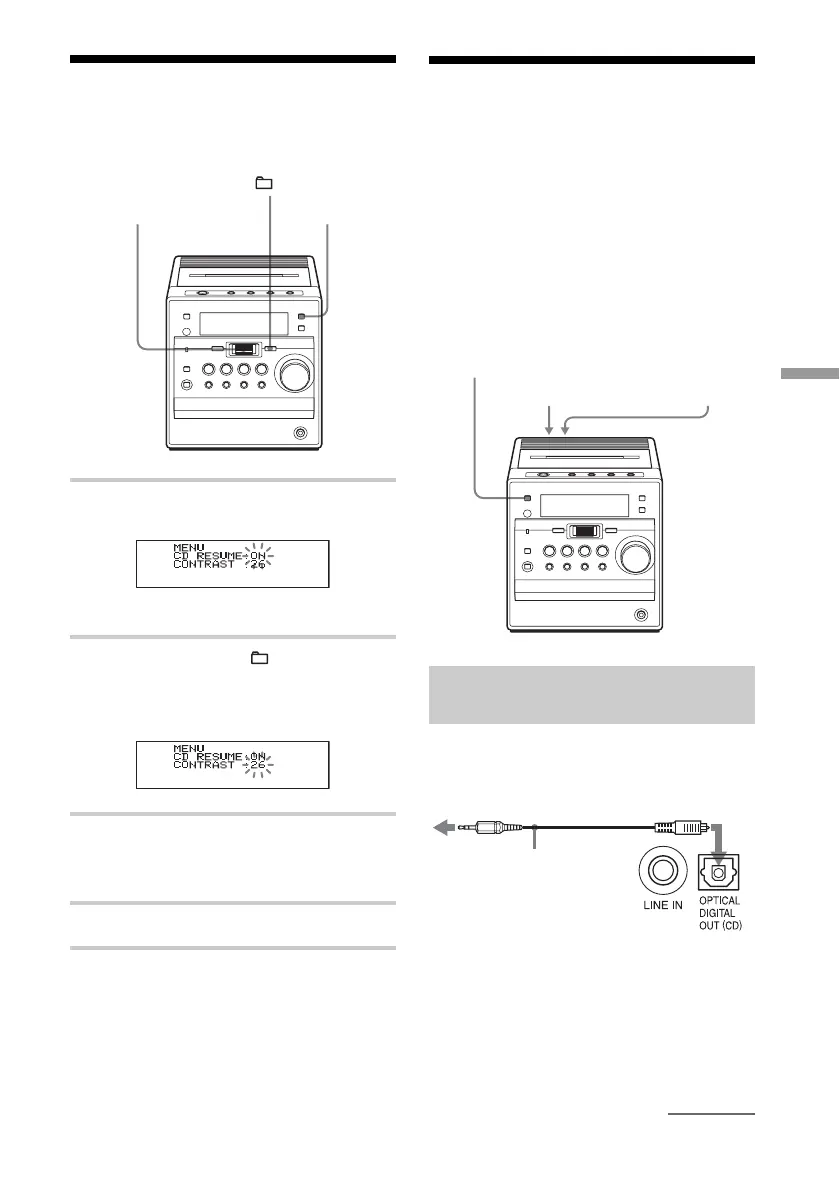
Adjusting the contrast
of the display
1 Press DISPLAY when the player is
turned off.
The MENU display appears.
2 Press the jog dial or + to select
“CONTRAST”.
The contrast digits (1 - 32) flash on the
display.
3 Turn the jog dial to select the number
you want for the contrast you want
while observing the display.
4 Press the jog dial to enter the selection.
continued
Jog dial
(PUSH ENTER/
MEMORY)
+
DISPLAY



 To Next Page