32
To check/change the waking up
timer settings
Press TIMER to check the setting.
To change the setting, display the setting
you want to change, select the setting item
by pressing TUNING + or TUNING – or the
jog dial and re-enter it.
To use the player before a timer
playback starts
If you turn on the player, you can use it as
usual ( in case of the radio, if you listen to
the station which is different from the one
you tuned in step 1 on page 31, you will hear
that station at the preset time.) Turn off the
player before the preset time.
To stop play
Turn off the power.
Note
You cannot preset waking up timer and recording
timer at the same time.
Tips
• To exit the standby mode, press STANDBY to
make the indicator disappear.
• The preset settings remain until you reset them.
• When you press STANDBY during playback,
the power will go off and the player will enter
the standby mode.
Timer-recording radio
programs
You can set timer to record the radio at a
certain time. You can also record the sound
of the component connected to the LINE IN
jack, using the timer. Make sure you have set
the clock (see “Setting the clock” on page
30).
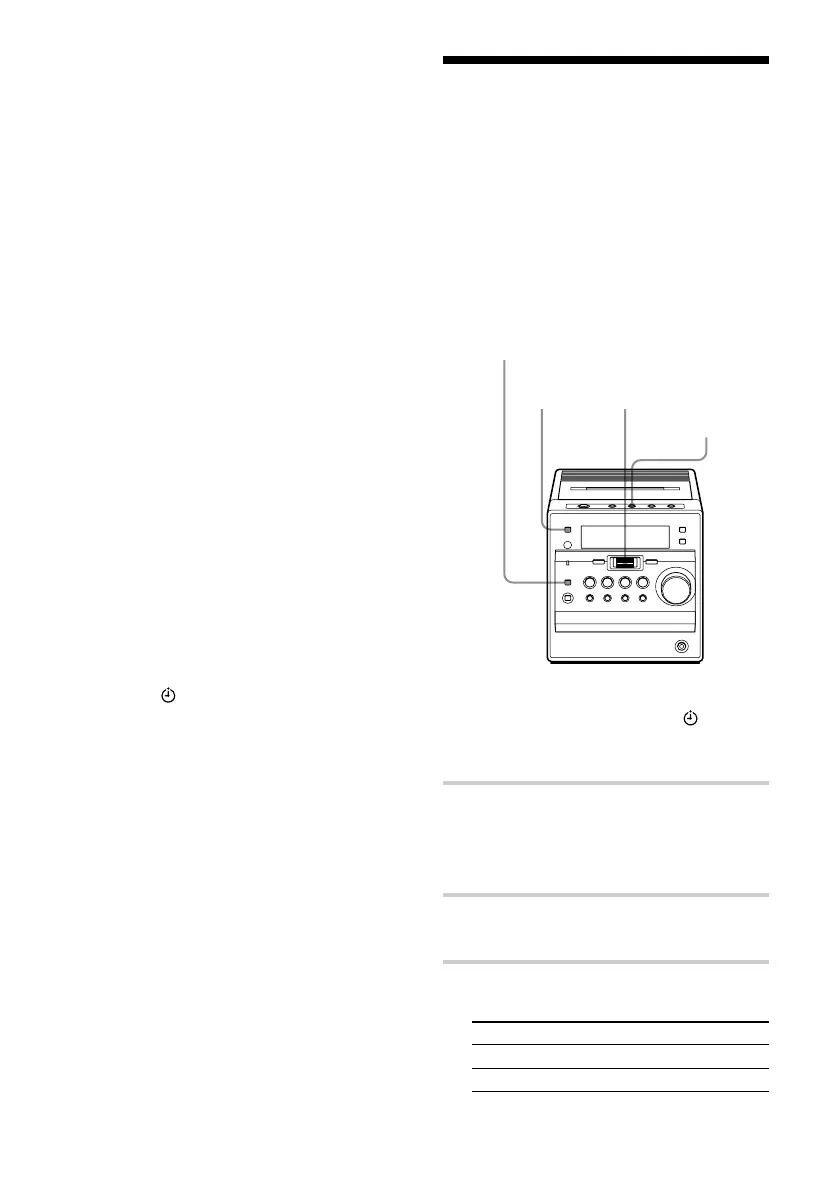
Before you begin, make sure the (clock)
indicator is not lit on the display. If it is lit,
press STANDBY.
1 Tune in the radio station and insert a
blank tape into the tape compartment
with the side you want to record on
facing up.
2 Press FUNCTION repeatedly until
“TAPE” appears on the display.
3 Press MODE/DIR to select recording
direction of the tape.
Display
One side g
Both sides h
STANDBY
MODE/DIR
Jog dial
(PUSH ENTER/
MEMORY)
Waking up to music
(continued)
FUNCTION



 To Next Page