21
GB
Recording/Playback
Recording movies
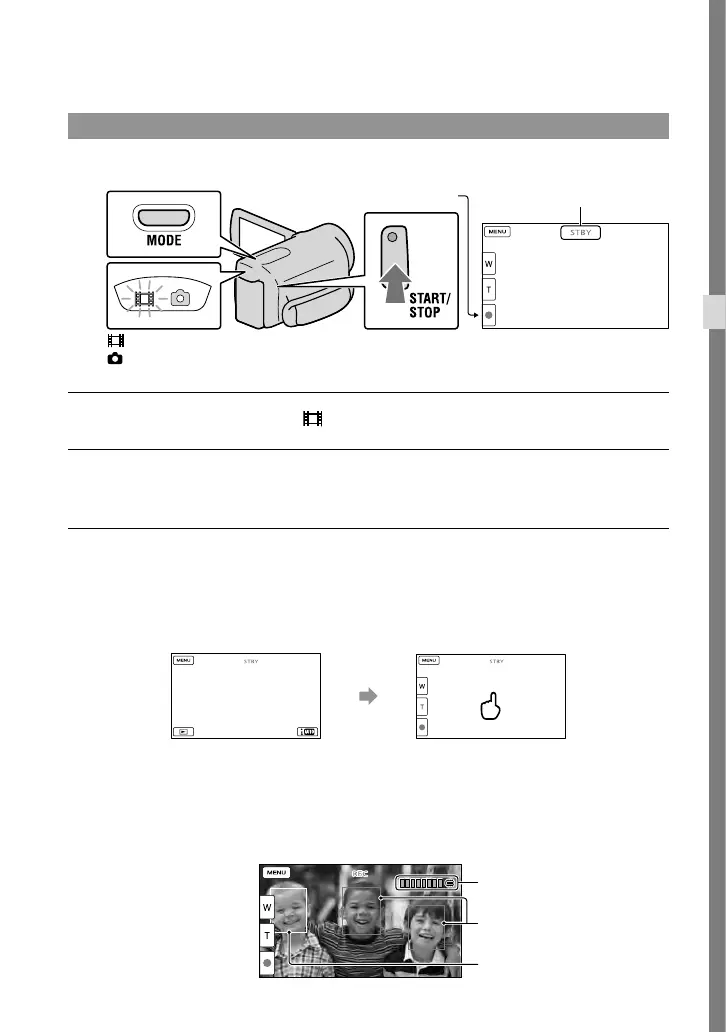
Press MODE to turn on the (Movie) lamp.
Press START/STOP to start recording.
To stop recording, press START/STOP again.
To display items on the LCD screen again
Touch anywhere on the screen except the buttons on the LCD screen so that you can use
items. You can change the settings using the [Display Setting] menu.
To capture smiles
In the default setting, a photo is automatically recorded when the camcorder detects the smile
of a person during movie recording (Smile Shutter). When the camcorder detects faces during
movie recording, image quality is automatically adjusted ([Face Detection]).
MODE button
(Movie): When recording a movie
(Photo): When recording a photo
[STBY] [REC]
START/STOP button
about 4sec
after
Face Detection frame (White)
Smile Detection frame
(Orange)
Capturing a photo





 To Next Page