24
GB
Selecting the recording mode
You can change the quality of the image that you record by touching (MENU)
[Image Quality/Size] [
REC Mode].
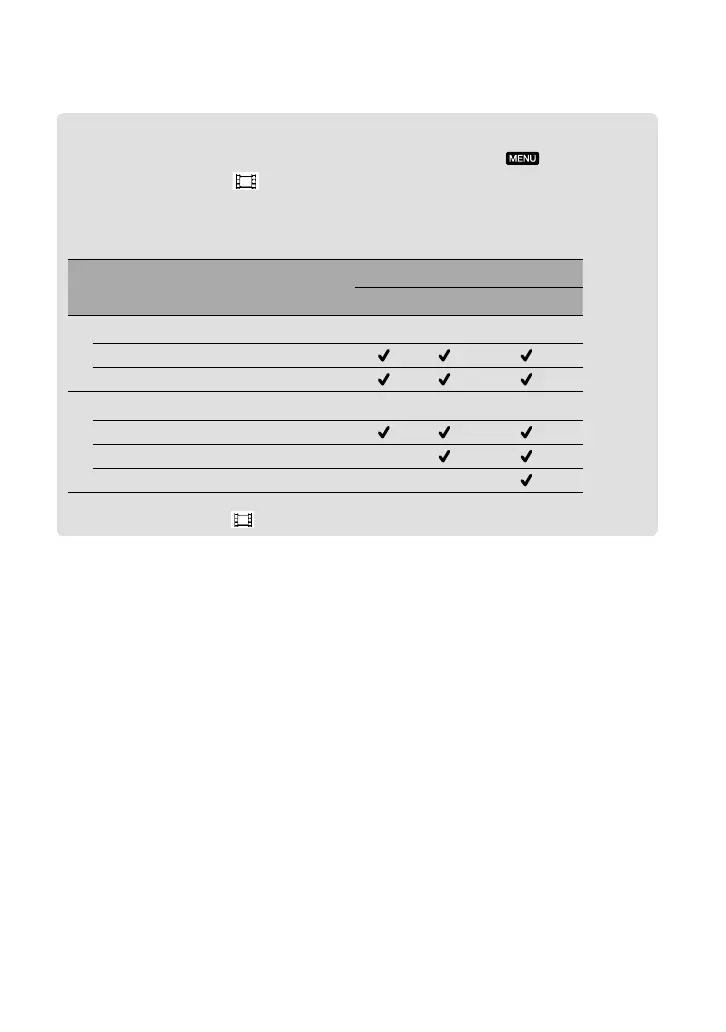
The types of media that images can be saved on will depend on the recording mode
selected.
For details on a save operation using the external devices, see page 40.
Types of media
Recording mode
PS
*
FX FH/HQ/LP
On this camcorder
Internal recording media
Memory card
On external devices
External media (USB storage devices)
Blu-ray discs —
AVCHD recording discs — —
* [PS] can be set only when [ Frame Rate] is set to [50p].





 To Next Page