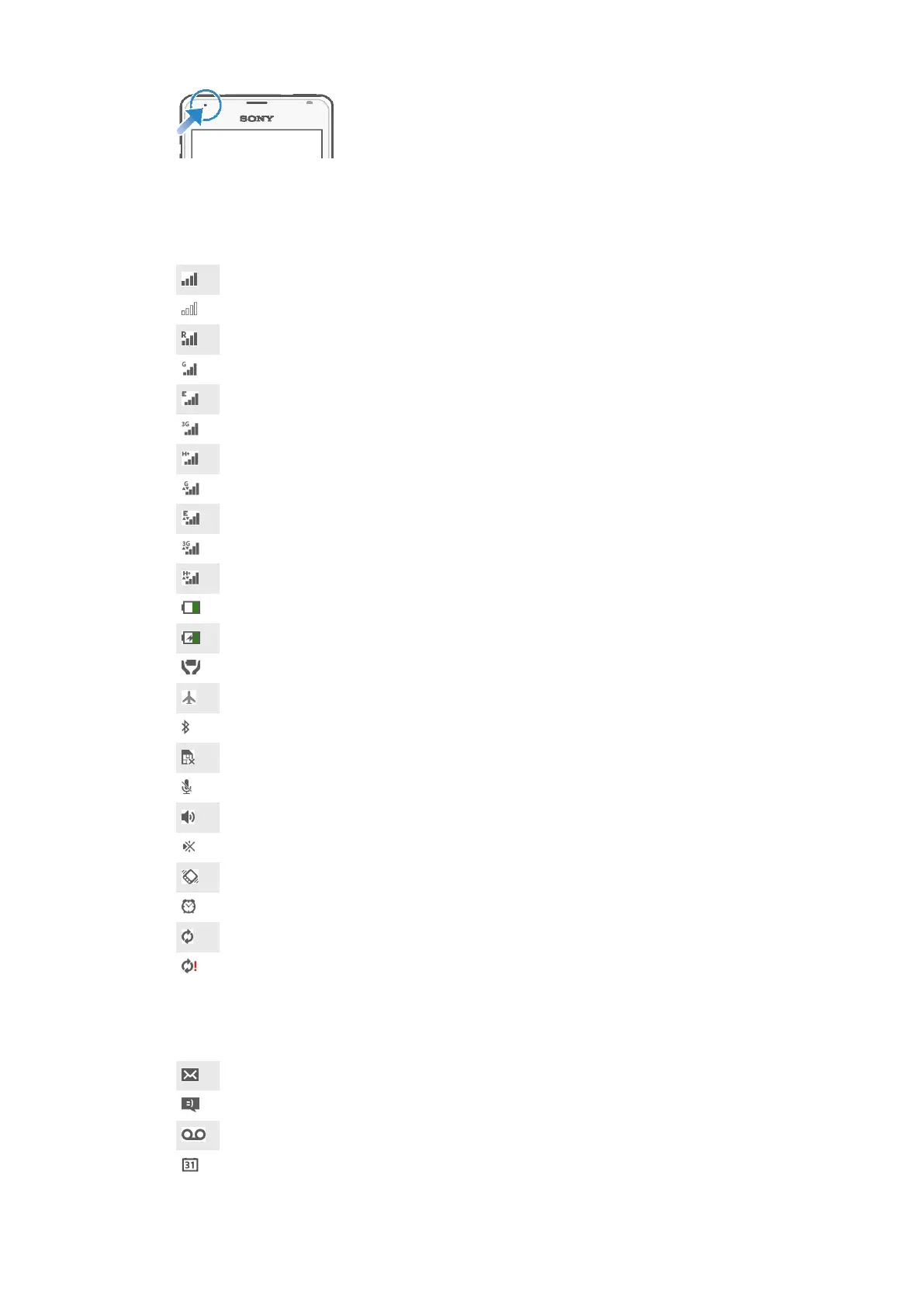
Icons in the status bar
Status icons
Signal strength
No signal
Roaming
GPRS is available
EDGE is available
3G is available
Cellular data network is available
Sending and downloading GPRS data
Sending and downloading EDGE data
Sending and downloading 3G data
Sending and downloading cellular data
Battery status
The battery is charging
STAMINA mode is activated
Flight mode is activated
The Bluetooth® function is activated
The SIM card is not inserted
The microphone is muted
The speakerphone is on
Silent mode
Vibrate mode
An alarm is set
Synchronization is ongoing
Problem with sign-in or synchronization
Notification icons
The following notification icons may appear on your screen:
New email message
New text message or multimedia message
New voicemail
Upcoming calendar event
20
This is an Internet version of this publication. © Print only for private use.










 To Next Page