Calling
Making calls
You can make a call by manually dialing a phone number, by tapping a number saved
in your contacts list, or by tapping the phone number in your call log view. You can
also use the smart dial feature to quickly find numbers from your contacts list and call
logs. To make a video call, you can use the Hangouts™ instant messaging and video
chat application on your device. See
Instant messaging and video chat
on page 53.
When you make a call, your device's main microphone works together with the second
microphone to suppress noise and background sound.
Do not cover the second microphone while making a call.
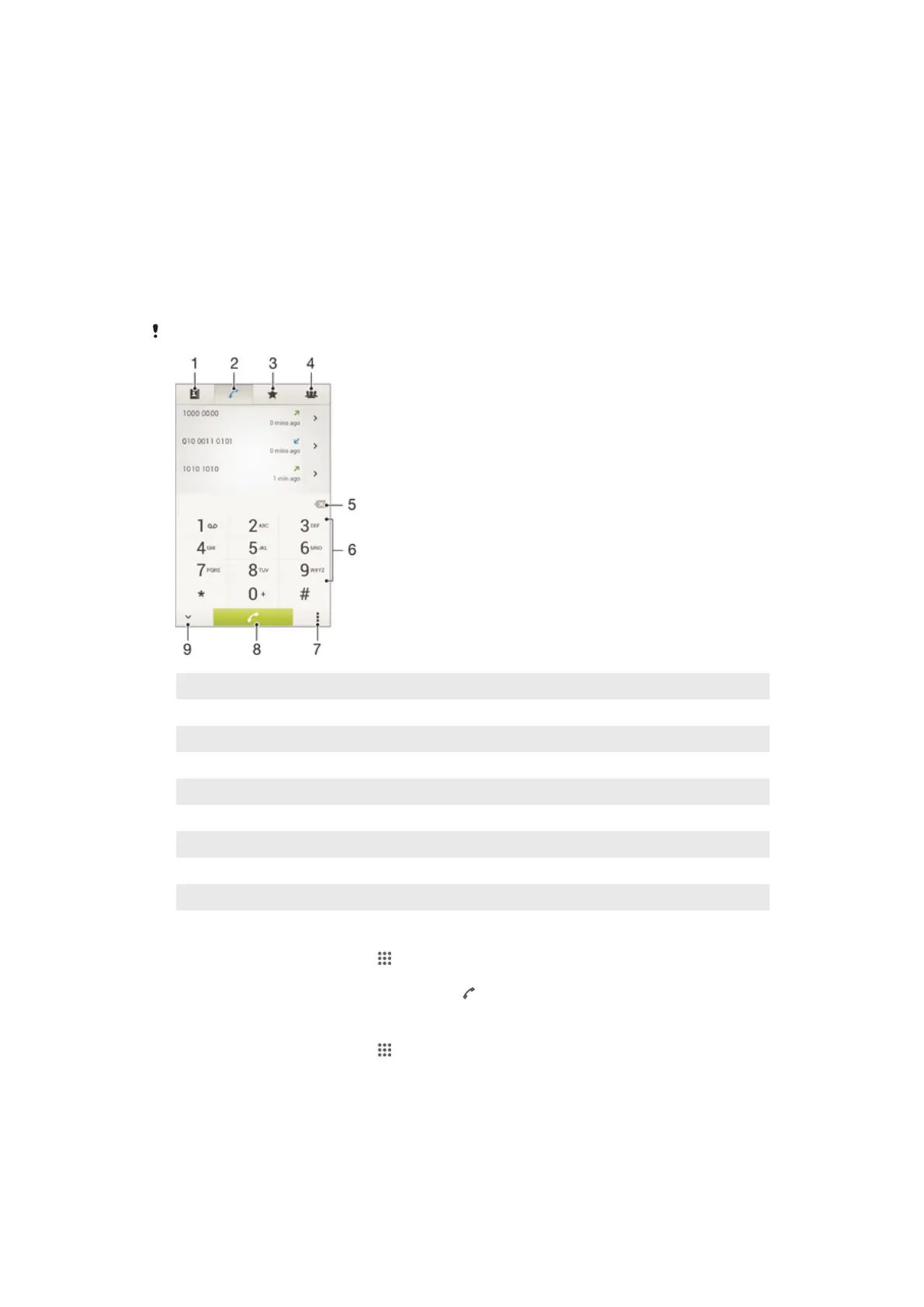
1 Open your contacts list
2 View your call log entries
3 View your favorite contacts
4 View all contact groups saved to your device
5 Delete number
6 Dialpad
7 Hide or clear the call log
8 Call button
9 Hide or show the dialer
To make a call by dialing
1 From your Home screen, tap .
2 Find and tap Phone.
3 Enter the number of the recipient and tap .
To make a call using smart dial
1 From your Home screen, tap .
2 Find and tap Phone.
3 Use the dialpad to enter letters or numbers that correspond to the contact you
want to call. As you enter each letter or number, a list of possible matches
appears.
4 Tap the contact you want to call.
40
This is an Internet version of this publication. © Print only for private use.












 To Next Page