52
GB
You can set a playback restriction for a disc.
Parental Control
You can set a playback limit some DVDs
according to a predetermined level, such as the
age of the viewer.
Limiting playback for children
(Parental Control)
(DVD only)
Playback of some DVDs can be limited
according to a predetermined level, such as the
age of the viewer. The “Parental Control”
function allows you to set a playback limitation
level.
A scene that is limited is not played, or it is
replaced by a different scene.
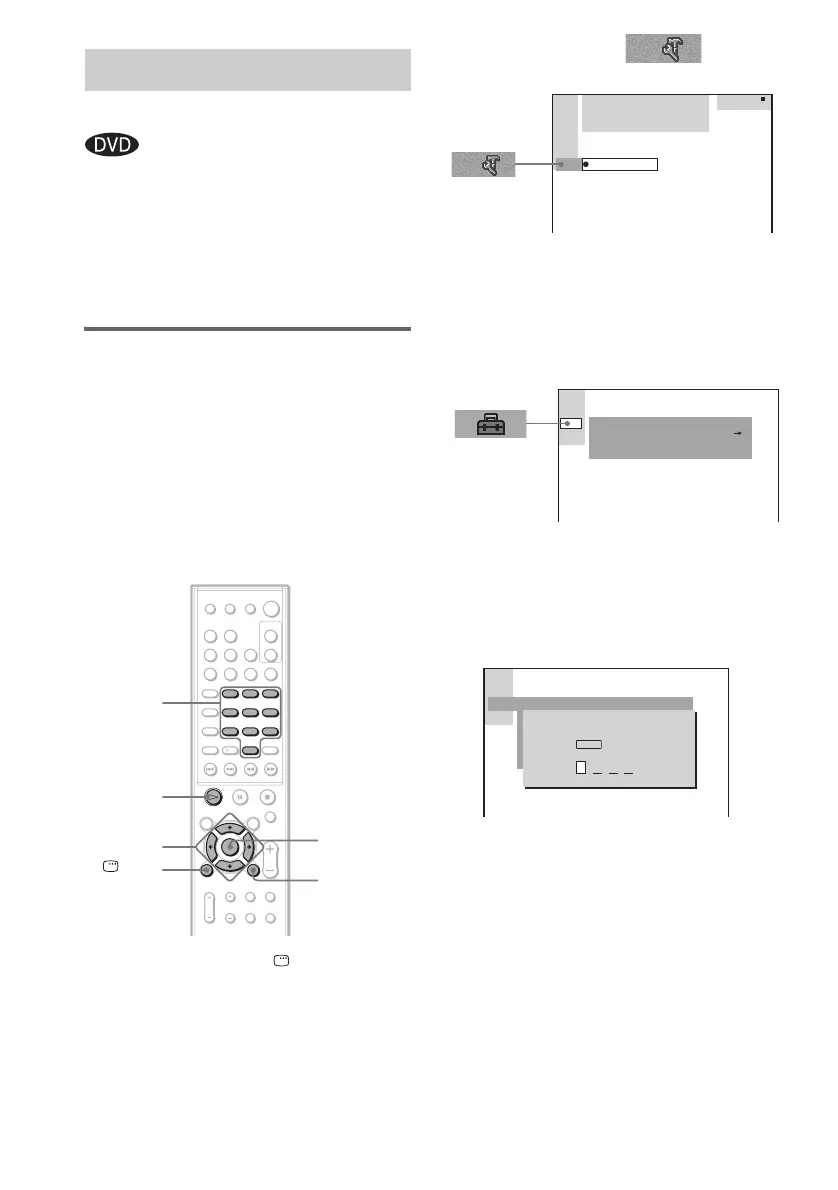
1 In stop mode, press DISPLAY.
The Control Menu appears.
2 Press X/x to select (SETUP),
then press ENTER or c.
3 Press ENTER.
The Setup Display appears.
4 Press X/x to select [CUSTOM SETUP],
then press ENTER or c.
[CUSTOM SETUP] is displayed.
5 Press X/x to select [PARENTAL
CONTROL t], then press ENTER or c.
x If you have not entered a password
The display for registering a new password
appears.
Enter a 4-digit password using the number
buttons, then press ENTER.
The display for confirming the password
appears.
Locking Discs
(PARENTAL CONTROL)
123
45
8
0
6
7
10
9
H
ENTER
Number
buttons
DISPLAY
C/X/x/c
O RETURN
DVD
1 2
(
2 7
)
TITLE12
1 8
(
3 4
)
T
1 : 3 2 : 5 5
CUSTOM
CUSTOM SETUP
OFF
PARENTAL CONTROL
TRACK SELECTION
MP3DATA CD PRIORITY:
CUSTOM SETUP
PARENTAL CONTROL
Enter a new 4-digit password,
then press
.
ENTER



 To Next Page