6-27
DCR-SR32E/SR33E/SR42/SR42A/SR42E/SR52E/SR62/SR62E/SR72E/SR82/SR82C/SR82E_ADJ
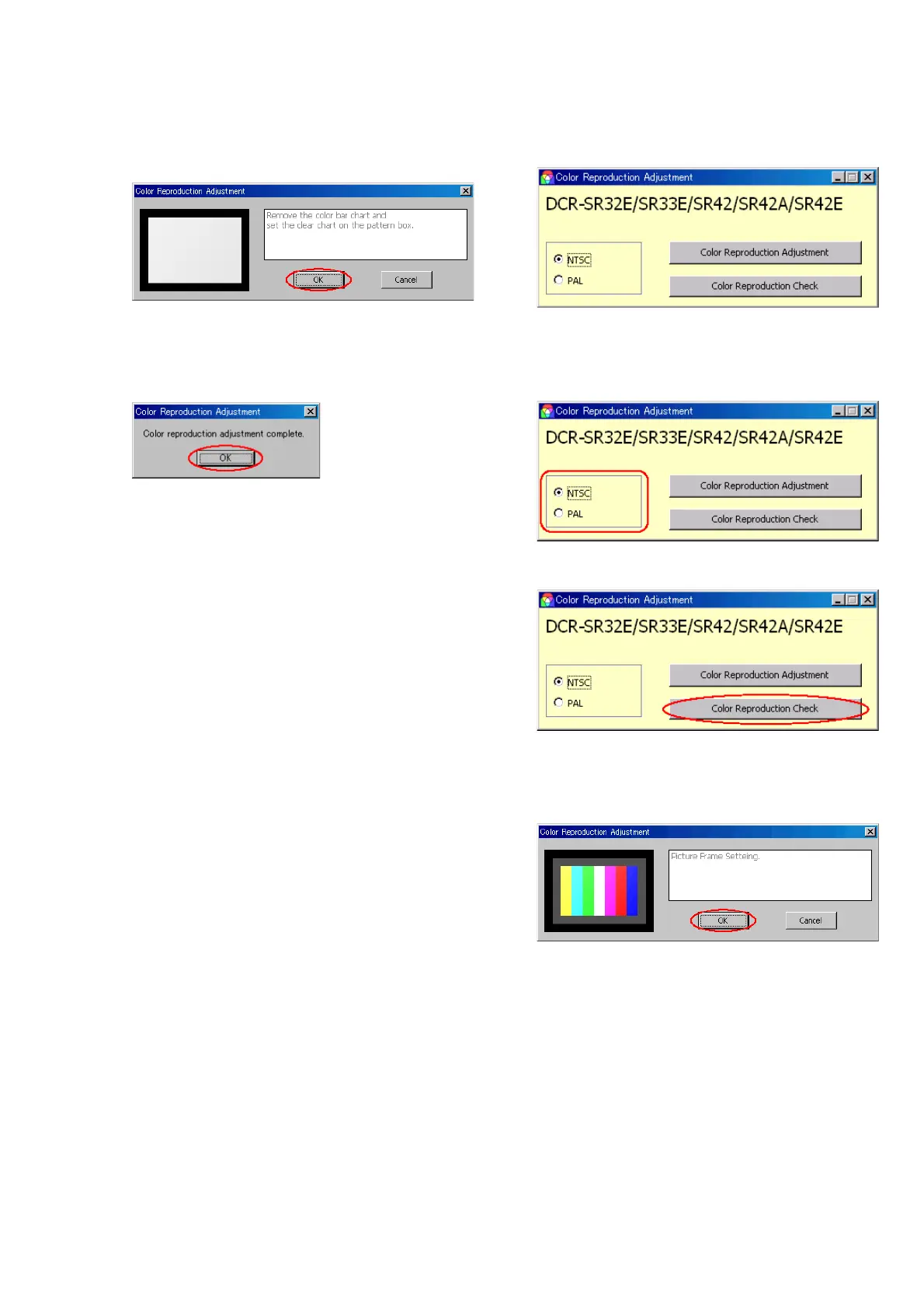
5) The data with the color bar chart are captured, and then the
following message will be displayed.
With the picture frame setting retained, replace the color bar
chart with the clear chart and press the [OK] button.
6) The data with the clear chart are captured, the adjustment value
is calculated, and it is written to the camcorder.
Upon successful completion, the following message will be
displayed.
Click the [OK] button, and thus the adjustment is complete.
[Checking method]
1) Click the [Start] button in CAMERA Adjustment 6, and the
following screen will appear.
2) Select the model (NTSC or PAL) with the Model Select radio
button.
Note: NTSC model: DCR-SR42/SR42A
PAL model: DCR-SR32E/SR33E/SR42E
3) Click the [Color Reproduction Check] button.
4) The following message will be displayed, and then shoot the
color bar chart and set the picture frame, and then click the
[OK] button.
(Refer to “Picture Frame Setting”)
Ver. 1.7 2008.04



 To Next Page