111
“Memory Stick” Operations
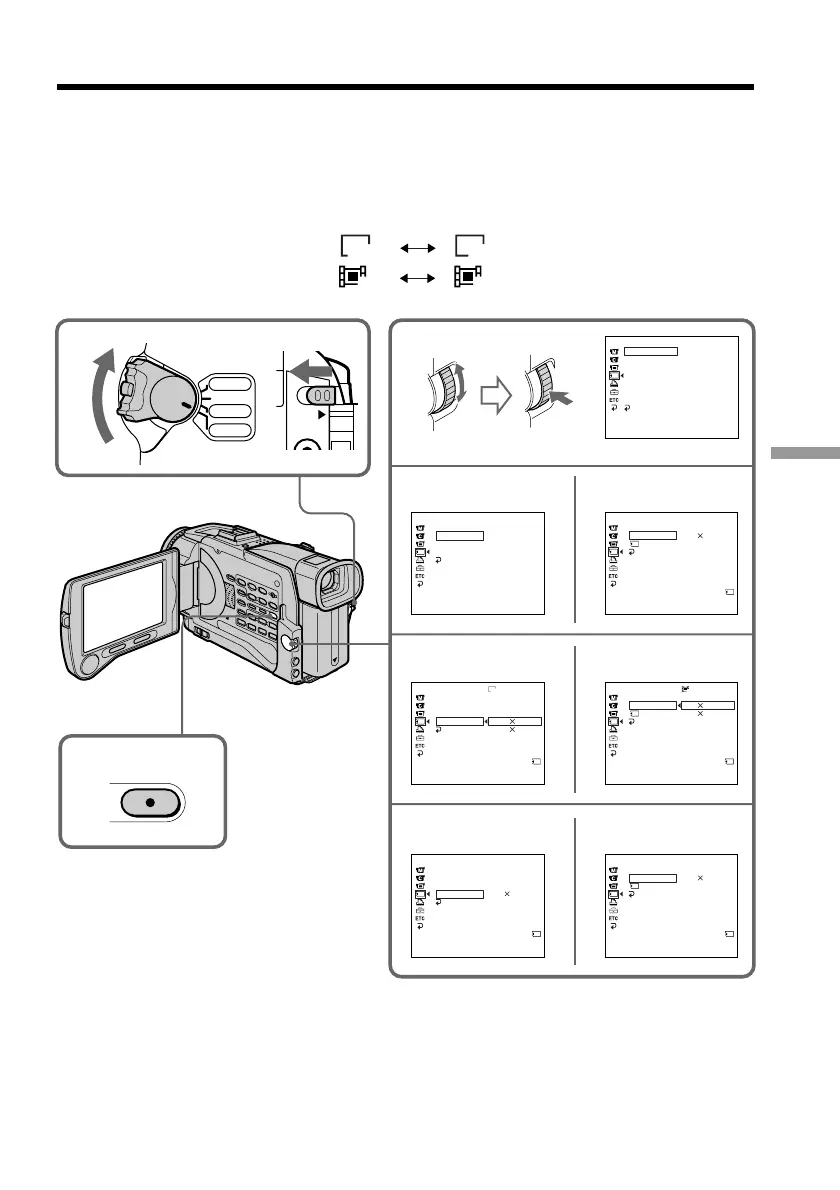
(4) Turn the SEL/PUSH EXEC dial to select STILL SET (still image) or MOVIE
SET (moving picture), then press the dial.
(5) Turn the SEL/PUSH EXEC dial to select IMAGESIZE, then press the dial.
(6) Turn the SEL/PUSH EXEC dial to select the desired image size, then press the
dial.
The indicator changes as follows:
Still images:
1360 640
Moving pictures:
320 160
Using a “Memory Stick” – introduction
4
3
5
6
1
LOCK
2
VCR
CAMERA
MEMORY
OFF(CHG)
POWER
MENU
MEMORY SET
ST I LL SET
MOV I E S ET
PR I NT MARK
PROTECT
SL IDE SHO
W
DELETE AL L
FORMAT
RETURN
[
MENU
]
:
END
MEMORY SET
MOV I E S E T
RETURN
REMA IN
[
MENU
]
:
END
IMAGESIZE
320 240
NIAMER
40sec
MEMORY SET
MOV I E S ET
RETURN
REMA I N
[
MENU
]
:
END
IMAGESIZE
320 240
160 112
REMA IN
320
160 112
MEMORY SET
MOV I E S E T
RETURN
REMA IN
[
MENU
]
:
END
IMAGESIZE
REMA IN
2
min
PIC MODE
MEMORY SET
ST I LL SET
RETURN
[
MENU
]
:
END
SINGLE
QUA L I TY
IMAGESI ZE
PIC MODE
MEMORY SET
ST I LL SET
RETURN
[
MENU
]
:
END
QUA L I TY
IMAGESIZE
1360 1020
640 480
1360
2
REMA I N
PIC MODE
MEMORY SET
ST I LL SET
RETURN
[
MENU
]
:
END
QUA L I TY
IMAGESIZE
640 480
60
REMA IN
40sec
1
STILL SET MOVIE SET
STILL SET MOVIE SET
STILL SET
MOVIE SET














 To Next Page