94
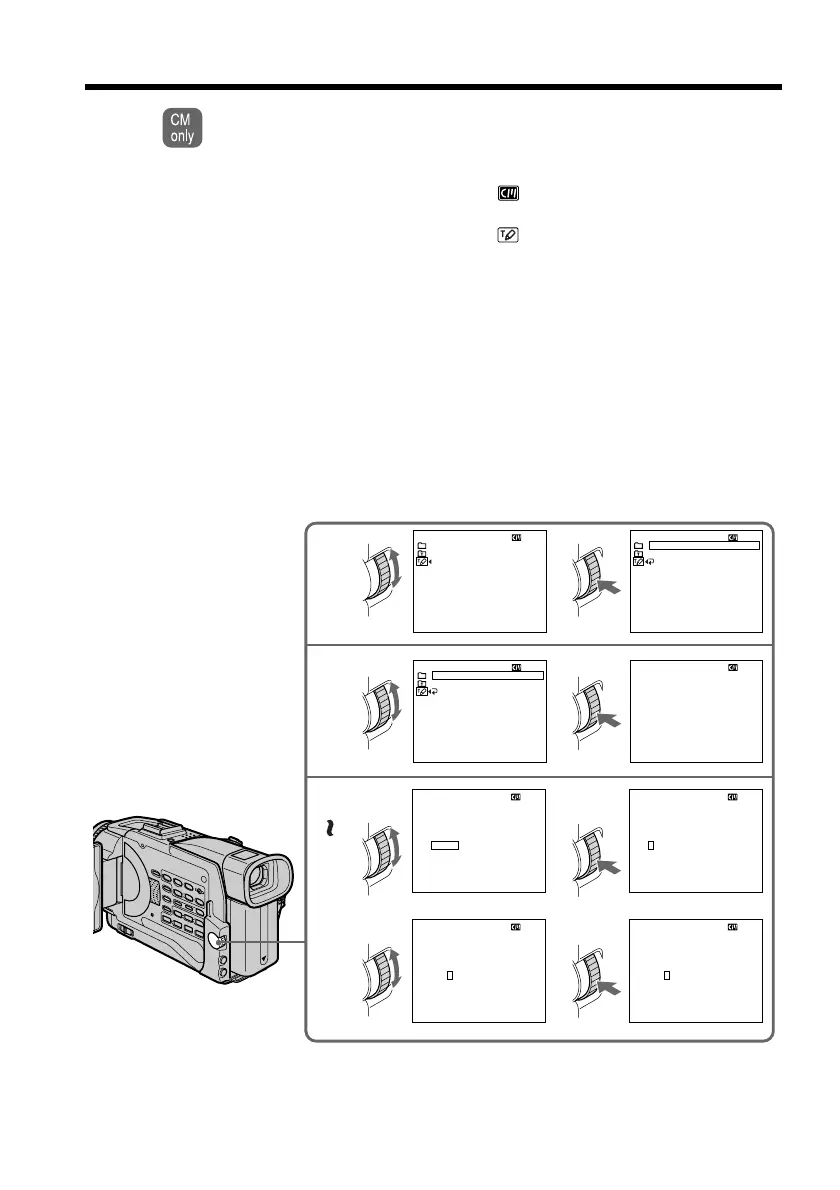
Making your own titles
You can make up to 2 titles and store them in cassette memory. Each title can
have up to 20 characters.
(1) Press MENU to display the menu in the standby or VCR mode.
(2) Turn the SEL/PUSH EXEC dial to select
,then press the dial.
(3) Turn the SEL/PUSH EXEC dial to select TITLE, then press the dial.
(4) Turn the SEL/PUSH EXEC dial to select
, then press the dial.
(5) Turn the SEL/PUSH EXEC dial to select the first line (CUSTOM1 SET) or
second line (CUSTOM2 SET), then press the dial.
(6) Turn the SEL/PUSH EXEC dial to select the column of the desired character,
then press the dial.
(7) Turn the SEL/PUSH EXEC dial to select the desired character, then press the
dial.
(8) Repeat steps 6 and 7 until you have selected all characters and completed the
title.
(9) To finish making your own titles, turn the SEL/PUSH EXEC dial to select
[SET], then press the dial.
(
10
)Press MENU to make the title menu disappear.
4
5
6
8
12
34
____________________
TITLE SET
ABCDE
FGHI J
KLMNO
PQRST
UV
W
XY
Z
&?!
12345
67890
’.,/–
[
SET
]
[
MENU
]:
END
____________________
TITLE SET
ABCDE
FGHI J
KLMNO
PQRST
UV
W
XY
Z
&?!
12345
67890
’.,/–
[
SET
]
[
MENU
]:
END
____________________
TITLE SET
ABCDE
FGHI J
KLMNO
PQRST
UV
W
XY
Z
&?!
12345
67890
’.,/–
[
SET
]
[
MENU
]:
END
____________________
TITLE SET
ABCDE
FGHI J
KLMNO
PQRST
UV
W
XY
Z
&?!
12345
67890
’.,/–
[
SET
]
[
MENU
]:
END
S
___________________
TITLE SET
ABCDE
FGHI J
KLMNO
PQRST
UV
W
XY
Z
&?!
12345
67890
’.,/–
[
SET
]
[
MENU
]:
END
CUSTOM
1
TITLE SET
CUSTOM
2
[
MENU
]:
END
RETURN
TES
TES
TITLE SET
CUSTOM
1
CUSTOM
2
[
MENU
]:
END
TES
TES
CUSTOM
1
TITLE SET
CUSTOM
2
[
MENU
]:
END
RETURN
TES
TES
[
C
]
[
C
]
[
C
]
[
C
]
[
C
]














 To Next Page