98
— Customizing Your Camcorder —
Changing the menu settings
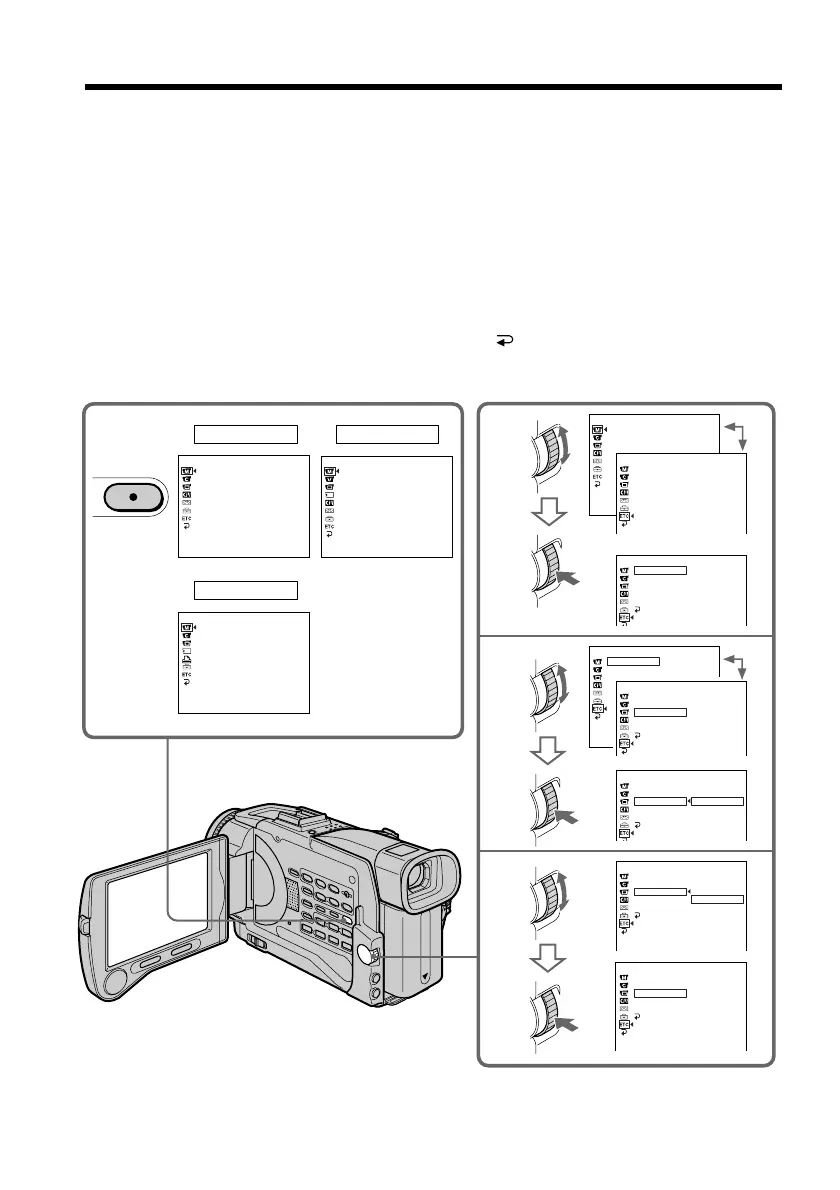
To change the mode settings in the menu settings, select the menu items with the SEL/
PUSH EXEC dial. The default settings can be partially changed. First, select the icon,
then the menu item and then the mode.
(1) In CAMERA, MEMORY or VCR mode, press MENU.
(2) Turn the SEL/PUSH EXEC dial to select the desired icon, then press the dial to
set.
(3) Turn the SEL/PUSH EXEC dial to select the desired item, then press the dial to
set.
(4) Turn the SEL/PUSH EXEC dial to select the desired mode, then press the dial
to set.
(5) If you want to change other items, select
RETURN and press the dial, then
repeat steps 2 to 4.
For details, see “Selecting the mode setting of each item” (p. 99).
To make the menu display disappear
Press MENU.
1
CAMERA
2
3
4
VCR
MEMORY
MENU
MANUA L SET
PEFFECT
W
HT BAL
AUTO SHTR
[
MENU
]
:
END
MANUA L SE T
PEFFECT
[
MENU
]
:
END
MANUA L SE T
W
HT BAL
[
MENU
]
:
END
MANUA L SE T
AUTO SHTR
OTHERS
W
ORLD T IME
BEEP
0
HR
OTHERS
W
ORLD T IME
BEEP
COMMANDER
DISPLAY
REC LAMP
RETURN
ON
OFF
MENU
:
END
CE TFE
P
F
LABTH
W
OTHERS
W
ORLD T IME
BEEP
COMMANDER
DISPLAY
REC LAMP
RETURN
OFF
:
OTHERS
W
ORLD T IME
BEEP
COMMANDER
DISPLAY
REC LAMP
RETURN
ON
SREHTO
W
ORLD T IME
BEEP
COMMANDER
DISPLAY
REC LAMP
OTHERS
W
ORLD T IME
BEEP
COMMANDER
DISPLAY
REC LAMP
RETURN
0
HR
OTHERS
W
ORLD T IME
BEEP
COMMANDER
DISPLAY
REC LAMP
RETURN
ON
OFF














 To Next Page