51
Advanced Recording Operations
Using the PROGRAM AE function
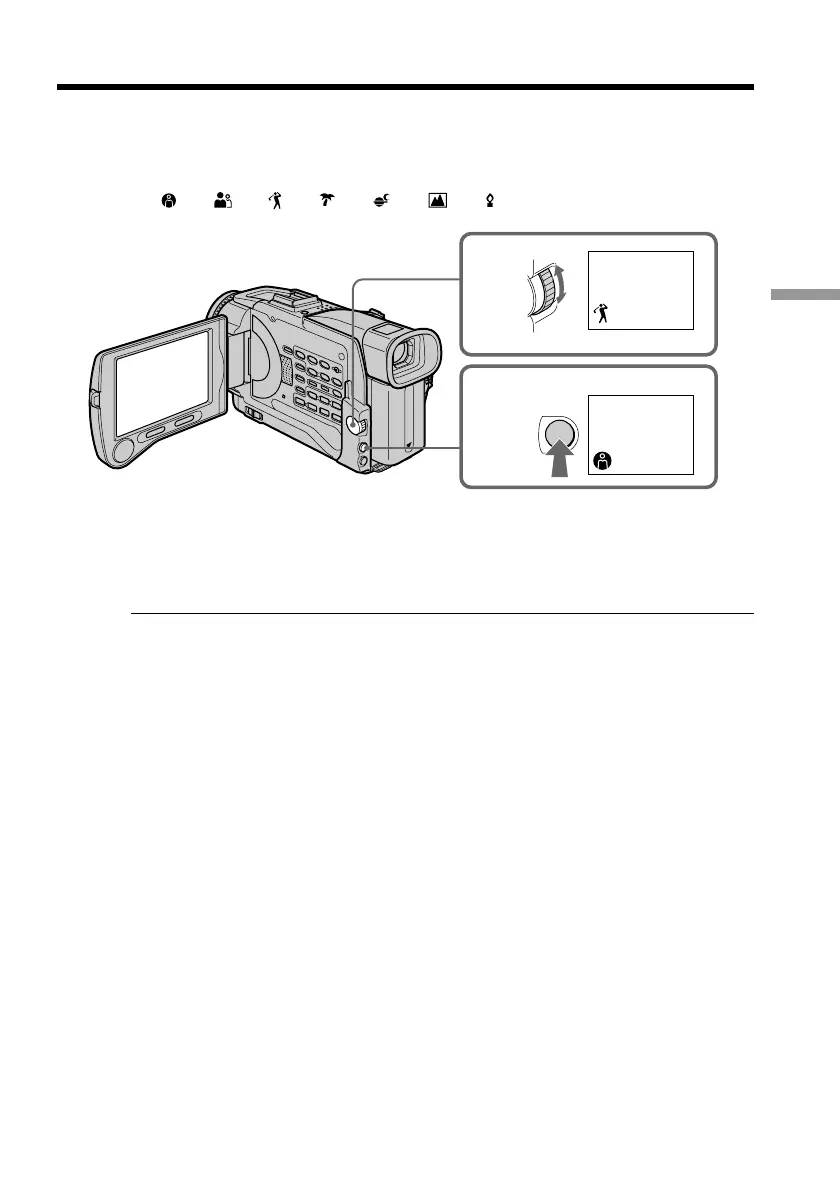
(1) In CAMERA or MEMORY mode, press PROGRAM AE. The PROGRAM AE
indicator appears.
(2) Turn the SEL/PUSH EXEC dial to select the desired PROGRAM AE mode.
The indicator changes as follows:
y y y y y y
To cancel the PROGRAM AE function
Press PROGRAM AE again.
Notes
•Because your camcorder is set to focus only on subjects in the middle to far distance,
you cannot take close-ups in the following modes:
– Spotlight
– Sports lesson
– Beach & ski
•Your camcorder is set to focus only on distant subjects in the following modes:
– Sunset & moon
– Landscape
•The following functions do not work in the PROGRAM AE mode:
– Slow shutter
– Old movie
– Bounce
•The following functions do not work in the low lux mode:
– Digital effect
– Overlap
– Wipe
– Dot
– Recording with the flash
•While shooting in MEMORY mode the following modes do not work (The indicator
flashes.):
– Low lux
– Sports lesson
•While setting the NIGHTSHOT to ON, the PROGRAM AE function does not work.
(The indicator flashes.)
1
2
PROGRAM
AE











 To Next Page