Getting started
17
Inserting the “Memory Stick”
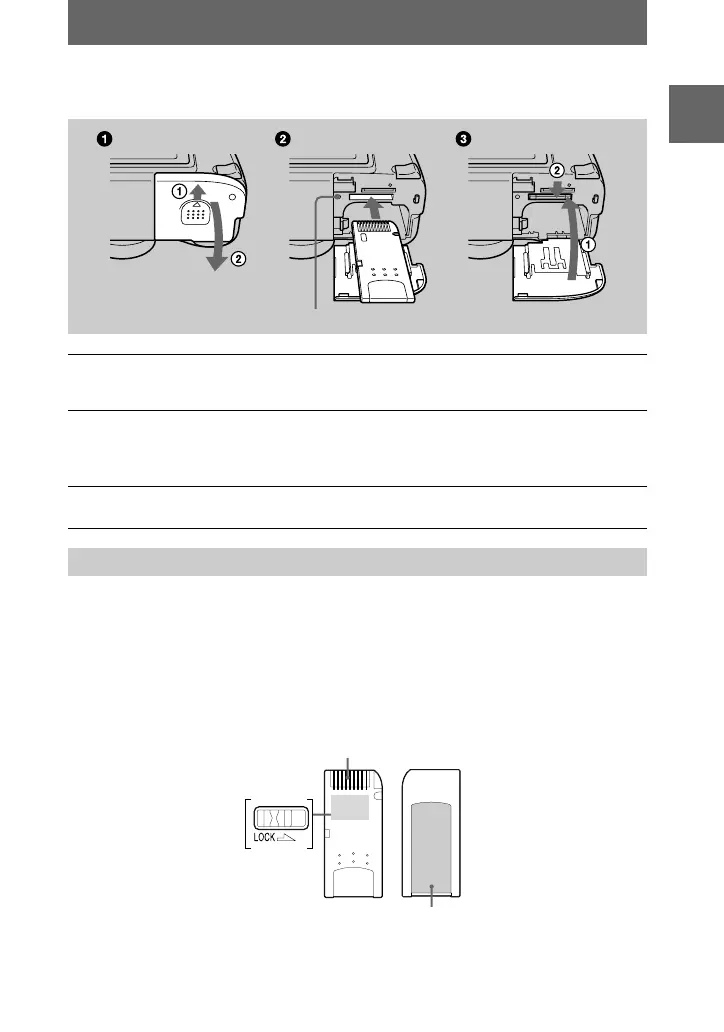
Open the battery/“Memory Stick” cover, then press the “Memory Stick” once lightly.
Notes
•
Insert the “Memory Stick” firmly until it clicks, otherwise a message such as “MEMORY
STICK ERROR” will be displayed.
•
Never remove the “Memory Stick” or turn off the power while the access lamp is lit up.
•
You cannot record or edit images on a “Memory Stick” if the erasure prevention switch is set to
the LOCK position.
The position and shape of the erasure prevention switch may differ depending on the types of
“Memory Stick” used.
1
Open the battery/“Memory Stick” cover.
Slide the cover in the direction of the arrow.
2
Insert the “Memory Stick.”
Insert the “Memory Stick” with the
B
mark facing toward the battery
compartment as illustrated until it clicks.
3
Close the battery/“Memory Stick” cover.
Removing the “Memory Stick”
Access lamp
Erasure
prevention
switch
Connector
Label space







 To Next Page