50
B
Various recording
Recording with the
exposure fixed (AE
LOCK)
Mode dial: /S/A/M/SCN
Once you press AE LOCK, the
exposure, now captured, is fixed. For
instance, this function is convenient in
the following use:
Measure the exposure of the desired
portion of the subject using the spot
light-metering function and fix its
exposure value by pressing AE LOCK.
Then, recompose the picture.
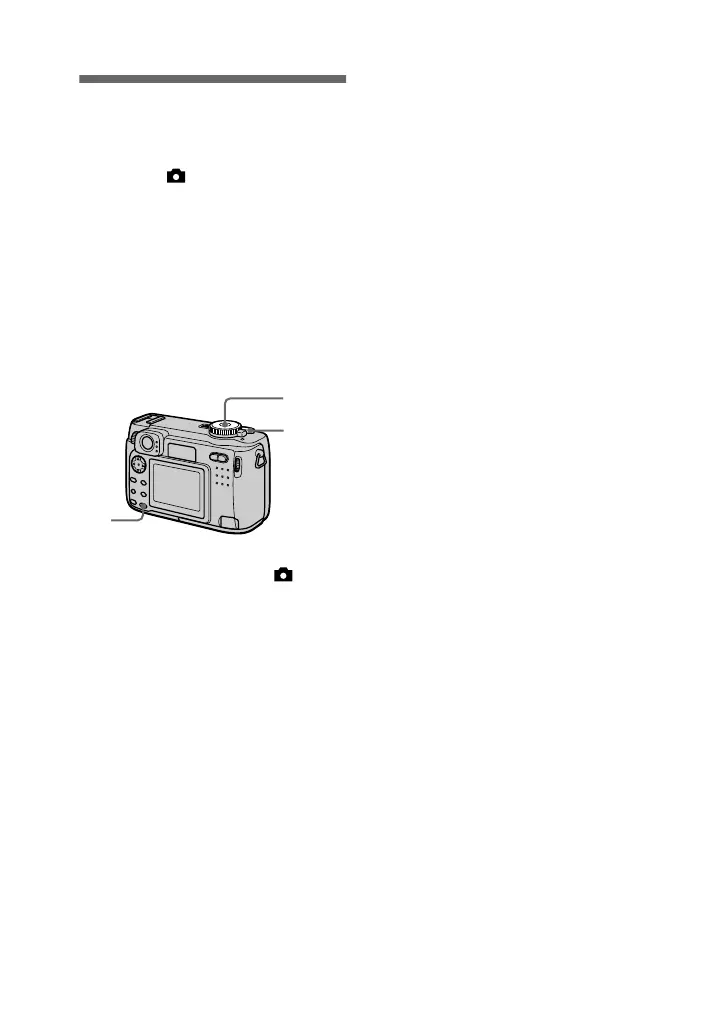
1
Set the mode dial to , S, A,
M or SCN.
2
Target the subject that has
desired exposure value, then
press AE LOCK.
The exposure is fixed and the AE-
L mark appears.
3
Target the subject you want
to record and press and hold
the shutter button halfway
down.
The focus is automatically
adjusted.
4
Press down the shutter
button.
1
2
3,4
To release AE LOCK
Carry out one of the followings:
•
Press AE LOCK again after step
2
.
•
Release your finger from the shutter
button after step
3
.
•
Press down the shutter button in step
4
.







 To Next Page