B
BB
B
Various recording
55
Recording still
images for e-mail
(E-MAIL)
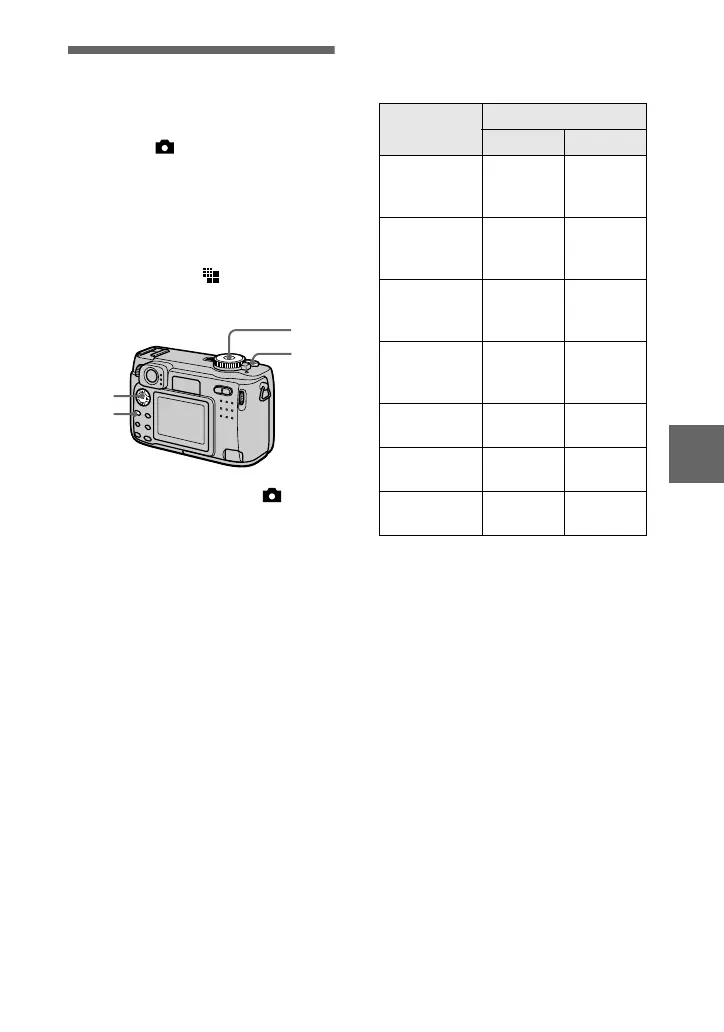
Mode dial: /S/A/M/SCN
In the E-MAIL mode, a small-size
image which is suitable for e-mail
transmission is also recorded at the
same time as recording a normal still
image. (The size of the normal still
image is set using [ ] (IMAGE
SIZE) in the menu settings (page 48).)
1
Set the mode dial to , S, A,
M or SCN.
2
Press MENU.
The menu appears.
3
Select [MODE] (REC MODE)
with
b
/
B
, [E-MAIL] with
v
/
V
.
4
Record the image.
3
2
1
4
The number of images that you can
record on a “Memory Stick” (8 MB
or 16 MB)* in E-MAIL mode
*
The numbers in the parentheses indicate
the number of images or the amount of
recordable time on a “Memory Stick”
(16 MB).
Remaining number of recordable
images (page 99)
The actual number of remaining images
may differ depending on the recording
conditions.
To return to normal
recording mode
Select [NORMAL] with
v
/
V
in step
3
.
Image size
Quality
STANDARD
FINE
2272×1704
(DSC-S85
only)
Approx. 7
(14)
Approx. 3
(7)
2272 (3:2)
(DSC-S85
only)
Approx. 7
(14)
Approx. 3
(7)
2048×1536
(DSC-S75
only)
Approx. 8
(17)
Approx. 4
(9)
2048 (3:2)
(DSC-S75
only)
Approx. 8
(17)
Approx. 4
(9)
1600×1200
Approx.
14 (28)
Approx. 8
(16)
1280×960
Approx.
21 (42)
Approx.
12 (24)
640×480
Approx.
95 (192)
Approx.
43 (87)







 To Next Page