98
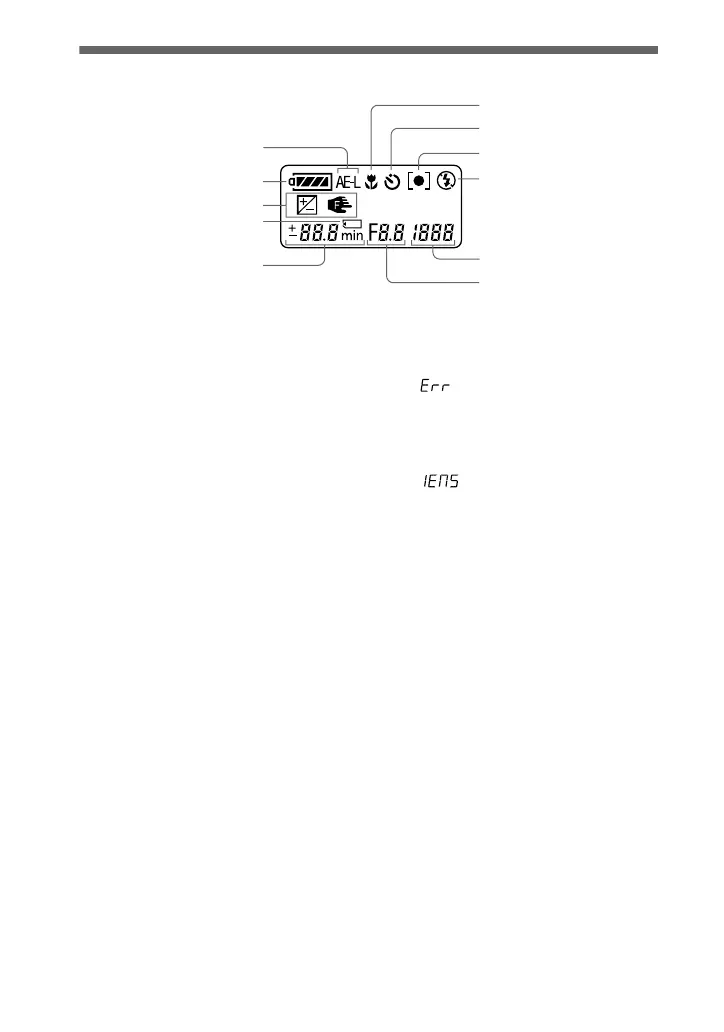
Display window indicators
A AE lock indicator
B Battery remaining indicator
C EV indicator/Focus lock
indicator
D “Memory Stick” mark
E Remaining number of
recordable images indicator
(+999 is displayed for 999 or
more images)/EV level
indicator/Focus distance
indicator/Battery usable time
indicator (displayed only
during charging)/Minutes
indicator for the remaining
recordable time of moving
images
F Aperture value indicator/
Seconds indicator for the
remaining recordable time of
moving images
G Shutter speed indicator
USB indicator
Error display
: Some kind of misoperation
has occurred. Check the self-
diagnosis display on the LCD
screen (page 96) and take the
appropriate corrective action.
: A problem has occurred
with lens drive. Turn the camera on
and off several times, and if the
problem persists, contact your
Sony dealer or authorized Sony
service facility.
H Flash mode indicator
I Spot light-metering indicator
J Self-timer indicator
K Macro mode indicator
1
2
3
4
5
8
9
0
qa
7
6







 To Next Page