Getting started
9
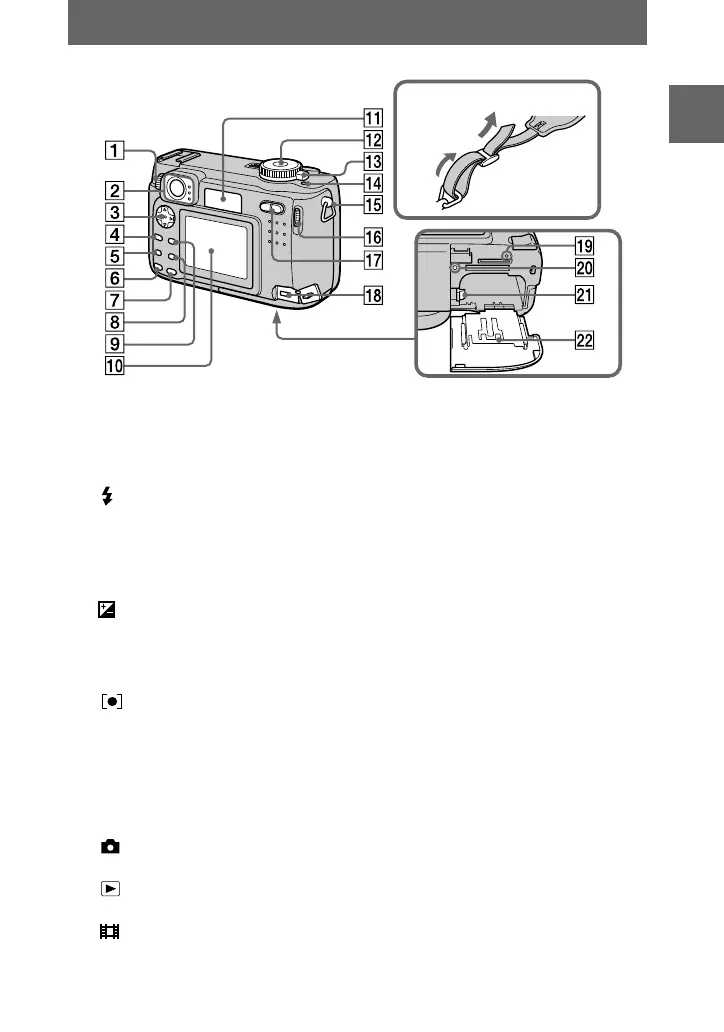
A Finder adjustment dial (21)
B Finder
Self-timer/recording lamp (red)
AE/AF lock lamp (green)
Flash charge lamp (orange)
(24)
C Control button (18, 41)
D MENU button (41)
E (Exposure) button (61)
F FOCUS button (60)
G AE LOCK button (50)
H (spot meter) button (65)
I DSPL/LCD ON/OFF button (23)
J LCD screen
K Display window
L Mode dial (18, 40)
: To record still images,
VOICE mode audio data
: To playback or edit
images
: To record moving images
or Clip Motion images
SET UP:To set the setup items
SCN: To record in the SCENE
SELECTION mode
M: To record with the
manual adjustment
A: To record in the aperture
priority mode
S: To record in the shutter
speed priority mode
M POWER switch (15)
N POWER ON/OFF (CHG) lamp
(15)
O Hook for strap
P Jog dial (42)
Q Zoom button (for recording) (22)/
INDEX/zoom button
(for playback) (67)
R DC IN jack (11, 14)
S RESET button (87)
T Access lamp (17)
U Battery ejesct lever (10)
V Battery/“Memory Stick” cover
Attaching the strap












 To Next Page