10
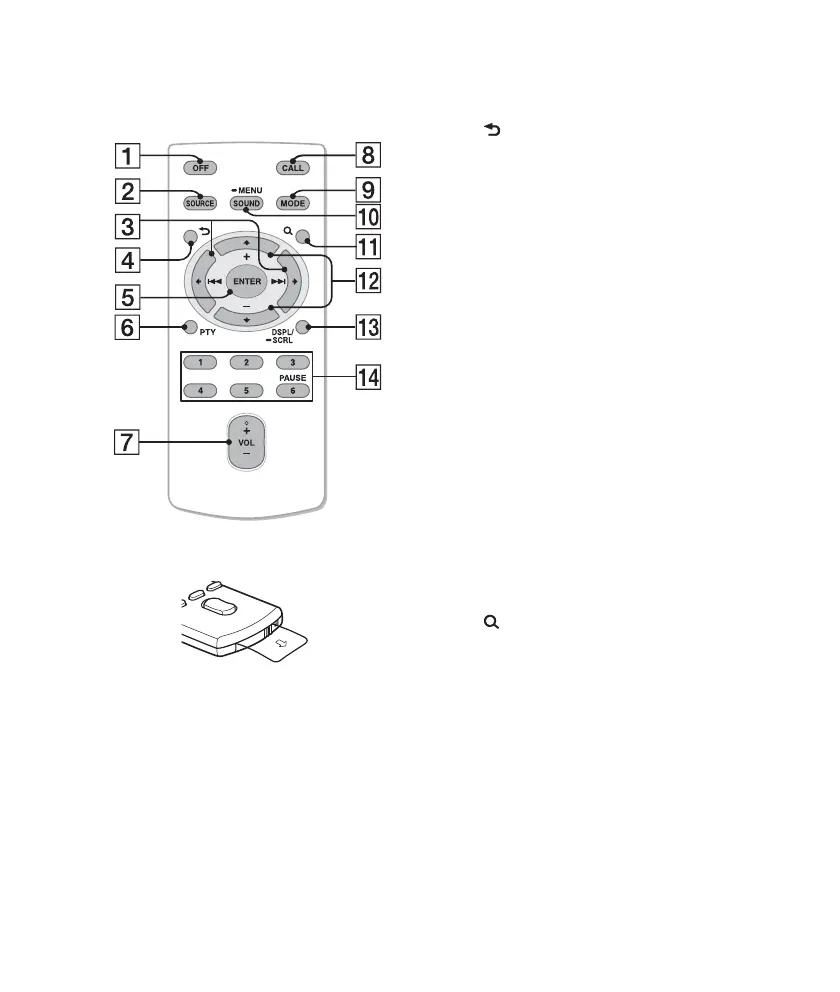
RM-X231 Remote
commander
Remove the insulation film before use.
OFF button
To turn off the power; stop the source;
reject a call.
SOURCE button
To turn on the power; change the
source (Radio/USB/AUX/Bluetooth
audio/Bluetooth phone).
()/ () buttons
To control Radio/USB/Bluetooth audio,
the same as –/+ on the unit.
Setup, sound setting, etc., can be
operated by .
(BACK) button
To return to the previous display.
ENTER button
To apply a setting; receive a call; end a
call.
PTY (Program Type) button
VOL (volume) +*/– button
CALL button
To enter the call menu.
MODE button
Radio:
To select the radio band (FM/AM).
Bluetooth phone:
During a call, press to switch between
talking handsfree (via this unit), or by
the cellular phone.
SOUND/MENU button
To enter sound setting (press); enter the
setup menu (press and hold).
(BROWSE) button
(+)/ (–) buttons
To control USB/Bluetooth audio device,
the same as / (ALBUM /) on
the unit.
Setup, sound setting, etc., can be
operated by .
DSPL (display)/SCRL (scroll) button
Number buttons
To pause playback (press
(PAUSE)).












 To Next Page