52
To cancel the “BNR” setting
Select “OFF” in Step 2.
To turn off the Control Bar
Press DISPLAY repeatedly until the Control
Bar is turned off.
Notes
• If the outlines of the images on your screen should
become blurred, set “BNR” to “OFF.”
• Depending on the disc or the scene being played,
the “BNR” effect may be hard to discern.
Adjusting the Playback
Picture (CUSTOM PICTURE MODE)
You can adjust the video signal of the DVD or
VIDEO CD from the player to obtain the
picture quality you want. Choose the setting
that best suits the program you are watching.
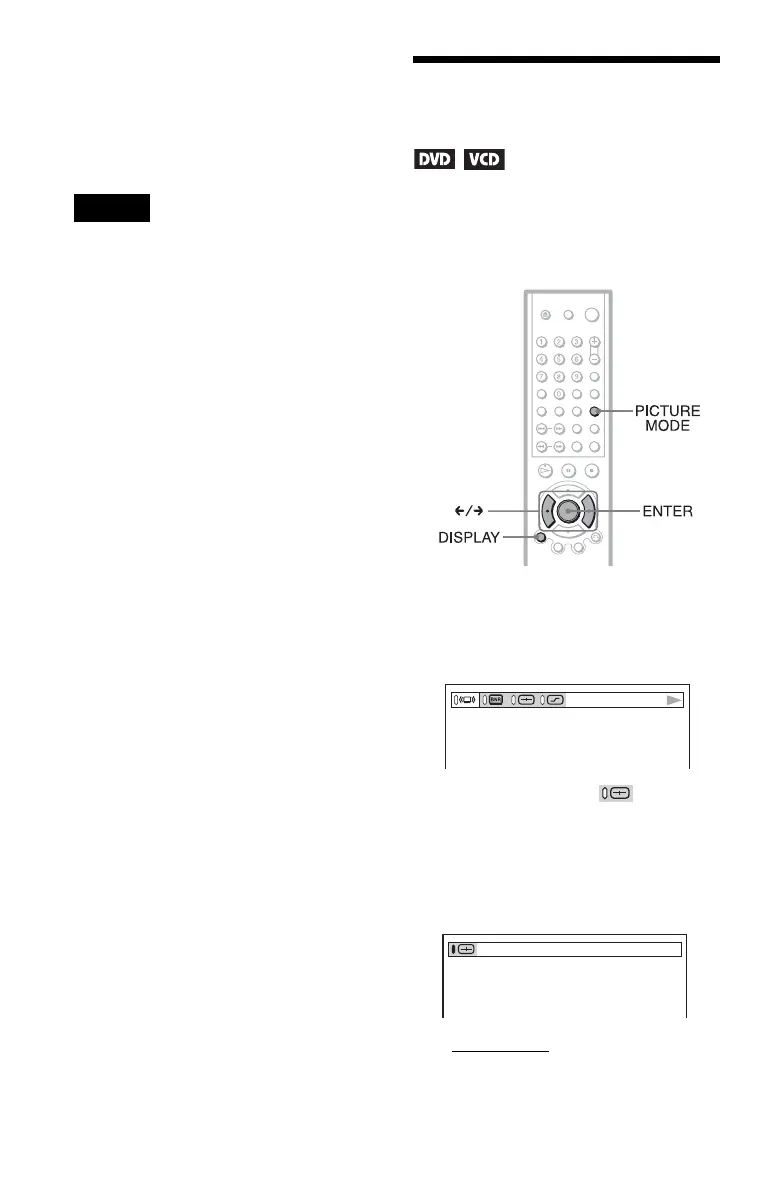
1 Press DISPLAY twice during
playback.
The following Control Bar appears.
2 Press C/c to select (CUSTOM
PICTURE MODE), then press
ENTER repeatedly to select the
setting you want.
The default setting is underlined.
• STANDARD:
displays a standard
picture.
• DYNAMIC 1: produces a bold
dynamic picture by increasing the
picture contrast and the color intensity.





 To Next Page