13
Guide to On-Screen
Displays (Control Bar)
The following explains the Control Bar. The
Control Bar is used for making adjustments to
the settings or displaying information during
playback.
The displayed contents differ according to the
type of disc being played. The numbers in
parentheses indicate reference pages.
Displaying the Control Bar during
playback
The following displays appear when the
DISPLAY button is pressed repeatedly
during playback. You can select the setting
that suits the current playback item and view
the related information.
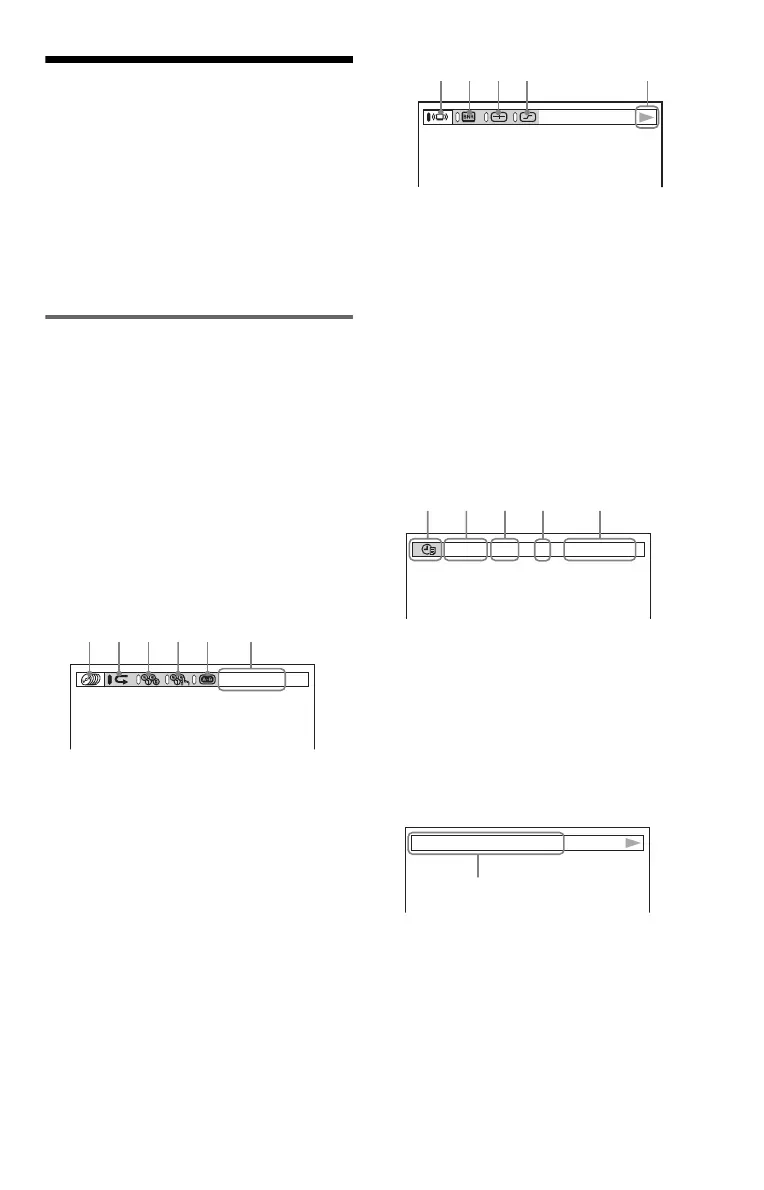
◆Display 1
The following play modes
1
~
5
can be set.
The indicator lights up in blue when activated.
Example: When Repeat Play is selected. (The
display will differ when A-B Repeat Play is
set.)
A Disc mode (37)
B Repeat Play (40)
C Shuffle Play (39)
D Program Play (37)
E A-B Repeat Play (41)
F Unit being repeated in this example.
m
◆Display 2
The following play modes
7
~
0
can be set.
The indicator lights up in blue when activated.
Example: When “TVS” is set.
G TVS (47)
H “BNR” (51)
I “CUSTOM PICTURE MODE” (52)
J “DIGITAL VIDEO ENHANCER”
(53)
K Playback status (NPlayback,
XPause, xStop, etc.)
m
◆Display 3
The following playback information is
displayed.
Example: When playing a DVD.
L TIME/TEXT icon
M Disc number and type
N Title number of the DVD (44)
O Chapter number of the DVD (44)
P Playing time or remaining time (44)
m
◆Display 4 (DVD playback only)
Q Format of the current audio signal (47)
m
◆No display
m
◆Return to Display 1
CHAPTER
;
a
T41
–
8
3:DVD T 1:01:57
h
g
f
d
s
DOLBY DIGITAL
3/2.1
qj
c continued





 To Next Page