61
Settings and Adjustments
Settings and Adjustments
Using the Setup Display
By using the Setup Display, you can make
various adjustments to items such as picture
and sound. You can also set a language for the
subtitles and the Setup Display, among other
things. The on-screen displays differ
depending on the player model. For details on
each Setup Display item, see pages from 62 to
67.
Note
Playback settings stored in the disc take priority
over the Setup Display settings and not all the
functions described may work.
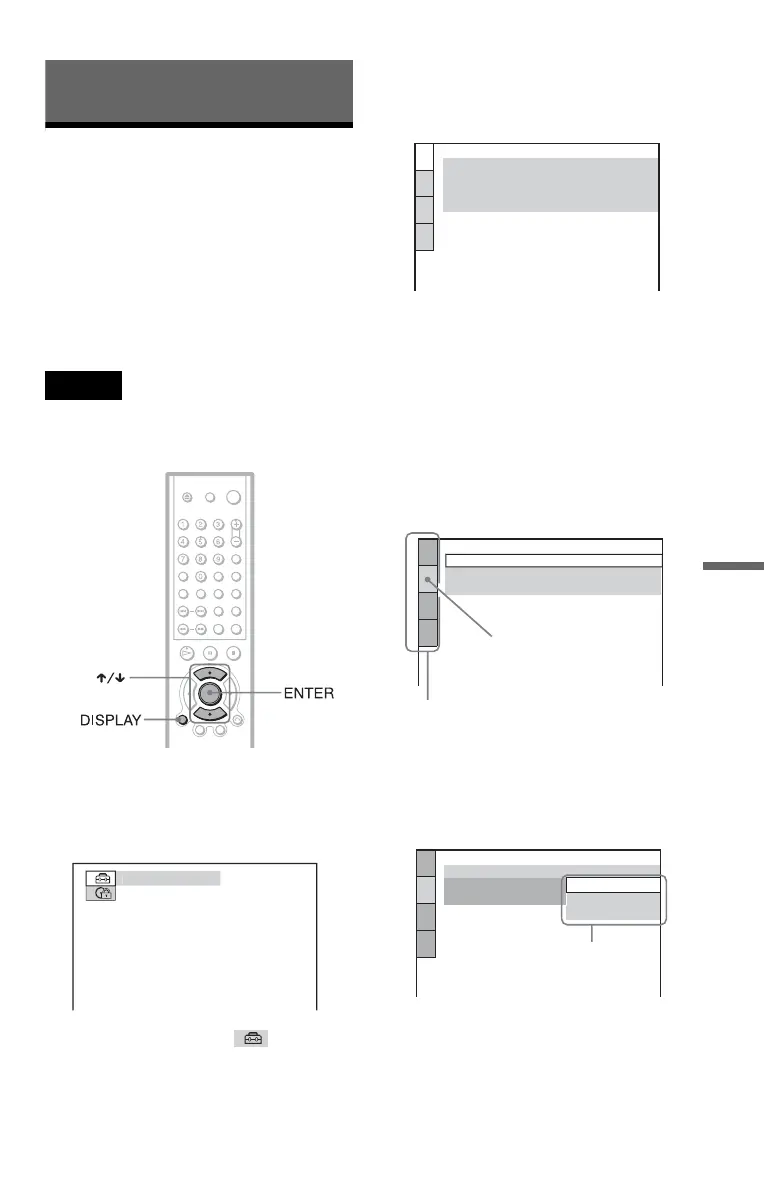
1 Press DISPLAY when the player is
in stop mode.
The Control Bar appears.
2 Press X/x to select (SETUP),
then press ENTER.
3 Press X/x to select “CUSTOM,”
then press ENTER.
The Setup Display appears.
4 Press X/x to select the setup item
from the displayed list:
“LANGUAGE SETUP,” “SCREEN
SETUP,” “CUSTOM SETUP,” or
“AUDIO SETUP.” Then press
ENTER.
The Setup item is selected.
Example: “SCREEN SETUP”
5 Select an item using X/x, then
press ENTER.
The options for the selected item appear.
Example: “TV TYPE”
UIC
LANGUAGE SETUP
MENU:
AUDIO:
SUBTITLE:
ORIGINAL
ENGLISH
OSD:
ENGLISH
ENGLISH
SCREEN SETUP
TV TYPE:
SCREEN SAVER:
BACKGROUND:
4:3 LETTER BOX
ON
JACKET PICTURE
Selected item
Setup items
SCREEN SETUP
TV TYPE:
SCREEN SAVER:
BACKGROUND:
4:3 LETTER BOX
4:3 LETTER BOX
4:3 PAN SCAN
16:9
Options
c continued





 To Next Page