38
Notes
•“MULTI-DISC RESUME” in “CUSTOM
SETUP” must be set to “ON” (default) for this
function to work (page 78).
• The resume playback point for the current disc is
cleared when:
– you change the play mode.
– you change the settings on the Setup Display.
• Resume Play does not work during Shuffle Play
and Programme Play.
• This function may not work with some discs.
Using the DVD’s Menu
A DVD is divided into long sections of a
picture or a music feature called “titles.”
When you play a DVD which contains
several titles, you can select the title you want
using the TOP MENU button.
When you play DVDs that allow you to select
items such as the language for the subtitles
and the language for the sound, select these
items using the MENU button.
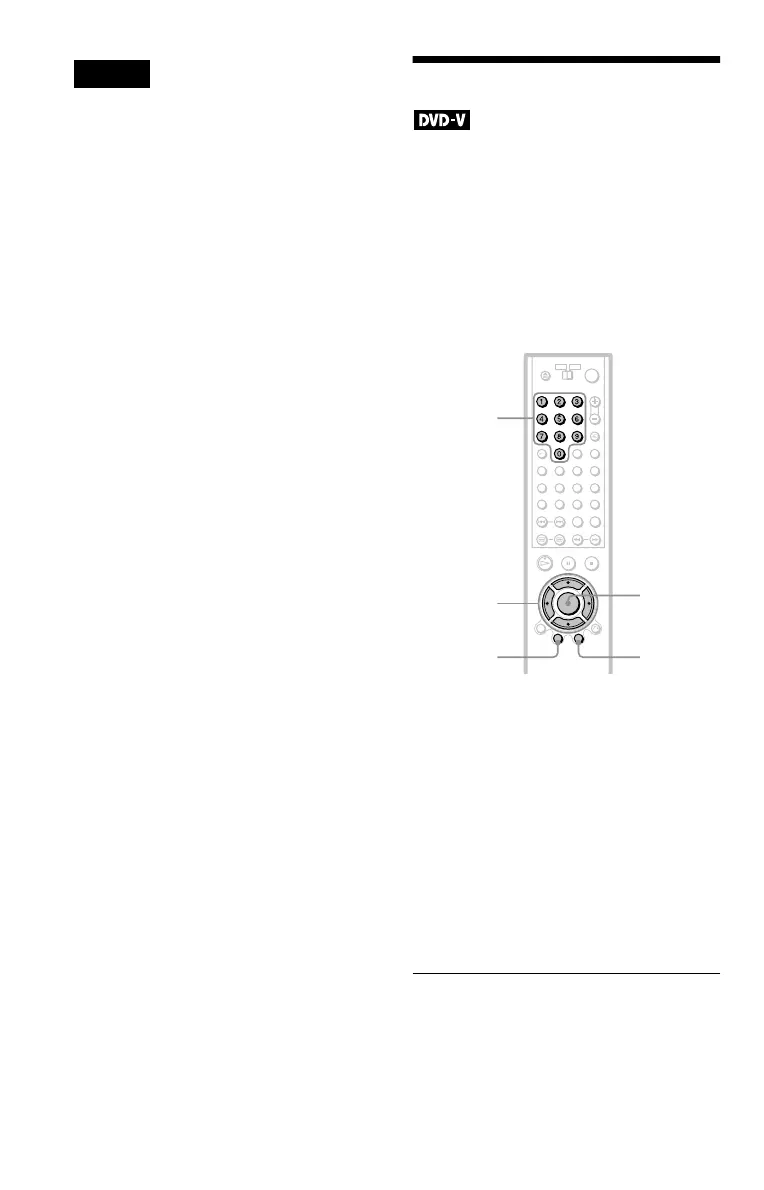
1 Press TOP MENU or MENU.
The disc’s menu appears on the TV
screen.
The contents of the menu vary from disc
to disc.
2 Press C/X/x/c or the number
buttons to select the item you want
to play or change.
3 Press ENTER.
z Hint
The disc’s menu also appears when the TOP MENU
or MENU button on the player is pressed.
Number
buttons
ENTER
MENUTOP MENU
C/X/x/c


 To Next Page