47
Playing Discs
◆ When playing a VIDEO CD, Super
Audio CD, or CD
• DISC: repeats all of the tracks.
• TRACK: repeats the current track.
◆ When playing a DATA CD (MP3 audio)
• DISC: repeats all of the albums.
• ALBUM: repeats the current album.
• TRACK: repeats the current track.
◆ When Programme Play or Shuffle Play
is activated
• ON: repeats Programme Play or
Shuffle Play.
To return to normal play
Press CLEAR, or select “OFF” in step 2.
z Hints
• You can set Repeat Play while the player is
stopped. After selecting the “REPEAT” option,
press H. Repeat Play starts.
• You can also select “REPEAT” from the Control
Menu (page 13).
Repeating a specific portion (A-
B Repeat Play)
You can play a specific portion of a title,
chapter or track repeatedly. (This function is
useful when you want to memorize lyrics, etc.)
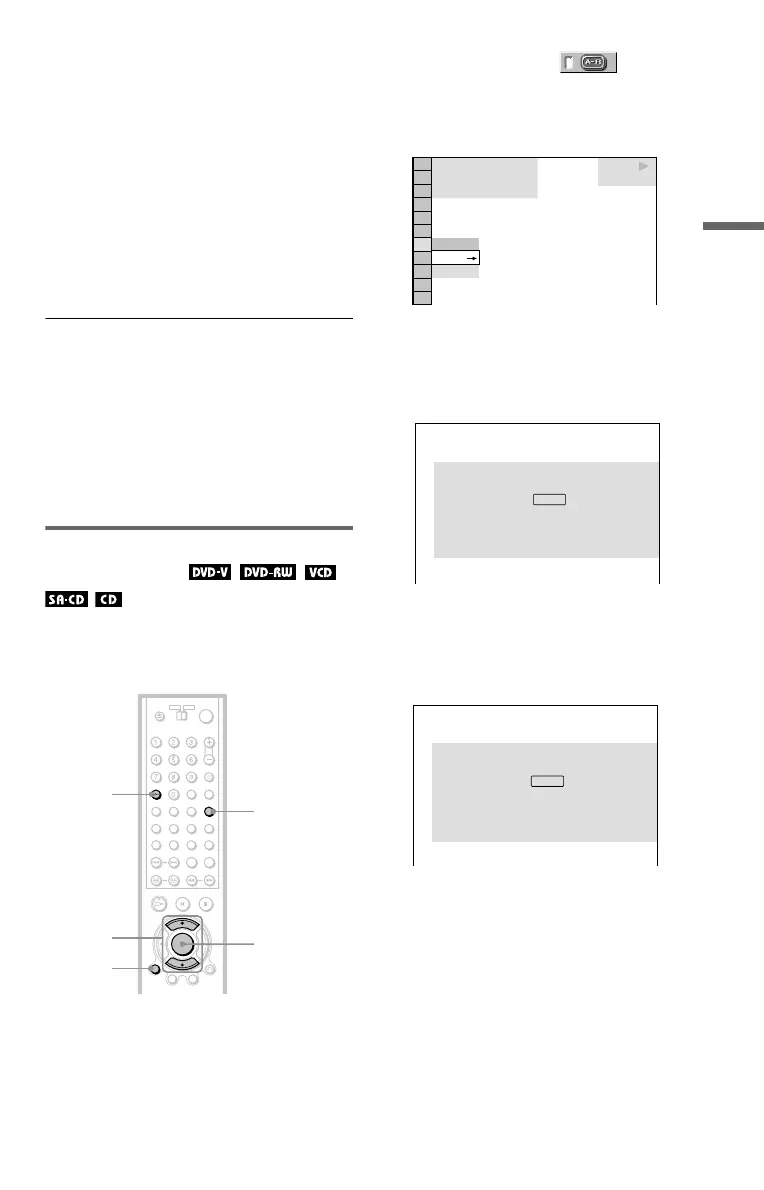
1 Press DISPLAY twice during playback
(when playing a Super Audio CD/CD,
press once).
The Control Menu appears.
2 Press X/x to select (A-B
REPEAT), then press ENTER.
The options for “A-B REPEAT”
appear.
3 Press X/x to select “SET t,” then
press ENTER.
The “A-B REPEAT” setting display
appears.
4 During playback, when you find the
starting point (point A) of the portion to
be played repeatedly, press ENTER.
The starting point (point A) is set.
DISPLAY
ENTER
X/x
CLEAR
A-B
(DVP-NS905V
only)
SET
OFF
OFF
1 8
(
3 4
)
1 2
(
2 7
)
T
1 : 3 2 : 5 5
DVD VIDEO
Set point A with
.
A-B REPEAT
ENTER
A: 18 – 1 : 32 : 55
CHAPTER
TIME
Set point B with .
ENTER
A-B REPEAT
,continued


 To Next Page