50
Note
You cannot search for a still picture on a DVD-RW
in VR mode.
Searching by Scene
(PICTURE NAVIGATION)
You can divide the screen into 9 subscreens
and find the desired scene quickly.
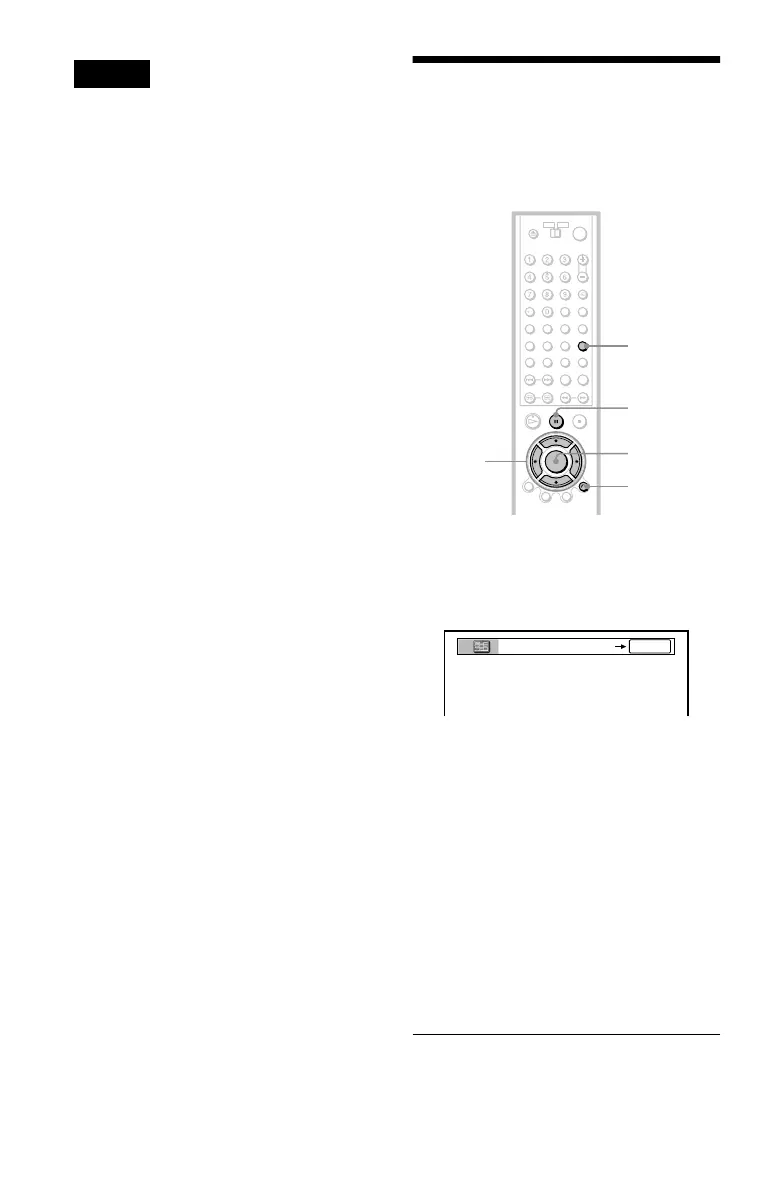
1 Press PICTURE NAVI during
playback.
The following display appears.
2 Press PICTURE NAVI repeatedly to
select the item.
Refer to the explanations given for each
item in the following sections.
• TITLE VIEWER (DVD VIDEO only)
• CHAPTER VIEWER (DVD VIDEO
only)
• TRACK VIEWER (VIDEO CD only)
• STROBE PLAYBACK (DVD VIDEO/
VIDEO CD only)
• ANGLE VIEWER (DVD VIDEO only)
3 Press ENTER.
ENTER
O RETURN
PICTURE
NAVI
C/X/x/c
X
ENTER



 To Next Page