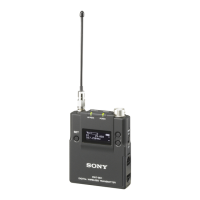
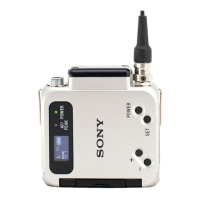
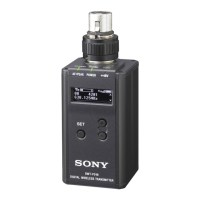
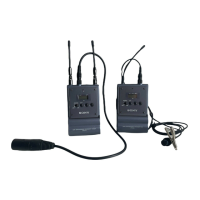
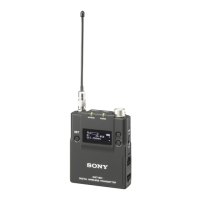
Sony DWT-P01N Digital Wireless Transmitter
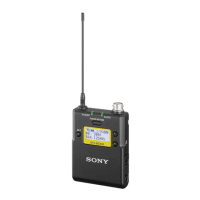
The Sony DWT-P01N is a digital wireless transmitter designed for UHF synthesized wireless microphone systems, ideal for broadcast and movie production, including Electronic News Gathering (ENG). It is part of Sony's DWX series, which combines Sony's expertise in professional microphones, sound design, and wireless technology to deliver high-quality digital audio with advanced features.
Function Description
The DWT-P01N transmitter offers multi-channel simultaneous operation, encrypted transmission for security, and metadata transmission for monitoring multiple transmitters. It supports remote control from a receiver via a main link and an additional link, allowing for flexible operation, even when the transmitter is worn under clothing.
The device utilizes WiDIF-HP (Wireless Digital Interface Format, High Profile), a Sony-developed digital audio interface format, ensuring highly secure transmission, high sound quality, and low system latency.
Important Technical Specifications
Transmitting Section:
- Oscillator type: Crystal-controlled PLL synthesizer
- RF power output: Selectable between 1 mW, 10 mW, and 50 mW (e.r.p). The maximum RF output power can also be configured on the unit.
- Occupied RF bandwidth: 192 kHz or less
- Audio delay: MODE1: 1.5 ms, MODE2: 1.0 ms, MODE3: 2.1 ms
- Allowable deviation of transmission frequency: ±6.5 ppm
- Type of emission: G1E or G1D
- Modulation method: π/4 Shift QPSK
- Carrier frequency range: The DWT-P01N covers a wide RF carrier frequency range, from 42-MHz to 72-MHz depending on the model (e.g., 72-MHz with the 42CE model). This broad coverage allows the transmitter to be used in various regions.
Audio Section:
- Maximum input level: MIC: -22 dBu (with 0 dB attenuator), LINE: +24 dBu
- Audio attenuator adjustment range (pad): 0 dB to 48 dB (in 3-dB steps, MIC input mode only)
- Microphone input connector: XLR-3-11C (female)
- Input impedance: 4.7 kohms or more
- Frequency response: 20 Hz to 22 kHz
- T.H.D: MODE1, MODE2: 0.03% or less; MODE3: 0.3% or less (at 0 dBu = 0.775 V)
- Audio codec modes: Three modes (MODE1, MODE2, MODE3) are available, allowing users to switch based on operational needs. MODE1 is compatible with first-generation DWX series. MODE2 offers reduced delay and improved audio quality, recommended for normal circumstances. MODE3 prioritizes stable transmission performance by suppressing noise and audio interruptions from interference.
General:
- Operating voltage: 3 V DC, with two LR6 (size AA) alkaline batteries
- Continuous operating time: Approximately 5.0 hours at 25 °C (77 °F) with 10-mW output, Sony LR6 (AA) alkaline batteries, CODEC MODE set to MODE1, wireless remote control function off, DIMMER MODE set to AUTO OFF, and +48V set to OFF.
- Operating temperature: 0 °C to 50 °C (32 °F to 122 °F)
- Storage temperature: -20 °C to +60 °C (-4 °F to +140 °F)
- Wireless remote control: 2.4-GHz IEEE802.15.4 compliant
- Dimensions: 44 mm (W) x 113.5 mm (H) x 78 mm (D) (1 3/4 inches x 4 1/2 inches x 3 1/8 inches)
- Mass: Approx. 245 g (8.6 oz) including batteries
- Supplied accessories: Spare battery case (1), Soft case (1), USB adapter cable (1), Before Using this Unit (3), CD-ROM (1)
- Optional accessories: Electret Condenser Microphones (ECM-673/9X, ECM-674/9X, ECM-678/9X)
Usage Features
Power Supply:
- Operates on two LR6 (size AA) alkaline batteries.
- Battery indication shows power status with eight levels; batteries should be replaced when the indicator flashes.
- Battery type setting (TYPE1, TYPE2, TYPE3, TYPE4) allows for accurate power status indication based on the type of batteries used (Sony Alkaline, rechargeable nickel-metal-hydride 2000 mAh, lithium, rechargeable nickel-metal-hydride 2500 mAh).
Transmission Channel Setup:
- Provides groups of interference-free channels for multi-microphone operation.
- Group and channel selection is done via the RF indicator and scanning functions on the receiver, then matched on the transmitter.
- Pairing mode with Cross Remote automatically sets the transmitter's transmission channel to match the receiver.
Cross Remote Function:
- Allows remote control of transmitter parameters (low-cut filter, attenuation, power save mode, etc.) via a receiver or other devices.
- Uses 2.4-GHz IEEE802.15.4 compliant wireless control, which does not affect the RF band of digital wireless audio.
- Requires pairing between the transmitter and receiver before use.
- Settings controllable via Cross Remote include transmitter name, frequency band, group/channel, RF transmission power, MIC/LINE input level, low-cut filter, power save, +48 V power supply, accumulated use time reset, audio codec mode, internal signal, and POWER switch lock.
Encrypted Transmission Function:
- Prevents signal hacking by scrambling the signal during transmission.
- Secure key mode: Automatically generates a unique encryption key for one-to-one transmission between a transmitter and receiver. The key is exchanged via USB connection or RF REMOTE.
- Password mode: Allows setting a user-designated password (up to eight characters) for multiple transmitters and receivers within a group, enabling encrypted transmission for all.
User Interface:
- OLED Display: Easy-to-see, full dot-matrix Organic Light-Emitting Diode display provides clear and accurate real-time operating conditions.
- Menu Operations: Functions and parameters are set using the +, –, and SET buttons.
- USB Keyboard Support: An optional USB keyboard can be connected via the Micro USB connector and supplied adapter cable for menu operations, entering names, and passwords.
- +48 V Power Supply: Can be turned on or off for microphones requiring external power.
- Internal Signal Generator: Generates a 1-kHz reference level sine wave for adjusting or checking audio levels.
- POWER Switch Lock: Prevents accidental turning off or on of the transmitter.
- Display Brightness: Ten levels of brightness can be selected for the OLED display.
- Automatic Dimming: The display can be set to turn off (AUTO OFF) or dim (AUTO DIMMER) after 30 seconds, or stay always on (ALWAYS ON).
- Factory Preset: Resets all parameters to factory settings.
- Software Version Display: Shows the current software version.
Audio Input Level:
- Switchable mic or line input level with an adjustable attenuator (0 dB to 48 dB in 3-dB steps).
- Reference input levels: -58 dBu (MIC, 0 dB attenuation), +4 dBu (LINE).
- AF (audio frequency) / PEAK indicator lights green for strong signal input and red when the signal input is 3 dB below distortion level.
Low-cut Filter:
- Adjustable low-cut filter frequency (OFF, 20 Hz to 220 Hz).
Power Save Mode:
- Allows putting all transmitter functions to sleep (SLEEP) to conserve power; the POWER indicator flashes at 2-second intervals during sleep. Normal operation (ACTIVE) can be resumed by pressing SET, +, or – buttons.
Maintenance Features
Cleaning:
- For use in humid, dusty, or active gas environments, clean the surface and connectors with a dry, soft cloth soon after use to prevent shortening the transmitter's life.
- Do not use thinner, benzene, alcohol, or other chemicals, as they may mar the finish.
Important Notes:
- Operate within a temperature range of 0 °C to 50 °C (32 °F to 122 °F).
- Avoid operating near electrical equipment (motors, transformers, dimmers) to minimize electromagnetic induction and interference.
- Maintain distance from air conditioning equipment, public address loudspeakers, and other vibrating or noisy equipment to prevent signal degradation.
- Keep microphones at least 30 cm (11 7/8 inches) away from other transmitters/microphones for multi-channel operation.
- When using only digital wireless microphones, keep the transmitter at least 4 meters (13 feet) from the receiver antenna for up to 10 channels, and at least 6 meters (20 feet) for 11 or more channels.
- When mixing digital and analog wireless microphones, keep the transmitter at least 6 meters (20 feet) from the receiver antenna.
- Maintain at least 100 meters (328 feet) from analog wireless systems using the same frequency in wide, unobstructed areas.
- If noise occurs, increase the distance between transmitter and receiver or decrease transmission power.
- Recommended microphones are Sony ECM-673/9X, ECM-674/9X, or ECM-678/9X Electret Condenser Microphones. Lowering transmission power may reduce noise with some microphones.
- Turn off portable communication devices near the DWT-P01N to prevent malfunction and audio signal interference.


 To Next Page
 General