
 To Next Page
E
ernestmcdonaldAug 19, 2025
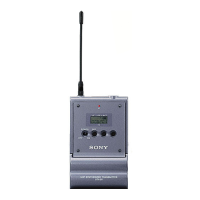
How to fix too much bass on Sony DWT-B03R?
- JJennifer HarveyAug 19, 2025
If there is excessive bass, use the low-cut filter function to reduce it.

How to fix too much bass on Sony DWT-B03R?
If there is excessive bass, use the low-cut filter function to reduce it.
Why is there no bass on my Sony DWT-B03R?
If there is no bass, the frequency of the low-cut filter may be set too high. Decrease the low-cut filter frequency to a level that produces the proper sound quality while monitoring the audio.
What to do if there is no audio on my Sony Transmitter?
If there is no audio, ensure that the channel settings on both the transmitter and receiver are the same. Also, verify that the encrypted transmission function settings and the audio codec mode settings match on both devices.
Why does audio keep cutting out on my Sony Transmitter?
Audio interruptions can occur if the unit is too far from the receiver; try reducing the distance to improve reception. Also, if the transmission power is set to “L: 2 mW,” increase it for better signal strength.
What to do if my Sony DWT-B03R Transmitter battery discharges quickly?
If the battery discharges quickly, fully charge it, as batteries naturally discharge over time even when not in use. If the remaining charge isn't correctly displayed after a full charge, the battery may be old and need replacement. Extremely high or low ambient temperatures can also affect battery performance; use the unit within its recommended operating temperature range.
What to do if the Sony DWT-B03R Transmitter battery indicator is incorrect?
An incorrect battery indicator, immediate shut-off, or failure to turn on can occur if you're not using the supplied NP-BX1 rechargeable battery pack, so ensure you are using the correct battery. Also, make sure the battery is fully charged, as batteries discharge naturally over time. If the issue persists after charging, the battery may be at the end of its life cycle and require replacement. Lastly, extreme temperatures can cause this issue; use the unit within its operating temperature range.
What to do if my Sony Transmitter audio is distorted?
If the audio is distorted, the attenuator might be set too low for the unit's audio input level. Adjust the attenuator to a level that eliminates distortion while monitoring the audio input level meter.
How to improve weak audio on Sony DWT-B03R?
If the audio is weak, and a microphone is connected, set the audio input level to MIC. Also, adjust the attenuator to an appropriate level while monitoring the unit’s audio input level meter.
How to reset Sony Transmitter when it won't turn off?
If the unit does not turn off even when holding the power button, the POWER button operation may be locked. Set the LOCK function to UNLOCK.
Why can't I change settings on my Sony DWT-B03R?
If settings cannot be changed, the settings may be locked. Set the LOCK function to UNLOCK.
 General
| Frequency Response | 20 Hz to 20 kHz |
|---|---|
| Dynamic Range | 100 dB |
| Operating Temperature | -10 °C to +50 °C |
| Type | Wireless Transmitter |
| Audio Input | Line Level, Mic Level |
| Modulation | Digital |
| Audio Input Connector | XLR |
| Power Requirements | 2 x AA Batteries |
| Power Supply | 2 AA Batteries |