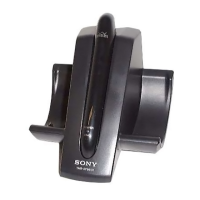
The Sony WLA-NS7 is a wireless transmitter designed to enable wireless audio transmission from a TV to Bluetooth headphones, enhancing the listening experience, particularly with Sony brand headphones for spatial sound.
Function Description
The primary function of the WLA-NS7 is to transmit TV audio wirelessly to Bluetooth headphones. It connects to a TV via an optical digital cable for audio input and a USB Type-C cable for power. Once connected, it can be paired with Bluetooth headphones, allowing users to listen to TV audio through their headphones. A key feature is its ability to work in conjunction with BRAVIA XR™ TVs and Sony brand headphones to deliver spatial sound, including Dolby Atmos content. When spatial sound is active with a BRAVIA XR TV, the audio output from the TV itself is typically muted, and the volume control shifts to the headphones. For non-BRAVIA XR TVs, the transmitter still allows listening to TV audio through headphones, but spatial sound features are not available, and PCM must be specified as the digital audio output method on the TV. In this scenario, audio may come from both the TV and the headphones.
The device features a single Bluetooth button for pairing and control, and an indicator light that changes color (orange or blue) and flashing patterns to communicate its power status, audio signal reception, and Bluetooth connection state.
Usage Features
Getting Started and Connections:
To begin, the transmitter needs to be connected to a TV. This involves two main steps:
- Audio Connection: Connect the DIGITAL IN (optical digital audio input) port on the transmitter to the optical digital audio output port on the TV using the supplied optical digital cable.
- Power Connection: Connect the DC IN port on the transmitter to a USB port on the TV using the supplied USB Type-C cable. If the TV lacks a USB power output port, a commercially available USB AC adaptor can be used to connect the transmitter to an AC outlet.
After connecting, the TV needs to be turned on, and specific settings may be required. For BRAVIA XR TVs, on-screen instructions guide the setup of 3D surround functions. For non-BRAVIA XR TVs, PCM must be selected as the digital audio output method.
Bluetooth Pairing:
To establish a wireless connection with headphones, pairing is necessary.
- Initiate Pairing on Transmitter: Press and hold the Bluetooth button on the transmitter for approximately 5 seconds. The indicator will start double-flashing in blue, signaling that it is in pairing mode. The transmitter automatically enters pairing mode upon first use or after initialization if no pairing information exists.
- Initiate Pairing on Headphones: Put the Bluetooth headphones into pairing mode. Refer to the headphones' operating instructions for this step.
- Connection Confirmation: Once a Bluetooth connection is established, the transmitter's indicator will stop flashing and remain lit in blue.
Listening to TV Audio:
- Spatial Sound (with BRAVIA XR TV and Sony headphones): After connecting the transmitter and TV, and establishing a Bluetooth connection with Sony brand headphones, wear the headphones and adjust their volume. The 3D surround functions on the TV should be active.
- Standard Headphone Listening (with non-BRAVIA XR TV or other headphones): Connect the transmitter and TV, ensuring PCM is set as the digital audio output. Establish a Bluetooth connection with the headphones. If no audio is heard, a brief press of the Bluetooth button on the transmitter may resolve it. Audio will typically come from both the TV and the headphones.
Terminating Connections:
- Terminating Bluetooth Connection: To end the Bluetooth connection, either turn off the Bluetooth function on the connected device (headphones) or turn off the Bluetooth device itself.
- Terminating Spatial Sound Output: If listening in spatial sound, turning off the headphones or deactivating the 3D surround functions on the TV will terminate the spatial audio output, and audio will resume from the TV speakers.
Troubleshooting:
The manual provides guidance for common issues:
- No sound/Low sound/Distorted sound/Noise: Check if 3D surround functions are active (if applicable), ensure PCM is set for non-BRAVIA XR TVs, verify TV and headphones are on, reconnect cables, adjust headphone volume, re-pair the devices, or change Bluetooth quality preferences (e.g., to "Priority on Stable Connection" if available on headphones). Also, ensure the equalizer function on the TV is deactivated and move the transmitter away from potential interference sources like microwave ovens, wireless LAN access points, radios, or tuners.
- Unable to pair: Ensure headphones are within 1 meter of the transmitter, both devices are on and in pairing mode, and press and hold the Bluetooth button on the transmitter for 5 seconds if the indicator is not double-flashing blue.
- Initializing the transmitter: If the transmitter is not working correctly, it can be initialized to restore factory default settings. Connect it to a TV or AC outlet, then press and hold the Bluetooth button for about 10 seconds until the indicator flashes 4 times in blue. This deletes all pairing information.
The indicator light provides visual cues:
- Powered, no audio: Flashing orange.
- PCM not specified: Double flashing orange.
- Receiving audio: Stays lit in blue.
- Pairing mode: Double flashing blue.
- Connection attempt: Flashing blue at 1-second intervals for 30 seconds.
- Connection established: Flashing quickly in blue for about 5 seconds, then stays lit in blue.
- Connection attempt on hold/in process: Stays lit in blue.
- Initialization complete: Flashes 4 times in blue.
Notes on Use:
- Volume Control: The TV remote cannot control the volume of headphones connected via the transmitter. Headphone volume must be adjusted on the headphones themselves.
- Audio/Video Synchronization: Watching video on a non-BRAVIA XR TV while listening via headphones may cause unsynchronized video and audio.
- Headphone Operations: While connected to the transmitter, headphone operations like pausing or skipping playback content are generally not available.
- Bluetooth Range and Interference: The Bluetooth wireless technology operates within about 30 meters (98 ft). This range can shorten due to obstacles (people, metal, walls) or interference from wireless LAN devices, microwave ovens, or other electromagnetic radiation sources.
- Medical Devices: Microwaves from Bluetooth devices may affect electronic medical devices. Turn off Bluetooth devices in hospitals, trains, airplanes, gas stations, or near automatic doors/fire alarms.
- Security: While the transmitter supports Bluetooth security capabilities, users should be careful when communicating using Bluetooth wireless technology, as security may not always be sufficient depending on settings.
Maintenance Features
Care for the Transmitter:
- Cleaning: If the surface of the transmitter becomes soiled, wipe it with a dry, soft cloth or a well-wrung cloth dipped in tap or lukewarm water.
- Avoid Harsh Cleaners: Do not use detergent, thinner, benzine, or alcohol to clean the transmitter, as these can damage the surface.
Placement and Environment:
- Flat Surface: Always place the transmitter on a flat, level surface to prevent it from falling over due to vibration, which could cause injury, malfunctions, or performance degradation.
- Avoid Extreme Conditions: Do not use or leave the transmitter in extremely cold or hot environments (outside 5 °C - 35 °C / 41 °F - 95 °F). The transmitter may automatically shut down to protect internal circuitry if temperatures are outside this range.
- Avoid Moisture: The product and its supplied accessories are not waterproof; avoid splashing water on them.
- Avoid Dust and Vibration: Do not place the transmitter in locations subject to excessive dust or strong vibration.
- Avoid Heat Sources: Keep the transmitter away from high temperatures, direct sunlight, lighting equipment, heat sources, or saunas.
- Valuables: Do not leave any valuables near the transmitter, as it may fall off surfaces depending on conditions.
Safety Precautions:
- Hearing Protection: Avoid listening at loud volumes for extended periods, as this can damage hearing. Start with low volume and gradually increase it to an appropriate level.
- Situational Awareness: Do not use headphones while walking, driving, or cycling, as this can cause traffic accidents. Avoid using them in dangerous places where surrounding sounds need to be heard.
- Model Information: Important information, including the model name, is located on the bottom of the transmitter.
For any questions or problems not covered in the Help Guide, users are advised to consult their nearest Sony dealer.

 Need help?
 General
 Weight and Dimensions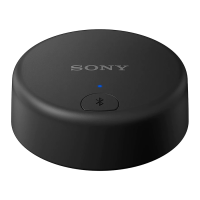

 To Next Page