8
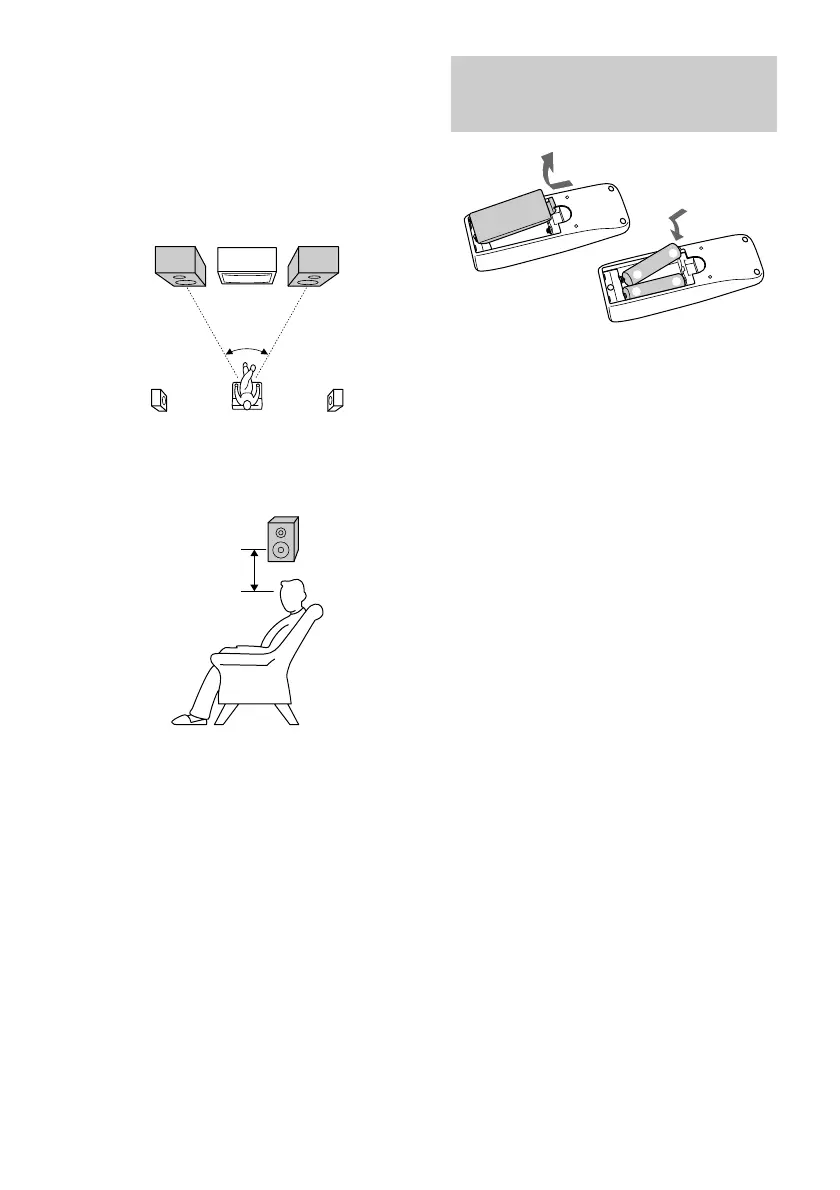
Inserting two R6 (size AA)
batteries into the remote
E
e
e
E
Tip
With normal use, the batteries should last for about
six months. When the remote no longer operates the
system, replace both batteries with new ones.
Note
If you do not use the remote for a long period of time,
remove the batteries to avoid possible damage from
battery leakage.
When carrying this system
Perform the following procedure to protect the
CD mechanism.
1 Make sure that all discs are removed from
the system.
2 Press ?/1 to turn off the system.
3 Unplug the power cord.
45º
2 Place the surround speakers facing
each other at about 60 to 90 cm above
your listening position.
Front
speaker
(L)
Front
speaker
(R)
Surround
speaker
(L)
Surround
speaker
(R)
Surround
speaker
60 to 90 cm
Hooking up the system (continued)
Positioning the speakers (MHC-
RG4SR only)
1 Place the front speakers at an angle of
45 degrees from your listening
position.



 To Next Page