EasyManua.ls Logo

Sony DXC-325P - Viewfinder Character Display Sequence

Sony DXC-325P
46 pages
Print Icon
To Next Page IconTo Next Page
To Previous Page IconTo Previous Page
Loading...
Warning
Indicators
and
Character
Display
_
Character
Display
on
the
Viewfinder
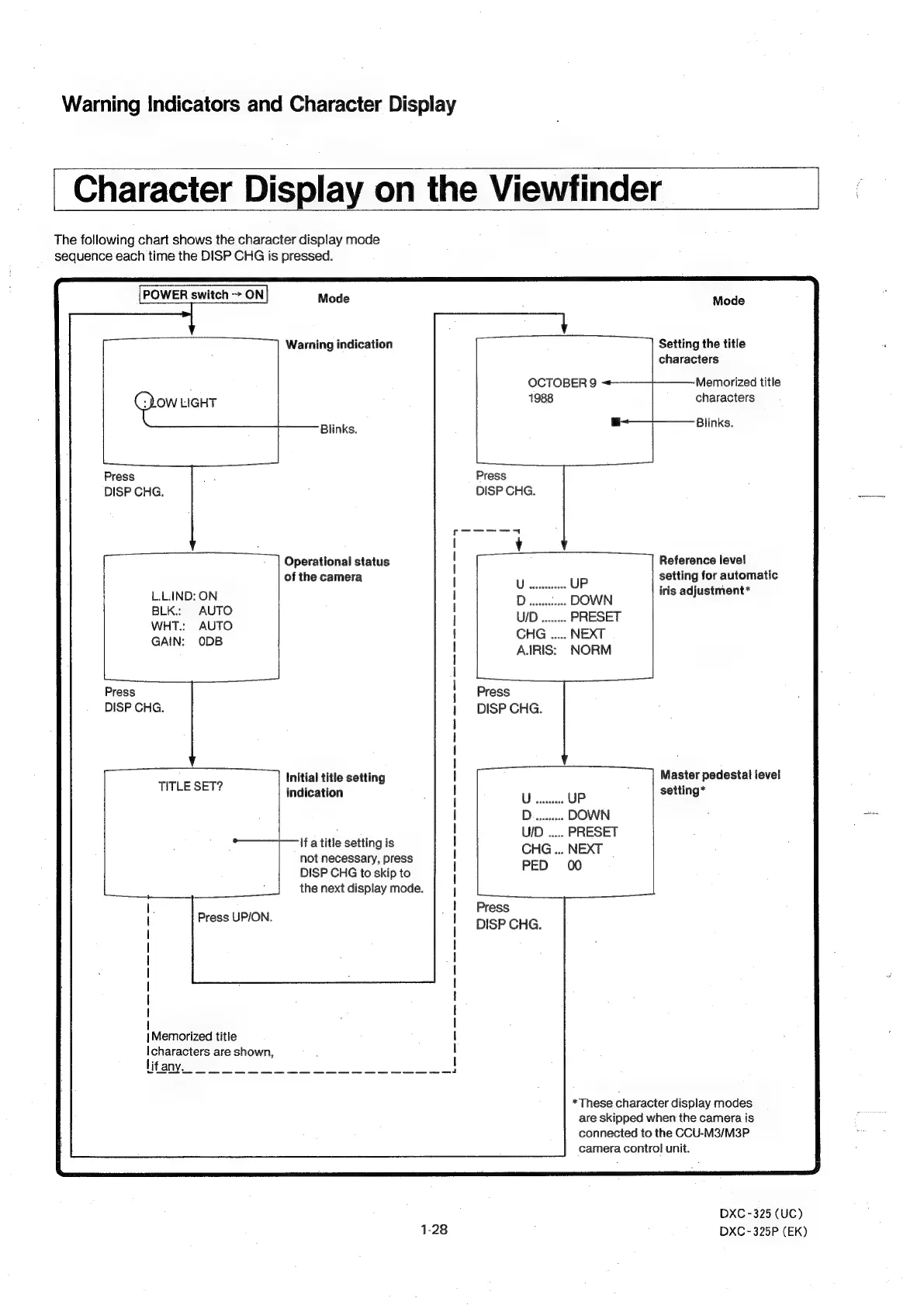
The
following
chart
shows
the
character
display
mode
sequence
each
time
the
DISP
CHG
is
pressed.
POWER
switch
>
ON
Mode
Mode
Warning
indication
Setting
the
title
characters
OCTOBER
9
«+
Memorrized
title
OW
LIGHT
1988
characters
Blinks.
git:
a
Fe
named
Press
re
Press
DISP
CHG.
;
DISP
CHG.
Operational
status
Reference
level
of
the
camera
setting
for
automatic
L.L.IND:
ON
D
.....
DOWN
iris
adjustment*
BLK.:
AUTO
WHT.;
AUTO
UID
ne.
PRESET
GAIN:
ODB
A.IRIS:
NORM
Press
Press
DISP
CHG.
DISP
CHG.
Initial
title
setting
Master
pedestal
level
TITLE
SET?
indication
;
setting*
1H
a
title
setting
is
not
necessary,
press
DISP
CHG
to
skip
to
the
next
display
mode.
PED
00
Press
Press
UP/ON.
DISP
CHG.
-
|
I
|
|
|
|
|
|
|
|
|
Memorized
title
Icharacters
are
shown,
*These
character
display
modes
are
skipped
when
the
camera
is
connected
to
the
CCU-M3/M3P
camera
contro]
unit.
DXC
-325
(UC)
1-28
DXC
-325P
(EK)