EasyManua.ls Logo

Sony DXC-325P - Camera Operational Status Display; Title Setting Indication

Sony DXC-325P
46 pages
Print Icon
To Next Page IconTo Next Page
To Previous Page IconTo Previous Page
Loading...
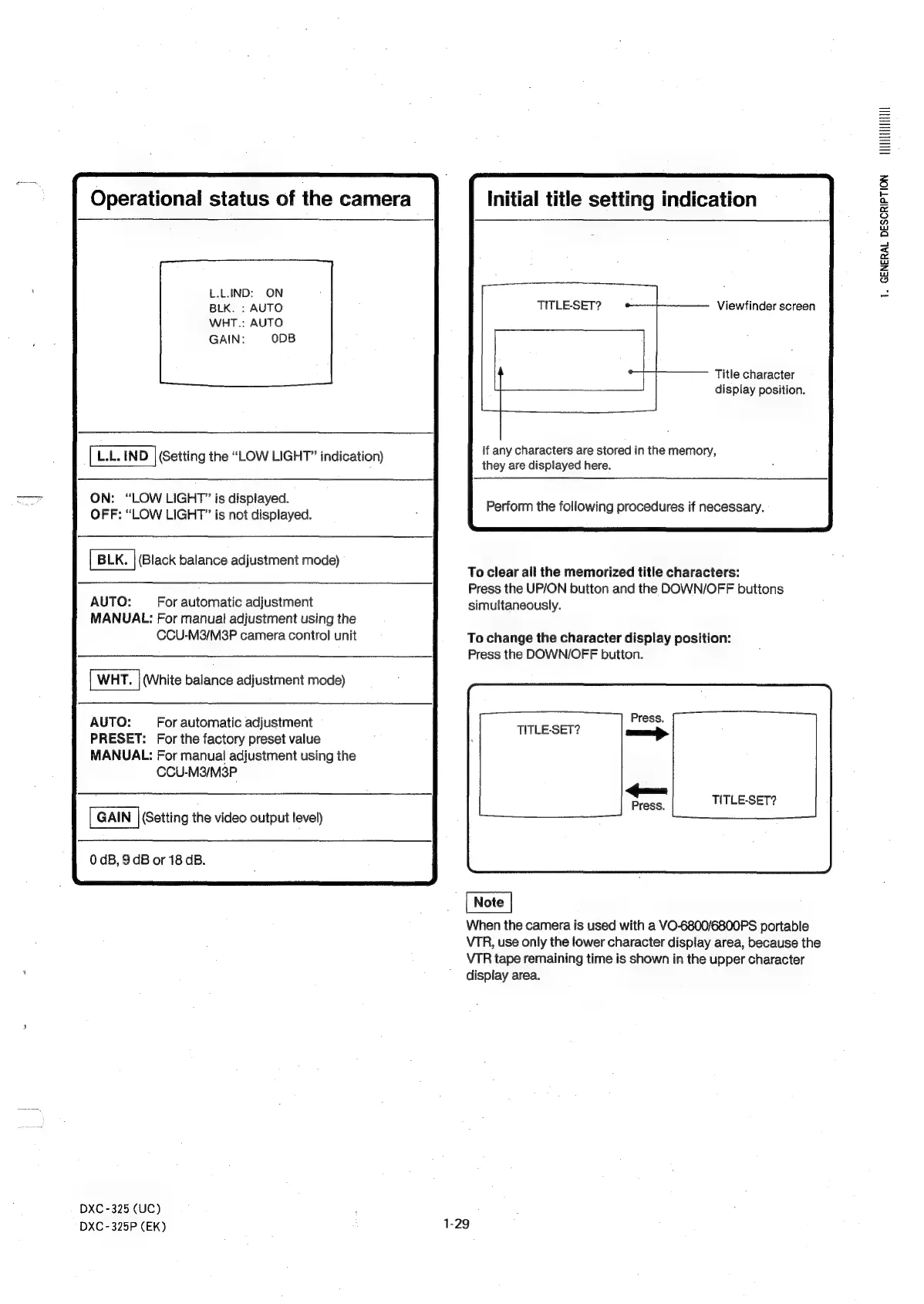
Operational
status
of
the
camera
L.L.IND:
ON
BLK.
:
AUTO
WHT.:
AUTO
GAIN:
ODB
L.L.
IND
|
(Setting
the
“LOW
LIGHT”
indication)
ON:
“LOW
LIGHT”
is
displayed.
OFF:
“LOW
LIGHT”
is
not
displayed.
(Black
balance
adjustment
mode)
AUTO:
For
automatic
adjustment
MANUAL:
For
manual
adjustment
using
the
CCU-M3/M3P
camera
control
unit
(White
balance
adjustment
mode)
AUTO:
For
automatic
adjustment
PRESET:
For
the
factory
preset
value
MANUAL:
For
manual
adjustment
using
the
CCU-M3/M3P
(Setting
the
video
output
level)
0
dB,
9
GB
or
18
GB.
DXC
-325
(UC)
DXC-325P
(EK)
Initial
title
setting
indication
TITLE-SET?
Viewfinder
screen
Title
character
display
position.
If
any
characters
are
stored
in
the
memory,
they
are
displayed
here.
Perform
the
following
procedures
if
necessary.
To
clear
all
the
memorized
title
characters:
Press
the
UP/ON
button
and
the
DOWN/OFF
buttons
simultaneously.
To
change
the
character
display
position:
Press
the
DOWN/OFF
button.
Press.
TITLE-SET?
TITLE-SET?
When
the
camera
is
used
with
a
VO-6800/6800PS
portable
VTR,
use
only
the
lower
character
display
area,
because
the
VTR
tape
remaining
time
is
shown
in
the
upper
character
display
area.
1-29
UTHIELATIETII
1.
GENERAL
DESCRIPTION