EasyManua.ls Logo

Sony DXC-325P - Setting Title Characters

Sony DXC-325P
46 pages
Print Icon
To Next Page IconTo Next Page
To Previous Page IconTo Previous Page
Loading...
Warning
Indicators
and
Character
Display
TEETH
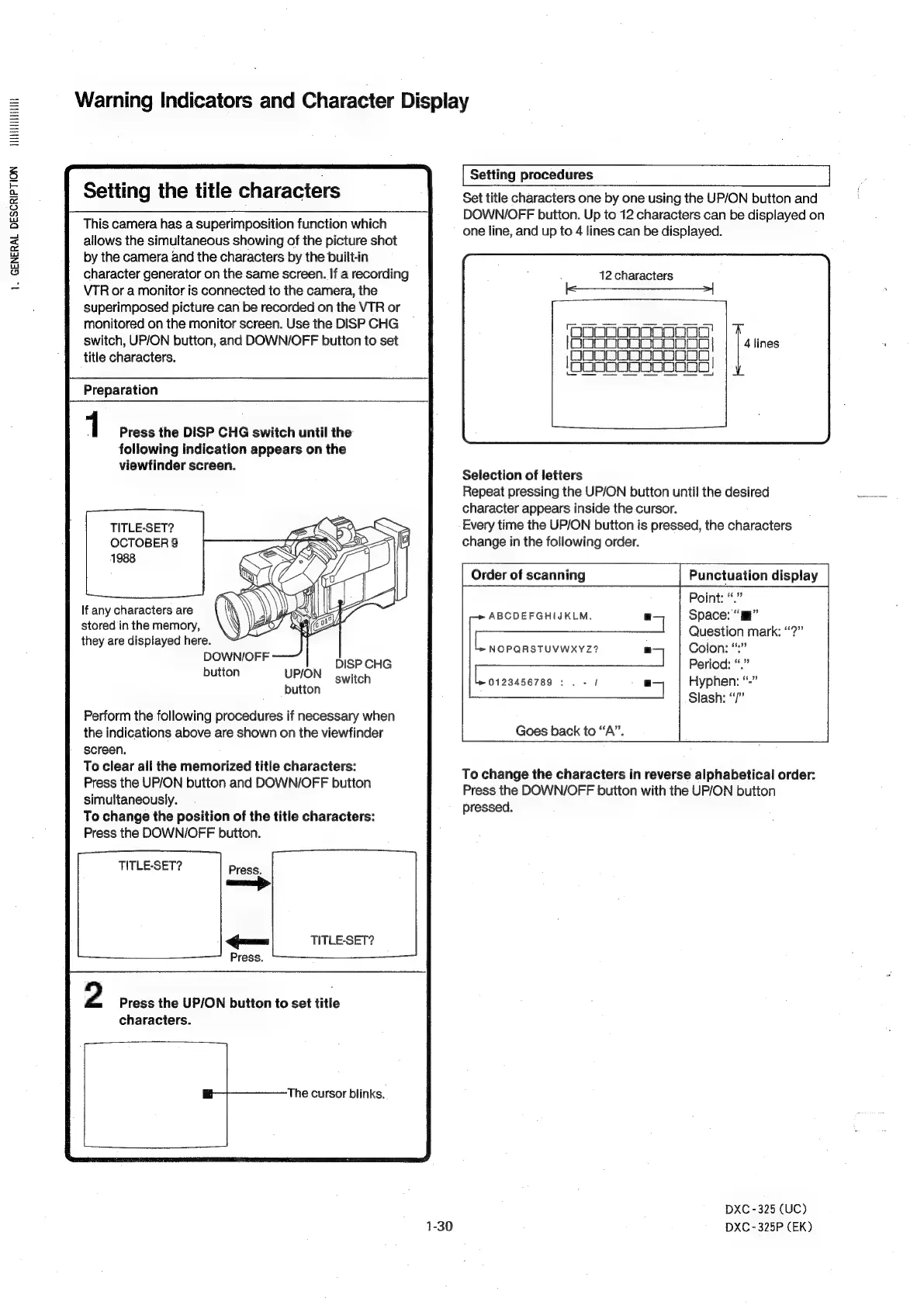
Setting
procedures
Set
title
characters
one
by
one
using
the
UP/ON
button
and
DOWN/OFF
button.
Up
to
12
characters
can
be
displayed
on
one
line,
and
up
to
4
lines
can
be
displayed.
Setting
the
title
characters
This
camera
has
a
superimposition
function
which
allows
the
simultaneous
showing
of
the
picture
shot
by
the
camera
and
the
characters
by
the
built-in
character
generator
on
the
same
screen.
If
a
recording
VTR
or
a
monitor
is
connected
to
the
camera,
the
superimposed
picture
can
be
recorded
on
the
VTR
or
monitored
on the
monitor
screen.
Use
the
DISP
CHG
switch,
UP/ON
button,
and
DOWN/OFF
button
to
set
title
characters.
12
characters
1.
GENERAL
DESCRIPTION
‘OOOoOoOoonoonoo'
lono0og
DoOoooo|
(BODSSSASS005
;
HoOoOogooooeoS
=
Preparation
1
Press
the
DISP
CHG
switch
until
the
following
indication
appears
on
the
viewfinder
screen.
Selection
of
letters
Repeat
pressing
the
UP/ON
button
until
the
desired
character
appears
inside
the
cursor.
TITLE-SET?
=
a
Every
time
the
UP/ON
button
is
pressed,
the
characters
OCTOBER
9
ox
:
change
in
the
following
order.
1988
.
Order
of
scanning
Punctuation
display
Point:
“.”
If
any
characters
are
ABCDEFGHIJKLM.
7
Space:
“ml”
stored
in
the
memory,
Question
mark:
“?”
they
are
displayed
here.
rey
NOPQRSTUVWXYZ?
rT
Colon:
“:
DOWNI/OFF
Period:
“.”
button
UP/ON
er
notion
0123456789:
.
-
|
.
Hyphen:
“-
Slash:
“/”
Perform
the
following
procedures
if
necessary
when
the
indications
above
are
shown
on
the
viewfinder
Goes
back
to
“A”.
screen.
Ecce
aA
ete
tas
Hee
patentee
To
change
the
characters
in
reverse
alphabetical
order:
:
Press
the
DOWN/OFF
button
with
the
UP/ON
button
simultaneously.
pressed
To
change
the
position
of
the
title
characters:
Press
the
DOWN/OFF
button.
TITLE-SET?
ae
Ques
TITLE-SET?
Press.
_—$_—_—_—_—_-—
2
Press
the
UP/ON
button
to
set
title
characters.
The
cursor
blinks.
DXC
-
325
(UC)
1-30
DXC-325P
(EK)