EasyManua.ls Logo

Sony DXC-325P - Cursor Movement and Character Memory

Sony DXC-325P
46 pages
Print Icon
To Next Page IconTo Next Page
To Previous Page IconTo Previous Page
Loading...
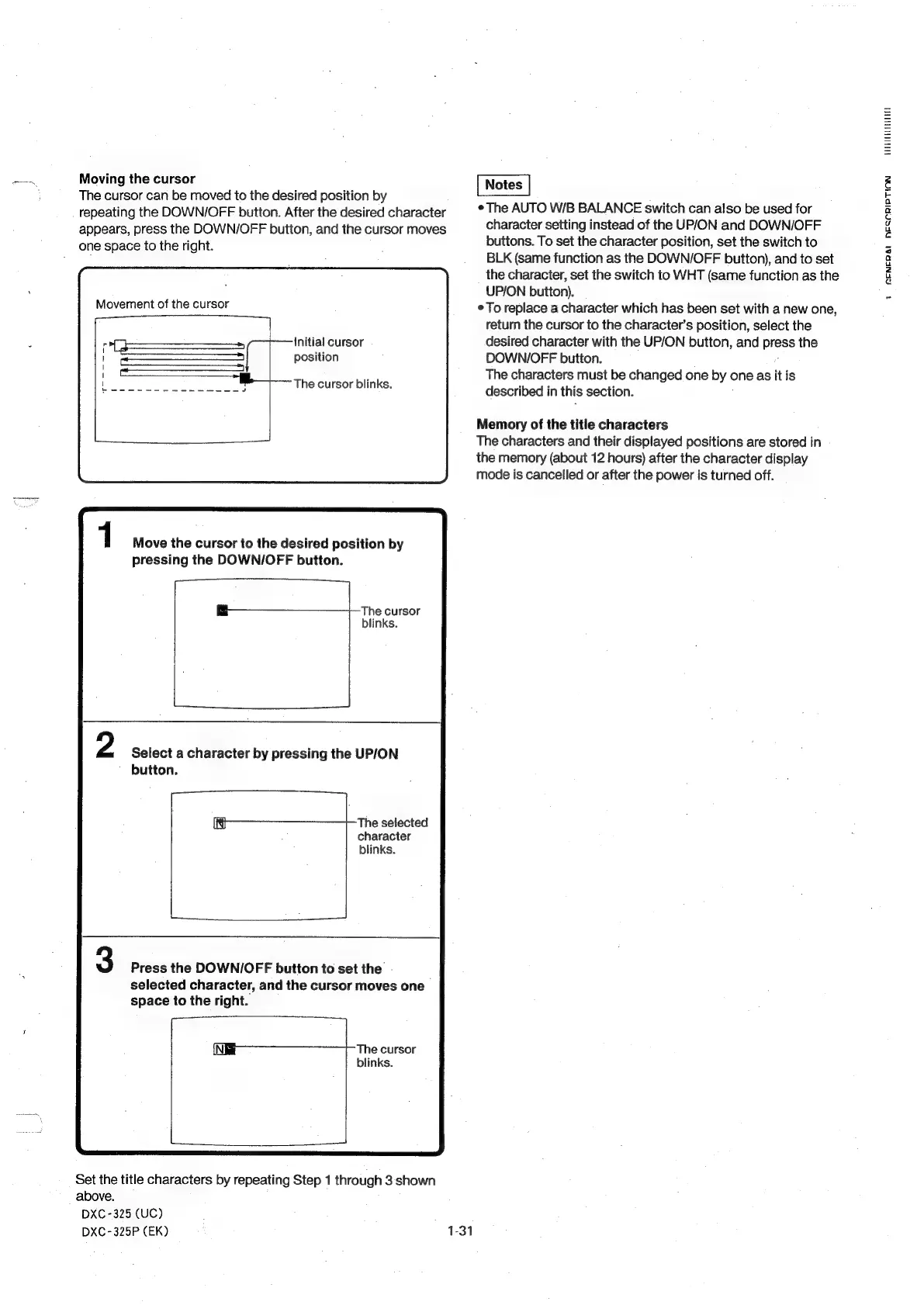
Moving
the
cursor
The
cursor
can
be
moved
to
the
desired
position
by
repeating
the
DOWN/OFF
button.
After
the
desired
character
appears,
press
the
DOWN/OFF
button,
and
the
cursor
moves
one
space
to
the
right.
Movement
of
the
cursor
initial
cursor
position
The
cursor
blinks.
Move
the
cursor
to
the
desired
position
by
pressing
the
DOWNI/OFF
button.
The
cursor
blinks.
Select
a
character
by
pressing
the
UP/ON
button.
The
selected
character
blinks.
Press
the
DOWN/OFF
button
to
set
the
-
selected
character,
and
the
cursor
moves
one
space
to
the
right.
The
cursor
blinks.
Set
the
title
characters
by
repeating
Step
1
through
3
shown
above.
DXC-325
(UC)
DXC-325P
(EK)
$34
¢
The
AUTO
W/B
BALANCE
switch
can
also
be
used
for
character
setting
instead
of
the
UP/ON
and
DOWN/OFF
buttons.
To
set
the
character
position,
set
the
switch
to
BLK
(same
function
as
the
DOWN/OFF
button),
and
to
set
the
character,
set
the
switch
to
WHT
(same
function
as
the
UP/ON
button).
¢
To
replace
a
character
which
has
been
set
with
a
new
one,
return
the
cursor
to
the
character’s
position,
select
the
desired
character
with
the
UP/ON
button,
and
Pisses
the
DOWNIOFF
button.
The
characters
must
be
changed
one
by
<
one
as
it
is
described
in
this
section.
Memory
of
the
title
characters
The
characters
and
their
displayed
positions
are
stored
in
the
memory
(about
12
hours)
after
the
character
display
mode
is
cancelled
or
after
the
power
is
turned
off.
HUTTE
1
MENERAL
HECCRID
TION