EasyManua.ls Logo

Sony DXC-325P - Advanced Settings; Automatic Iris Adjustment; Master Pedestal Level

Sony DXC-325P
46 pages
Print Icon
To Next Page IconTo Next Page
To Previous Page IconTo Previous Page
Loading...
Warning
Indicators
and
Character
Display
©
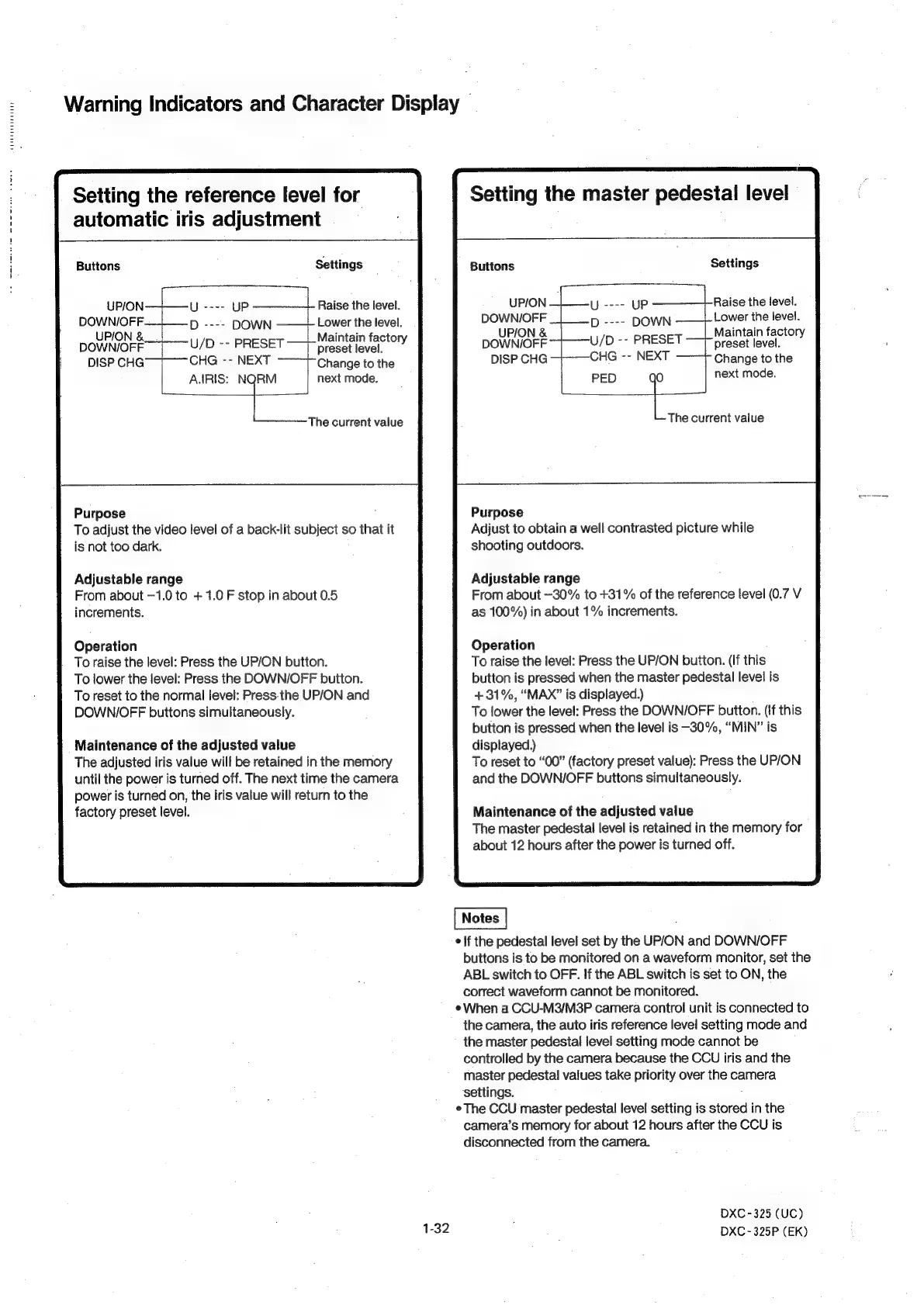
Setting
the
reference
level
for
automatic
iris
adjustment
Buttons
Settings
UPION
U
----
UP
DOWNIOFF.
D
----
DOWN
UPION
&_.
DOWNIOFF
U/D
--
PRESET
preset
level.
CHG
--
NEXT
Change
to
the
DISP
CHG
A.ARIS:
i.
next
mode.
The
current
value
Raise
the
level.
Lower
the
level.
Maintain
factory
Purpose
To
adjust
the
video
level
of
a
back-lit
subject
so
that
it
is
not
too
dark.
Adjustable
range
From
about
—1.0
to
+
1.0
F
stop
in
about
0.5
increments.
Operation
To
raise
the
level:
Press
the
UP/ON
button.
To
lower
the
level:
Press
the
DOWN/OFF
button.
To
reset
to
the
normal
level:
Press.the
UP/ON
and
DOWN/OFF
buttons
simultaneously.
Maintenance
of
the
adjusted
value
The
adjusted
iris
value
will
be
retained
in
the
memory
until
the
power
is
turned
off.
The
next
time
the
camera
power
is
turned
on,
the
iris
value
will
return
to
the
factory
preset
level.
Setting
the
master
pedestal
level
Buttons
Settings
Raise
the
level.
Lower
the
level.
Maintain
factory
preset
level.
Change
to
the
UPION—|—-y
----
UP
DOWNI/OFF
D
----
DOWN
UP/ON
&
DOWNIOFF
U/D
--
PRESET
CHG
--
NEXT
DISP
CHG
PED
i
next
mode.
The
current
value
Purpose
Adjust
to
obtain
a
well
contrasted
picture
while
shooting
outdoors.
Adjustable
range
From
about
—30%
to
+31%
of
the
reference
level
(0.7
V
as
100%)
in
about
1%
increments.
Operation
To
raise
the
level:
Press
the
UP/ON
button.
(If
this
button
is
pressed
when
the
master
pedestal
level
is
+31%,
“MAX”
is
displayed.)
To
lower
the
level:
Press
the
DOWN/OFF
button.
(If
this
button
is
pressed
when
the
level
is
—30%,
“MIN”
is
displayed.)
To
reset
to
“00”
(factory
preset
value):
Press
the
UP/ON
and
the
DOWN/OFF
buttons
simultaneously.
Maintenance
of
the
adjusted
value
The
master
pedestal
level
is
retained
in
the
memory
for
about
12
hours
after
the
power
is
turned
off.
:
¢|f
the
pedestal
level
set
by
the
UP/ON
and
DOWN/OFF
buttons
is
to
be
monitored
on
a
waveform
monitor,
set
the
ABL
switch
to
OFF.
If
the
ABL
switch
is
set
to
ON,
the
correct
waveform
cannot
be
monitored.
When
a
CCU-M3/M3P
camera
control
unit
is
connected
to
the
camera,
the
auto
iris
reference
level
setting
mode
and
the
master
pedestal
level
setting
mode
cannot
be
controlled
by
the
camera
because
the
CCU
iris
and
the
master
pedestal
values
take
priority
over
the
camera
settings.
e
The
CCU
master
pedestal!
level
setting
is
stored
in
the
camera’s
memory
for
about
12
hours
after
the
CCU
is
disconnected
from
the
camera.
DXC
-325
(UC)
DXC
-
325P
(EK)