EasyManua.ls Logo

Sony EV-S350 - Page 43

Sony EV-S350
50 pages
Print Icon
To Next Page IconTo Next Page
To Previous Page IconTo Previous Page
Loading...
So
rN
ne
a
mace
eee
i
at
ene
mrene
ea
4
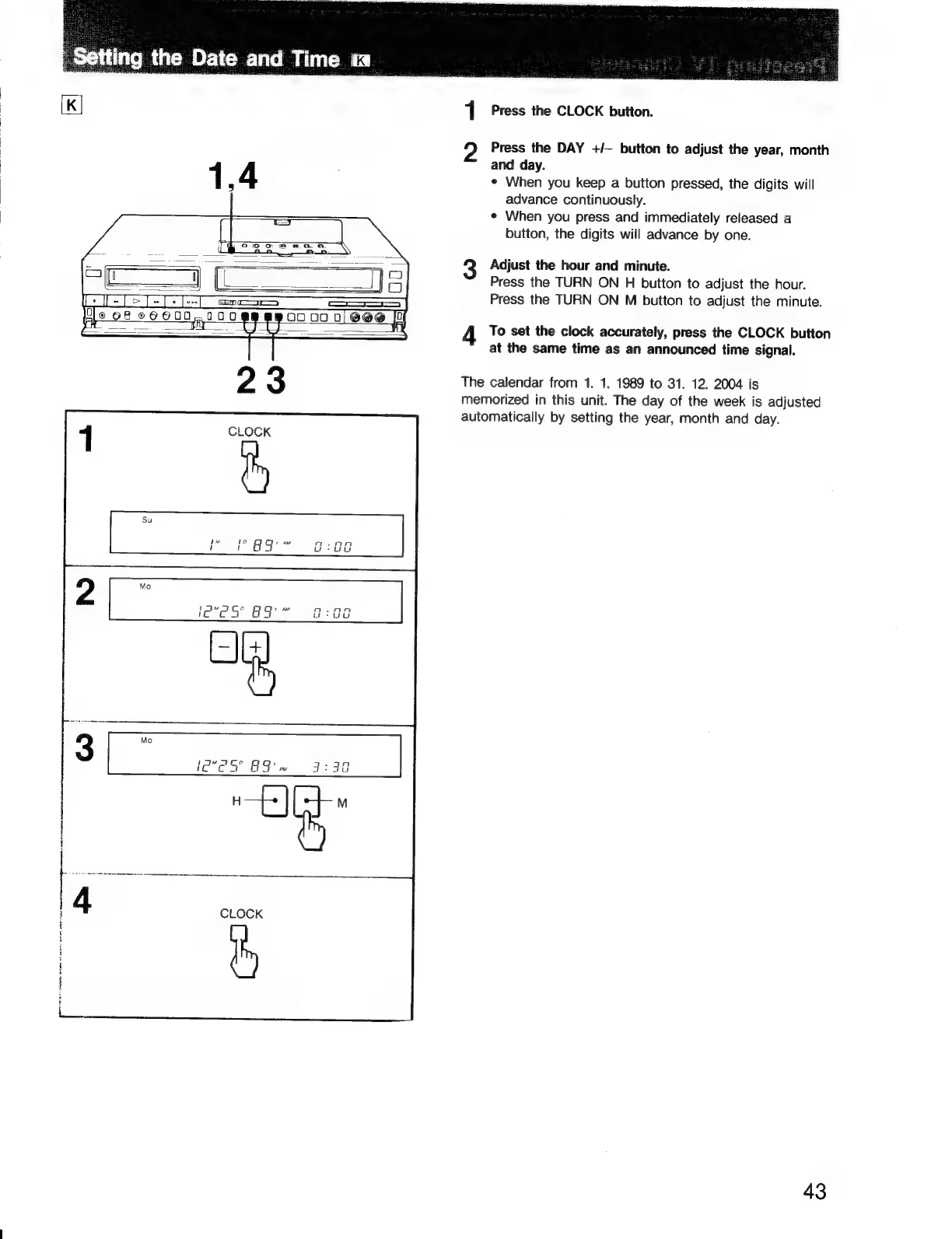
Press
the
CLOCK
button.
Press
the
DAY
+/—
button
to
adjust
the
year,
month
and
day.
¢
When
you
keep
a
button
pressed,
the
digits
will
advance
continuously.
¢
When
you
press
and
immediately
released
a
button,
the
digits
will
advance
by
one.
Adjust
the
hour
and
minute.
Press
the
TURN
ON
H
button
to
adjust
the
hour.
Press
the
TURN
ON
M
button
to
adjust
the
minute.
To
set
the
clock
accurately,
press
the
CLOCK
button
at
the
same
time
as
an
announced
time
signal.
The
calendar
from
1. 1.
1989
to
31.
12.
2004
is
memorized
in
this
unit.
The
day
of
the
week
is
adjusted
automatically
by
setting
the
year,
month
and
day.
43

Related product manuals