75
Connections
Installation and Connection
Connections
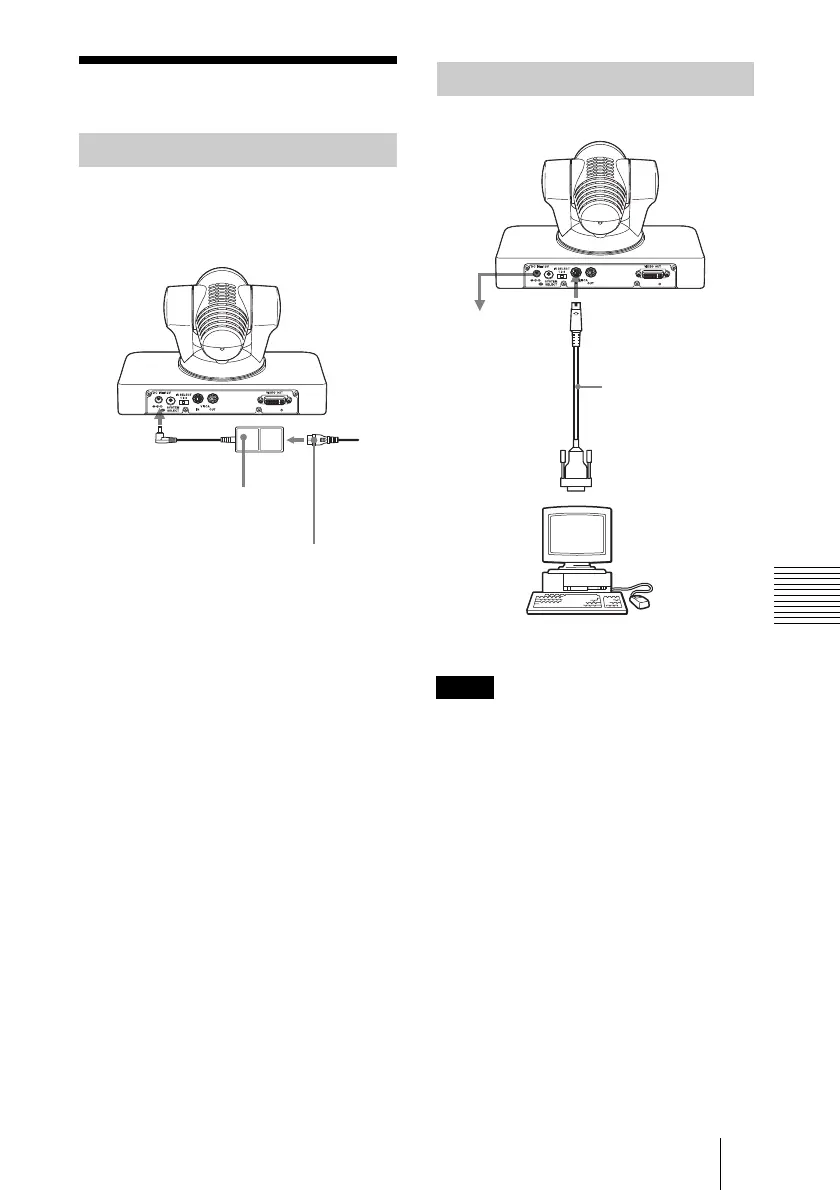
Use the supplied AC power adaptor and AC
power cord to connect the camera to an AC
outlet.
When you connect a computer to the camera
using the VISCA cable (RS-232C cross
cable), you can control the camera from a
computer instead of the supplied remote
commander.
To obtain a cable, consult your Sony dealer.
For detailed information on how to connect
the camera and the VISCA command list,
refer to the Technical Manual of the camera.
For details on obtaining a Technical
Manual, consult your Sony dealer.
Connecting to an AC Outlet
AC power adaptor
(supplied)
to AC
outlet
DC IN 12 V
AC power cord (supplied)
Connecting a Computer
Note
VISCA cable
(not supplied)
VISCA IN
to AC outlet
to RS-232C input
Computer


 To Next Page