76 Connections
Configure the COLOR SYSTEM, VIDEO
FORMAT, and sync switch (BOTTOM
switch 3) based on the specifications of the
HD monitor.
Configure the COLOR SYSTEM, VIDEO
FORMAT, and sync switch (BOTTOM
switch 3) based on the specifications of the
HD monitor.
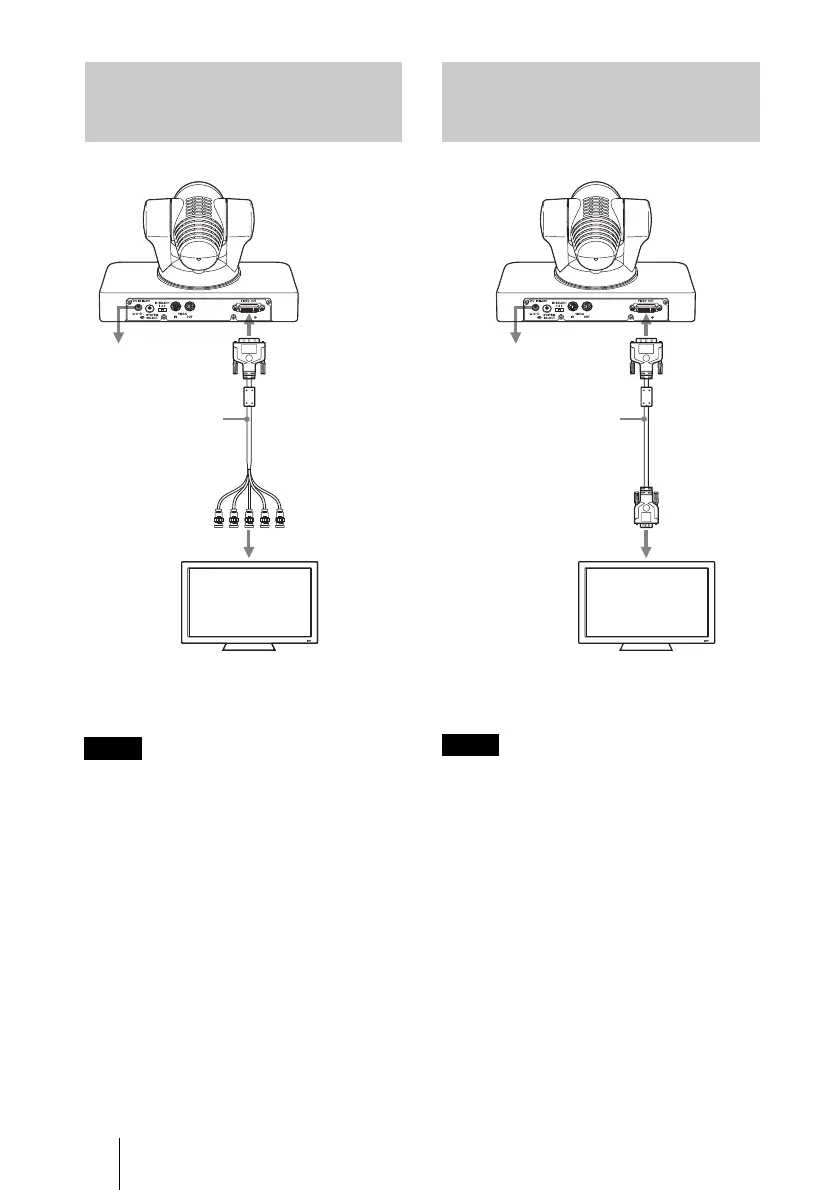
Connecting a Video Monitor,
etc., Equipped with an Analog
Component Input Connector
Note
to AC outlet
DVI to component
adapter cable
(not supplied)
to component
input connector
HD video monitor, etc.
VIDEO OUT
Connecting a Video Monitor,
etc., Equipped with an Analog
RGB Input Connector
Note
to AC outlet
DVI to analog RGB
adapter cable (not
supplied)
to analog
RGB input
HD video monitor, etc.
VIDEO OUT


 To Next Page