EasyManua.ls Logo

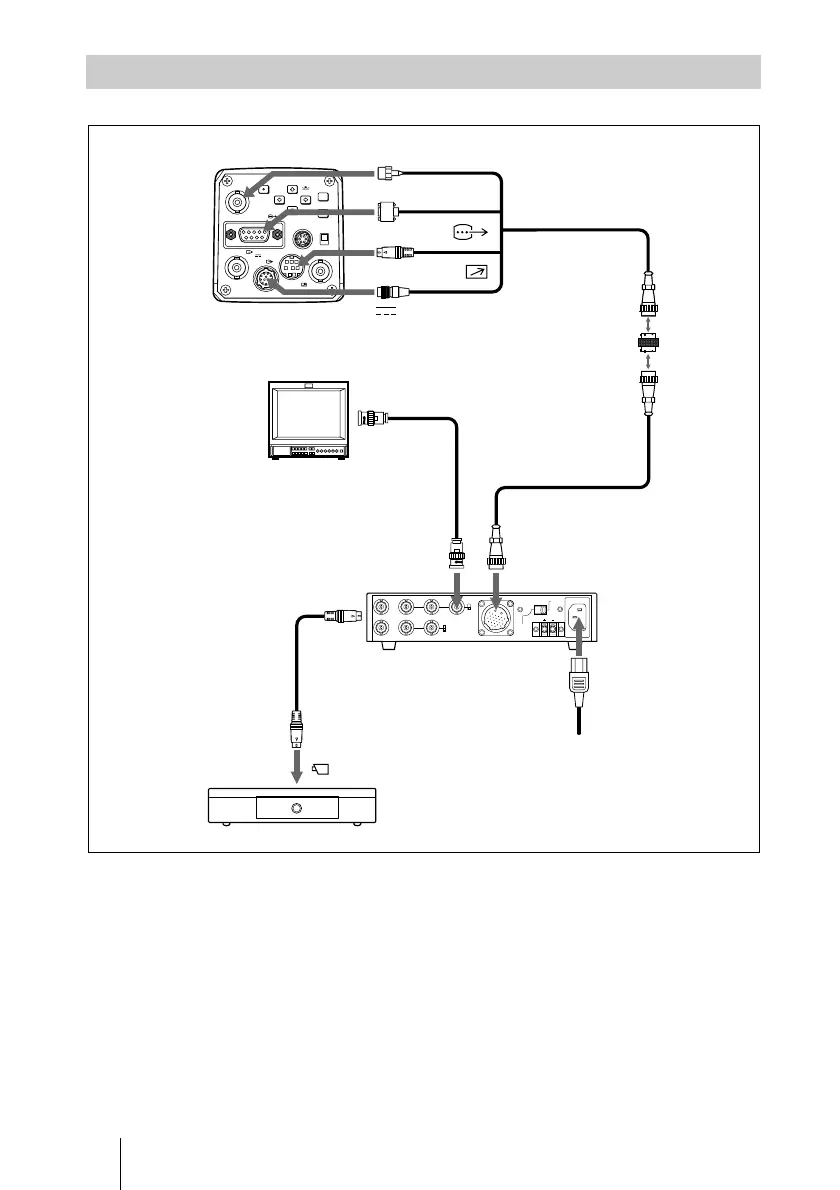
Sony ExwaveHAD DXC-990 - Connecting to the CMA-D3;D3 CE Camera Adaptor

Sony ExwaveHAD DXC-990
180 pages
Print Icon
To Next Page IconTo Next Page
To Previous Page IconTo Previous Page
Loading...
DXC-990/990P
3-205-543-12 (1)
D:\Nouhin\W00007\3205543121\320554312DXC990UC\02GB-
DXC990UC\06INST.fm
masterpage:Left
GB
32
Connections
a) To extend the cable, connect the CCMC-3MZ camera cable to the CCZ-A
camera cable using the cable adaptor supplied with the CCMC-3MZ.
Connecting to the CMA-D3/D3CE Camera Adaptor
W.E OUT
TRIG IN HD
G/Y OUT B/C
OUT
R/VBS
OUT
CAMERA
DC/AC
SELECT
~
AC IN
DC15V
IN
VD/SYNC
IN
RGB
VBS/Y/C
OUT
VIDEO OUT
DC IN/
VBS
REMOTE
LENS
TRIG IN
MENU
BLACK
FILE
SELECT WHITE
GEN LOCK
MENU LOCK
BARS
ENTER
OFF
ON
RGB/SYNC
Power
cord
DXC-990/990P
TRIG IN
RGB/SYNC
REMOTE
CCMC-3MZ camera cable
26-pin
DC IN/
VBS T
Video input
connector
CCZZ-1E cable
adaptor
a)
(supplied with the
CCMC-3MZ)
Video monitor, VCR, etc.
75-ohm coaxial
cable
CCZ-A camera cable
a)
(max. 100 m)
CAMERA (26-pin)
R/VBS OUT
REMOTE (front)
Connecting cable
(supplied with the
RM-C950)
CMA-D3/D3CE
camera adaptor
CAMERA
RM-C950
remote control unit

Table of Contents

Related product manuals