EasyManua.ls Logo

Sony FH-B155 - Microphone Mixing; Ruting the antil Mixed with a mures; Recording from a Microphone

Sony FH-B155
84 pages
Print Icon
To Next Page IconTo Next Page
To Previous Page IconTo Previous Page
Loading...
Microphone
Mixage
des
sons
i
atare
|
d’un
microphone
POWER
|
-ON
|
|
Mixing
Operation
Démarches
de
mixage
Fl
ia
:
ale
=
Is|
1
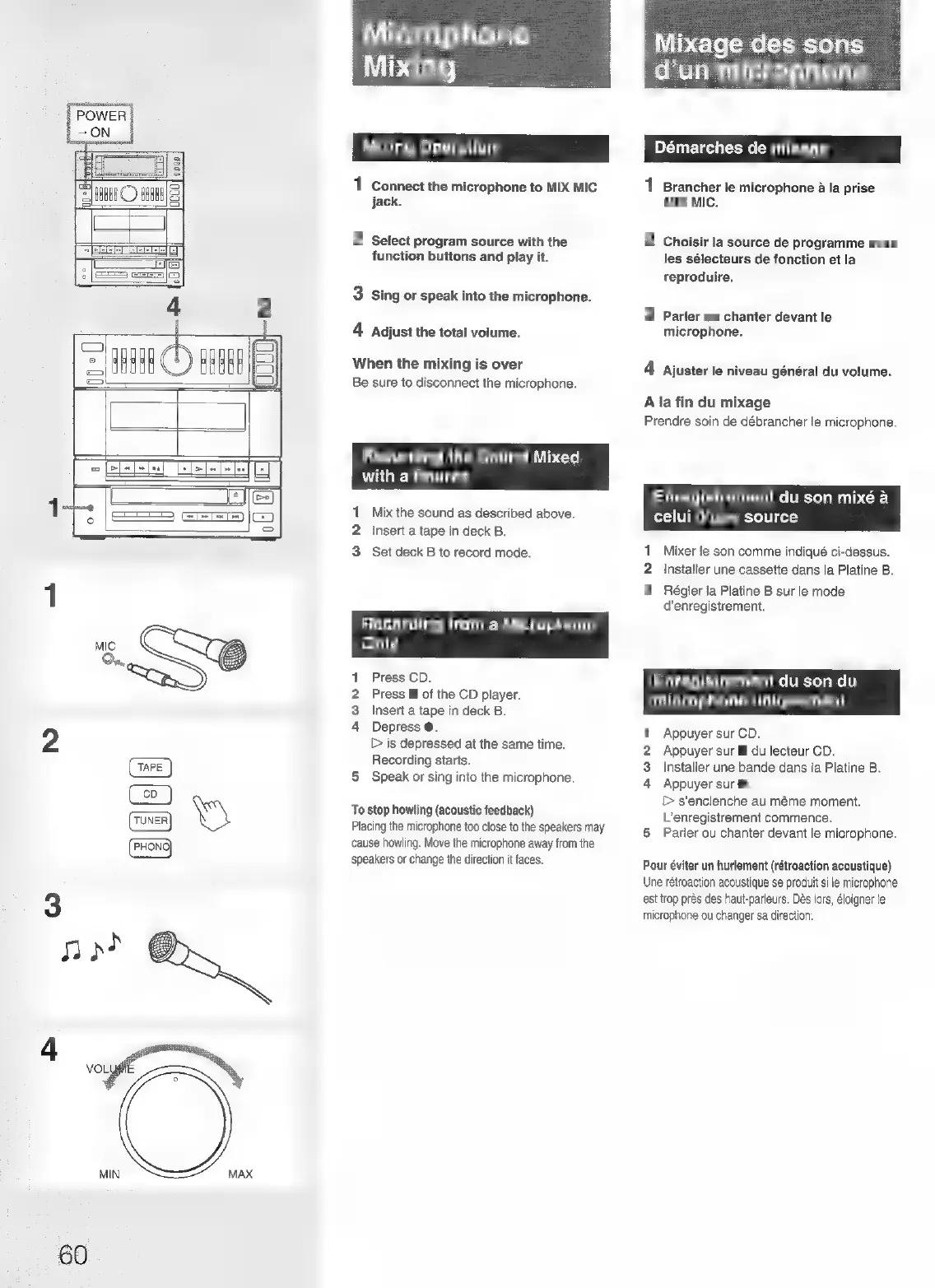
Connect
the
microphone
to
MIX
MIC
1
Brancher
le
microphone
a
la
prise
2
HAH
©
ERR)
|
jack.
MIX
MIC.
=
2
Select
program
source
with
the
2
Choisir
la
source
de
programme
avec
~
EEE
EEEEE
Ei
function
buttons
and
play
it.
les
sélecteurs
de
fonction
et
la
>|
_SSaza
reproduire.
3
Sing
or
speak
into
the
microphone.
4
2
3
Parler
ou
chanter
devant
le
|
4
Adjust
the
total
volume.
microphone.
4
rae}
.
itd
i
id
~
Hd af
f
When
the
mixing
is
over
4
Ajuster
le
niveau
général
du
volume.
Be
sure
to
disconnect
the
microphone.
A
la
fin
du
mixage
Prendre
soin
de
débrancher
le
microphone.
Recording
the
Sound
Mixed
with
a
Source
Enregistrement
du
son
mixé
a
1
Mix
the
sound
as
described
above.
celui
d’une
source
2
Insert
a
tape
in
deck
B.
3
Set
deck
B
to
record
mode.
1
Mixer
le
son
comme
indiqué
ci-dessus.
2
Installer
une
cassette
dans
la
Platine
B.
3
Régler
la
Platine
B
sur
le
mode
d’enregistrement.
Lat-Sefe)
col
(ale
Miceli
Miuiterceye)areyat=)
Only
1
Press
CD.
Enregistrement
du
son
du
2
Press
@
of
the
CD
player.
microphone
uniquement
3
Insert
a
tape
in
deck
B.
4
Depress
@.
?
1
Appuyer
sur
CD.
D
is
depressed
at
the
same
time.
2
Appuyer
sur
ll
du
lecteur
CD.
Recording
starts.
E
3.
Installer
une
bande
dans
la
Platine
B.
5
Speak
or
sing
into
the
microphone.
4
Appuyer
sur
@.
>
s’enclenche
au
méme
moment.
L’enregistrement
commence.
Parler
ou
chanter
devant
le
microphone.
To
stop
howling
(acoustic
feedback)
Placing
the
microphone
too
close
to
the
speakers
may
cause
howling.
Move
the
microphone
away
from
the
speakers
or
change
the
direction
it
faces.
a
Pour
éviter
un
hurlement
(rétroaction
acoustique)
Une
rétroaction
acoustique
se
produit
si
le
microphone
est
trop
prés
des
haut-parleurs.
Des
lors,
éloigner
le
microphone
ou
changer
sa
direction.
MIN
MAX
60

Related product manuals