7RPXWHWKHULQJWRQHIRUDQLQFRPLQJFDOO
ವ
When you receive the call, press the volume key.
5HMHFWLQJDFDOOZLWKDWH[WPHVVDJH
You can reject a call with a text message, sent automatically to the caller and stored
in the Messaging conversation with the contact.
You can select from a number of predefined messages available on your device, or
you can create a new message. You can also create your own personalised
messages by editing the predefined ones.
7RUHMHFWDFDOOZLWKDWH[WPHVVDJHZKHQWKHVFUHHQLVLQDFWLYH
When an incoming call arrives, tap 5
.
Select a predefined message or tap
.
7RUHMHFWDFDOOZLWKDWH[WPHVVDJHZKHQWKHVFUHHQLVDFWLYH
When an incoming call arrives, tap the heads-up notification window where the
phone number or the name of the contact is displayed.
Tap
.
Select a predefined message or tap
.
7RUHMHFWDVHFRQGFDOOZLWKDWH[WPHVVDJH
When you hear repeated beeps during a call, tap
.
Select a predefined message or tap
.
7RHGLWWKHWH[WPHVVDJHXVHGWRUHMHFWDFDOO
From your
, tap .
Find and tap
>
>
.
Tap the message that you want to edit, then make the necessary changes.
Tap
.
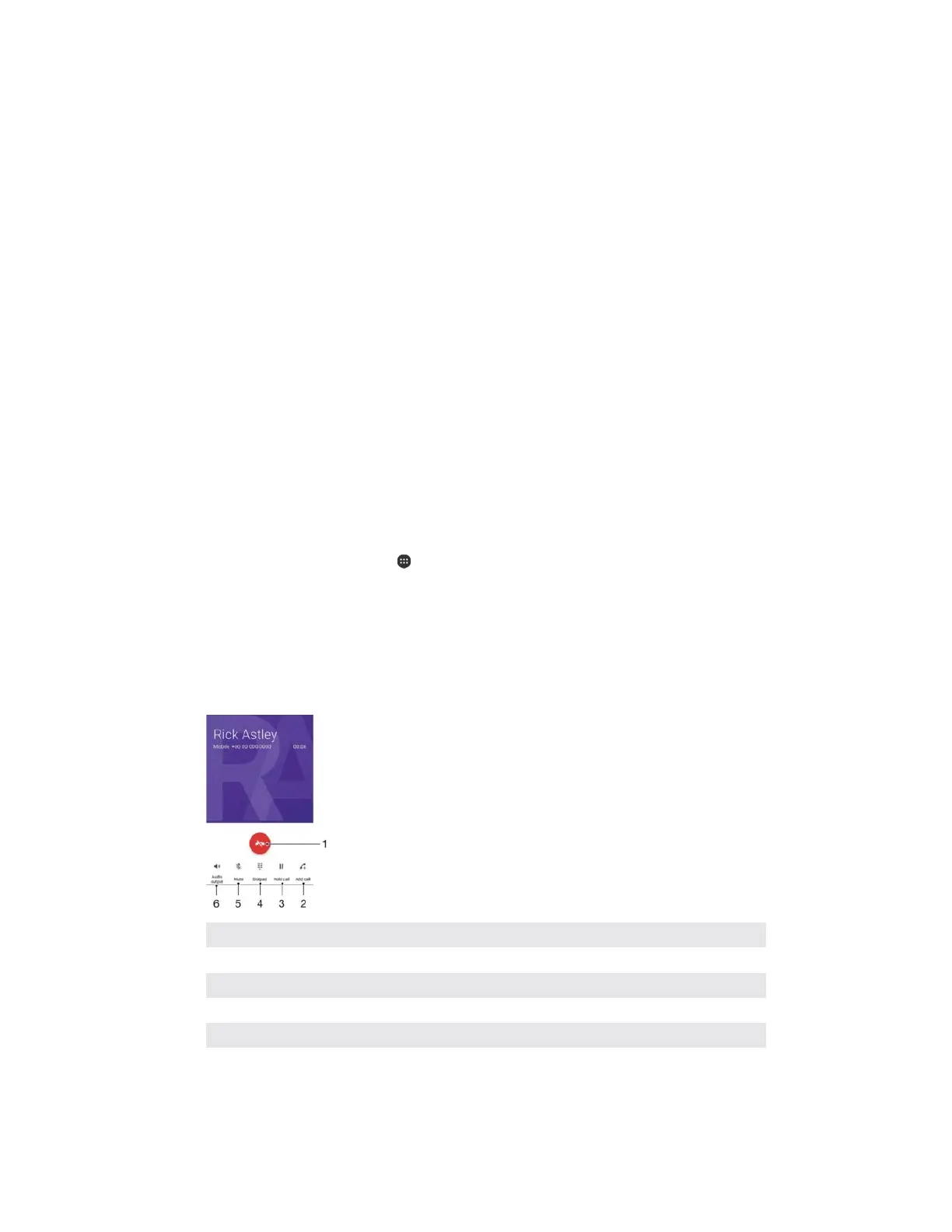
1 End a call
2 Make a second call
3 Put the current call on hold or retrieve a call on hold
4 Enter DTMF digits during a call
5 Mute the microphone during a call
6 Turn on the loudspeaker during a call
7RFKDQJHWKHYROXPHGXULQJDFDOO
ವ
Press the volume key up or down.
68
This is an internet version of this publication. © Print only for private use.



 To Next Page