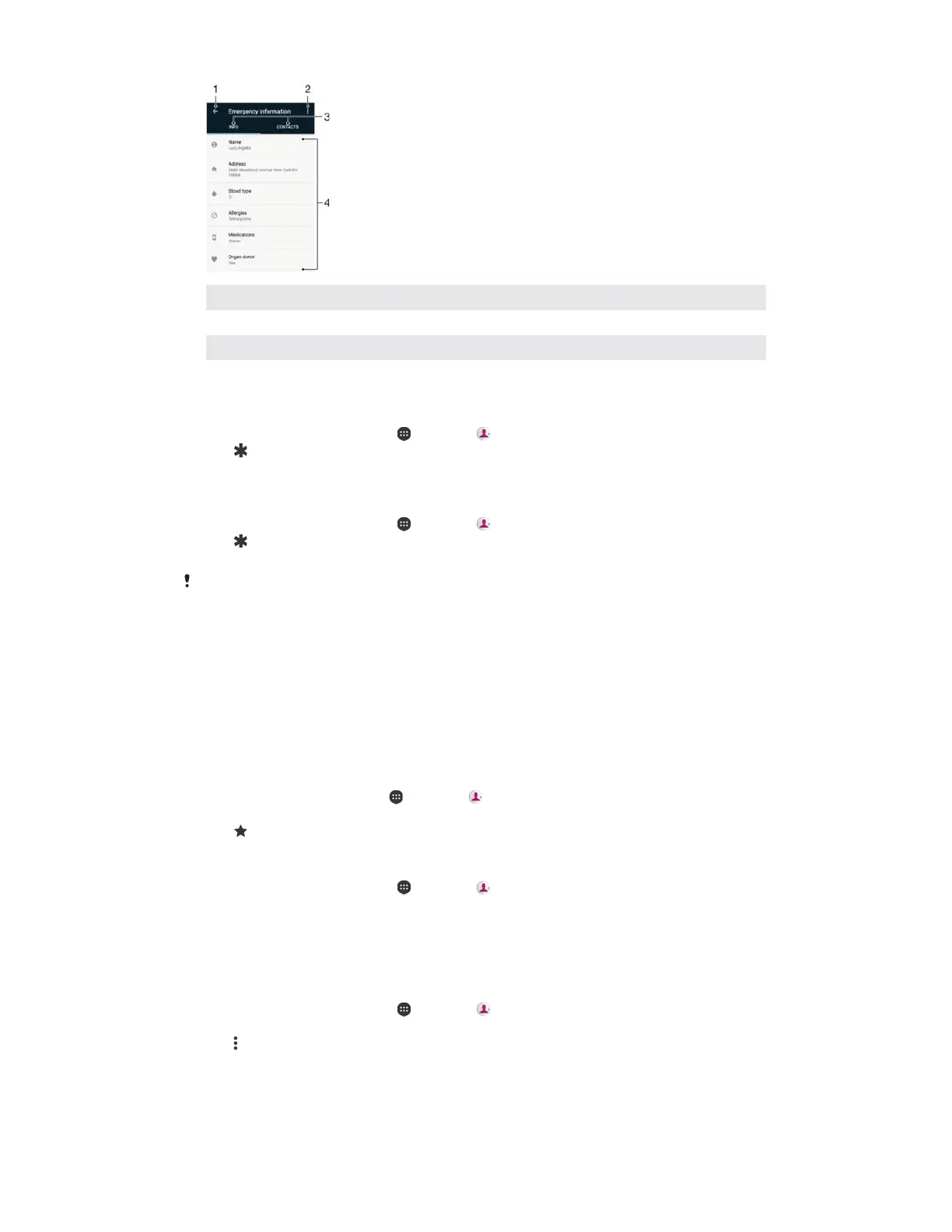
1 Go back to the main Contacts screen
2 View more options
3 Medical and personal information and emergency contacts tab
4 Medical and personal information
7RHQWHU\RXUPHGLFDOLQIRUPDWLRQ
From your +
, tap , then tap .
Tap .
Edit the desired information.
7RDGGDQHZHPHUJHQF\FRQWDFW
From your
, tap , then tap .
Tap
, then tap
>
.
Tap the contact that you want to use as an emergency contact.
The emergency contact must have at least a phone number which emergency personnel can
call. If your device is locked by a security screen lock, emergency personnel can only see the
phone number of the emergency contact, even if there is other information entered in the
Contacts application.
Contacts that you mark as favourites appear under the favourites tab in the Contacts
application along with your most frequently called contacts or "top contacts". This
way you get quicker access to these contacts.
7RPDUNRUXQPDUNDFRQWDFWDVDIDYRXULWH
From the
, tap , then tap .
Tap the contact you want to add to or remove from your favourites.
Tap
.
7RYLHZ\RXUIDYRXULWHFRQWDFWV
From your
, tap , then tap .
Tap
.
Sending contact information
7RVHQG\RXUEXVLQHVVFDUG
From your
, tap , then tap .
Tap
.
Tap
, then tap
.
Select an available transfer method and follow the on-screen instructions.
77
This is an internet version of this publication. © Print only for private use.



 To Next Page