: LINE OUT UNBALANCED L/R jacks of the HDD AUDIO PLAYER
: Audio cord (supplied)
: Analog input jack of an amplifier
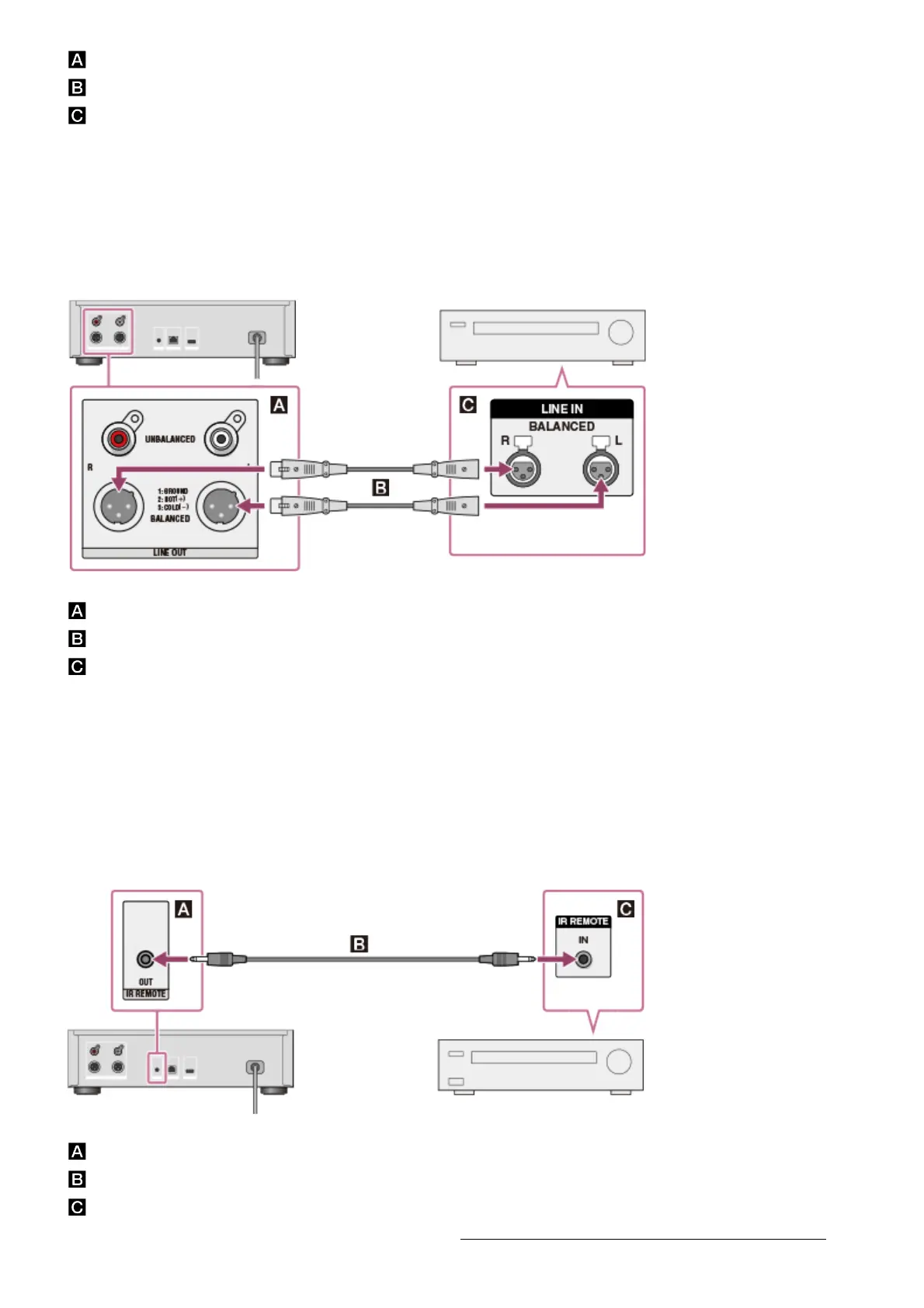
Connecting to the LINE OUT BALANCED jacks using XLR balanced
cords
Connect an amplifier to the LINE OUT BALANCED jacks on the rear panel of the HDD AUDIO
PLAYER using XLR balanced cords (not supplied).
: LINE OUT UNBALANCED L/R jacks of the HDD AUDIO PLAYER
: XLR balanced cords (not supplied)
: Analog input jack of an amplifier
Operating a connected amplifier
You can operate a connected amplifier using the remote control supplied with the HDD AUDIO
PLAYER or the dedicated application if you connect the supplied monaural mini-plug cable or
IR blaster.
When you use a Sony amplifier equipped with an IR input jack.
: IR REMOTE OUT jack of the HDD AUDIO PLAYER
: Monaural mini-plug cable (supplied)
: IR input jack of an amplifier
For details on how to operate an amplifier, see “Operating a Sony amplifier using the remote




 To Next Page