HCD-DZ370/DZ560/DZ570/DZ660/DZ777
33
8. DEMO PLAY OUT
It is a mode to release the demonstration reproduct by the dedicated
demonstration disc.
1. During playback the DEMO Disc, press the [
x
] and [
H
]
buttons for fi ve seconds simultaneously.
2. The message “DEMO OFF” is displayed, a mode to reproduct
the demonstration is released.
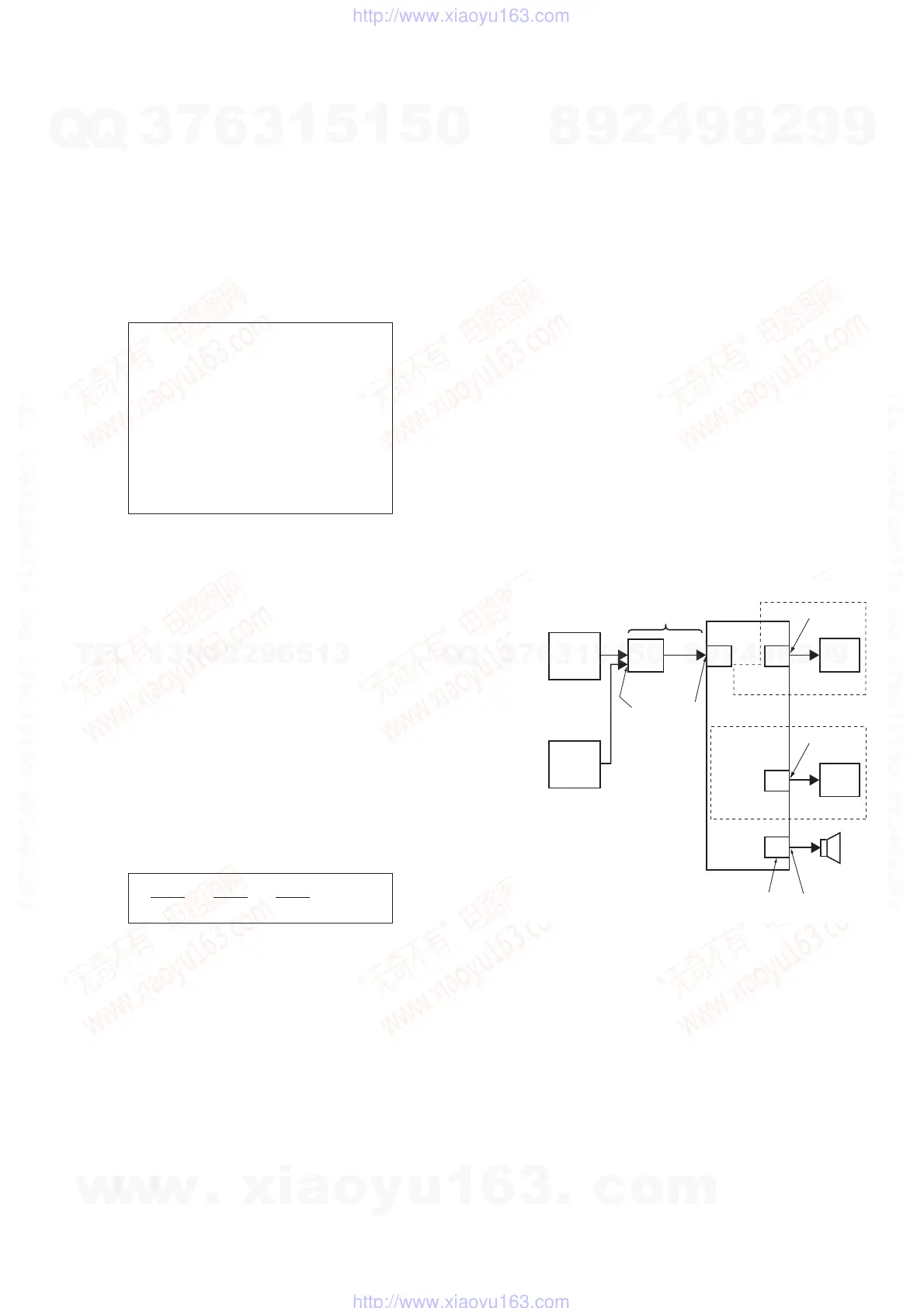
9. DIGITAL MEDIA PORT TEST
1. Connect the DMPORT CHECK JIG (P/N: J-2501-309-A) with
the terminal DMPORT.
2. Press the [
?/1
] button to turn the power on.
3. Confi rm that both LEDs of the DMPORT confi rmation JIG
lights. (Confi rmation the power supply line.)
4. Set the [FUNCTION] button with “DMPORT” on this model.
5. Press the [
X
], [
.
] buttons and turn the [VOLUME] control
in the direction of (+) simultaneously, the DMPORT test mode
is activated.
6. It is confi rmed that “DMPORT OK” is displayed on this set
display. (Confi rmation of communication line)
7. To a pin jack of the DMPORT confi rmation JIG input
information relevant to audio signal (sine-wave 1.0Vrms) and
composite video signal (white 100% 1.0Vp-p, color bar, etc.)
8. Confi rm the output of speakers and monitor TV. (Confi rmation
of analog signal)
9. To exit from this mode, press the [
X
], [
.
] buttons and turn
the [VOLUME] control in the direction of (+).
7-4-4. Return to the Top Menu of Remocon Diagnosis
Menu
Press [0] button on the remote commander.
• Check Version Information
To check the version information, please follow the following
procedure.
(1) From the Top Menu of Remocon Diagnosis Menu, select “4.
Version Information” by pressing the [4] button on the remote
commander. The following screen appears on the on-screen
display.
To return to the Top Menu of Remocon Diagnosis Menu, press
[0] button on the remote commander.
7-5. AUTOMATIC ACOUSTIC FIELD CALIBRATION
MICROPHONE TEST MODE
Procedure:
1. Press the [
?/1
] button to turn the power on.
2. Press the [FUNCTION] button to set the function “ DVD”.
3. Insert ECM-AC2 supplied as an accessory into the AUDIO IN/
A.CAL MIC jack.
4. While pressing the [
X
] and [
A
] buttons simultaneously, turn
the [VOLUME] control in the direction of (+).
5. Confi rm that the following are shown on the display panel.
1 The JACK inserted/non-inserted detection display and the
STEREO/MONO detection display.
2 Presence of DIGITAL voice input to the microcomputer.
(OK: input, NG: no input)
3 The value of the MIC input to the microcomputer. (shown
“255h”)
6. To exit from this mode, press the [
X
] and [
A
] buttons simulta-
neously, turn the [VOLUME] control in the direction of (+).
Version information
[O] Return to Top Menu
Firm (Main) : Ver. xxxxx
Firm (Sub) : xxxxx
RISC : xxxxx
8032 : xxxxx
Audio DSP : xxxxx
Servo DSP : xxxxx
“NON” : Not detected
“ST” : STEREO
“MN” : MONO
OK : input
NG : no input
0-255 (Changes in real time)
Ver. 1.1
color pattern
generator
DMPORT
CHECK JIG
(P/N: J-2501-309-A)
MAIN
board
TV
SET
CN204
CN400
J001 7
AF oscillator
FL speaker,
FR speaker
IO-SCART
board
SPEAKER
board
TB100
VIDEO
AUDIO
TV
J404
IO-COMPONENT
board
DZ560/DZ660
DZ370/DZ570/
DZ777
w
w
w
.
x
i
a
o
y
u
1
6
3
.
c
o
m
Q
Q
3
7
6
3
1
5
1
5
0
9
9
2
8
9
4
2
9
8
T
E
L
1
3
9
4
2
2
9
6
5
1
3
9
9
2
8
9
4
2
9
8
0
5
1
5
1
3
6
7
3
Q
Q
TEL 13942296513 QQ 376315150 892498299
TEL 13942296513 QQ 376315150 892498299
http://www.xiaoyu163.com
http://www.xiaoyu163.com


 To Next Page