EasyManua.ls Logo

Sony HCD-DZ151KB - User Manual

Sony HCD-DZ151KB
110 pages
Print Icon
To Next Page IconTo Next Page
Loading...
SERVICE MANUAL
Sony Corporation
Home Audio Division
Published by Sony Techno Create Corporation
Russian Model
E Model
HCD-DZ150K/DZ151KB
Australian Model
HCD-DZ150K
DVD RECEIVER
9-887-566-04
2007J16-1
© 2007.10
Ver. 1.3 2007.10
HCD-DZ150K/DZ151KB
HCD-DZ150K/DZ151KB are the amplifier, DVD/CD and
tuner section in DAV-DZ150K/DZ151KB.
SPECIFICATIONS
Model Name Using Similar Mechanism HCD-DZ110
Mechanism Type CDM85-DVBU102
Optical Pick-up Name
KHM-313CAA
This system incorporates with Dolby* Digital and Dolby Pro Logic (II)
adaptive matrix surround decoder and the DTS** Digital Surround System.
* Manufactured under license from Dolby Laboratories.
“Dolby”, “Pro Logic”, and the double-D symbol are trademarks of
Dolby Laboratories.
** Manufactured under license from DTS, Inc.
“DTS” and “DTS Digital Surround” are registered trademarks of DTS,
Inc.
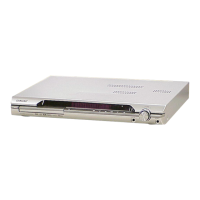
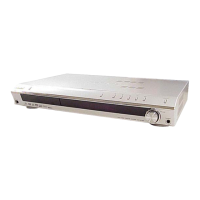
Photo : HCD-DZ150K
Amplifier section
Stereo mode (rated) 108 W + 108 W (at 3 ohms,
1 kHz, 1 % THD)
Surround mode (reference) RMS output power
FL/FR/C/SL/SR*: 142 watts
(per channel at 3 ohms,
1 kHz, 10 % THD)
Subwoofer*: 140 watts (at
3 ohms, 80 Hz, 10 % THD)
*Depending on the sound field settings and the source,
there may be no sound output.
Inputs (Analog)
TV/VIDEO (AUDIO IN) Sensitivity: 450/250 mV
AUDIO IN/MIC 1Sensitivity:
AUDIO IN 250/125 mV/
MIC 1 1 mV
MIC 2 Sensitivity: 1 mV
DVD system
Laser Semiconductor laser
(DVD: λ
= 650 nm)
(CD: λ
= 790 nm)
Emission duration:
continuous
Signal format system
Mexican and Latin American models:
NTSC
Other models: NTSC/PAL
Tuner section
System PLL quartz-locked digital
synthesizer
FM tuner section
Tuning range 87.5-108.0 MHz (50 kHz
step)
Antenna (aerial) FM wire antenna (aerial)
Antenna (aerial) terminals 75 ohms, unbalanced
Intermediate frequency 10.7 MHz
AM tuner section
Tuning range
Mexican and Latin American
models:
530 – 1,710 kHz (with the
interval set at 10 kHz)
531 – 1,710 kHz (with the
interval set at 9 kHz)
Russian and Middle Eastern models:
531 – 1,602 kHz (with the
interval set at 9 kHz)
Other models: 531 – 1,602 kHz (with the
interval set at 9 kHz)
530 – 1,610 kHz (with the
interval set at 10 kHz)
Australian and New Zealand models:
531 – 1,710 kHz (with the
interval set at 9 kHz)
530 – 1,710 kHz (with the
interval set at 10 kHz)
Antenna (aerial) AM loop antenna (aerial)
Intermediate frequency 450 kHz
Video section
Outputs VIDEO: 1 Vp-p 75 ohms
S VIDEO:
Y: 1 Vp-p 75 ohms
C: 0.286 Vp-p 75 ohms
COMPONENT:
Y: 1 Vp-p 75 ohms
PB/CB, PR/CR: 0.7 Vp-p
75 ohms
General
Power requirements
Mexican models: 120 V AC, 60 Hz
Saudi Arabian models: 127 - 240 V AC, 50/60 Hz
Other models:
120V AC, 50/60 Hz
Argentine models:
Latin American models (except forArgentine models):
Taiwan models:
220 - 240 V AC, 50/60 Hz
110 - 240 V AC, 50/60 Hz
Power consumption
Latin American and Saudi Arabian models:
On: 160 W
Standby: 0.3 W (at the
Power Saving mode)
Other models: On: 140 W
Standby: 0.3 W (at the
Power Saving mode)
Dimensions (approx.) 430 × 63 × 380 mm (w/h/d)
incl. projecting parts
Mass (approx.) 4.1 kg
Design and specifications are subject to change
without notice.
w
w
w
.
x
i
a
o
y
u
1
6
3
.
c
o
m
Q
Q
3
7
6
3
1
5
1
5
0
9
9
2
8
9
4
2
9
8
T
E
L
1
3
9
4
2
2
9
6
5
1
3
9
9
2
8
9
4
2
9
8
0
5
1
5
1
3
6
7
3
Q
Q
TEL 13942296513 QQ 376315150 892498299
http://www.xiaoyu163.com

Table of Contents

Question and Answer IconNeed help?

Do you have a question about the Sony HCD-DZ151KB and is the answer not in the manual?

Summary

Specifications

Caution: Radiation Exposure

Safety Related Component Warning

Self-diagnosis Function

SECTION 1 SERVICING NOTE

Handling Optical Pick-up Block

Precautions for handling the optical pick-up block.

Laser Diode Emission Check

Instructions for checking the laser diode emission safely.

Important Notice: TV Screen Damage Risk

Warning about potential TV screen damage from static images.

Capacitor Discharge Safety Procedure

Parts Requiring Adhesive Agent

OP Unit Installation & Solder Bridge Precautions

SECTION 3 DISASSEMBLY

3-1. Disassembly Flow

Outlines the order for disassembling the unit.

3-2. Case (DS) and Front Panel Assembly Disassembly

Step-by-step instructions for disassembling the case and front panel assembly.

3-3. FL Board Disassembly

Instructions for disassembling and installing the FL board.

3-4. JACK Board and P-SW Board Disassembly

Procedures for disassembling the JACK and P-SW boards.

3-5. Tuner (FM;AM) Disassembly

Instructions for disassembling the FM/AM tuner unit.

3-6. DIAT-CON Board Disassembly

Instructions for disassembling the DIAT-CON board.

3-7. IO-S-OUT Board Disassembly

Instructions for disassembling the IO-S-OUT board.

3-8. POWER Board Disassembly

Instructions for disassembling the POWER board.

3-9. SPEAKER Board and D.C. Fan Disassembly

Instructions for disassembling the SPEAKER board and DC fan.

3-10. MAIN Board Disassembly

Instructions for disassembling the MAIN board.

3-11. DVD Mechanism Deck Disassembly

Instructions for disassembling the DVD mechanism deck.

3-12. Tray Disassembly

Instructions for disassembling the disc tray.

3-13. Belt and MS-203 Board Disassembly

Instructions for disassembling the belt and MS-203 board.

3-14. Optical Pick-up Disassembly

Instructions for disassembling the optical pick-up.

SECTION 4 TEST MODE

1. Cold Reset Procedure

Procedure to clear all data and reset settings.

2. Panel Test Modes

Modes for testing panel functions like display and keys.

4. DVD Ship Mode

Mode used when returning the set to the customer after repair.

6. Product Out Mode

Mode to clear data and position the optical pick-up for customer return.

7-1. General Description

7-2. How to Enter Test Mode

Steps to enter the test mode and view the diagnosis menu.

7-3. Executing IOP Measurement

Standard procedures for performing IOP measurement.

7-4. Emergency History Check

7-5. Acoustic Field Calibration Microphone Test Mode

9. Protection Factor Identification Test Mode

SECTION 5 ELECTRICAL ADJUSTMENT

DVD Section: IOP Measurement

Performing IOP measurement after optical pick-up replacement.

SECTION 6 DIAGRAMS

6-1. Block Diagram - RF;Video Section

Block diagram of the RF and Video signal path.

6-2. Block Diagram - Audio;Amp Section

Block diagram of the Audio and Amplifier sections.

6-3. Block Diagram - Power Section

Block diagram of the Power supply section.

6-4. Printed Wiring Board - Main Board (Side A)

Printed wiring board layout for the Main board (Side A).

• IC Block Diagrams - MAIN Board -

IC Pin Function Description: MAIN BOARD IC1101 CXD9889 R

MAIN BOARD IC501 SYSTEM CONTROLLER IC Pin Function Description

SUPPLEMENT-1

Summary

Specifications

Caution: Radiation Exposure

Safety Related Component Warning

Self-diagnosis Function

SECTION 1 SERVICING NOTE

Handling Optical Pick-up Block

Precautions for handling the optical pick-up block.

Laser Diode Emission Check

Instructions for checking the laser diode emission safely.

Important Notice: TV Screen Damage Risk

Warning about potential TV screen damage from static images.

Capacitor Discharge Safety Procedure

Parts Requiring Adhesive Agent

OP Unit Installation & Solder Bridge Precautions

SECTION 3 DISASSEMBLY

3-1. Disassembly Flow

Outlines the order for disassembling the unit.

3-2. Case (DS) and Front Panel Assembly Disassembly

Step-by-step instructions for disassembling the case and front panel assembly.

3-3. FL Board Disassembly

Instructions for disassembling and installing the FL board.

3-4. JACK Board and P-SW Board Disassembly

Procedures for disassembling the JACK and P-SW boards.

3-5. Tuner (FM;AM) Disassembly

Instructions for disassembling the FM/AM tuner unit.

3-6. DIAT-CON Board Disassembly

Instructions for disassembling the DIAT-CON board.

3-7. IO-S-OUT Board Disassembly

Instructions for disassembling the IO-S-OUT board.

3-8. POWER Board Disassembly

Instructions for disassembling the POWER board.

3-9. SPEAKER Board and D.C. Fan Disassembly

Instructions for disassembling the SPEAKER board and DC fan.

3-10. MAIN Board Disassembly

Instructions for disassembling the MAIN board.

3-11. DVD Mechanism Deck Disassembly

Instructions for disassembling the DVD mechanism deck.

3-12. Tray Disassembly

Instructions for disassembling the disc tray.

3-13. Belt and MS-203 Board Disassembly

Instructions for disassembling the belt and MS-203 board.

3-14. Optical Pick-up Disassembly

Instructions for disassembling the optical pick-up.

SECTION 4 TEST MODE

1. Cold Reset Procedure

Procedure to clear all data and reset settings.

2. Panel Test Modes

Modes for testing panel functions like display and keys.

4. DVD Ship Mode

Mode used when returning the set to the customer after repair.

6. Product Out Mode

Mode to clear data and position the optical pick-up for customer return.

7-1. General Description

7-2. How to Enter Test Mode

Steps to enter the test mode and view the diagnosis menu.

7-3. Executing IOP Measurement

Standard procedures for performing IOP measurement.

7-4. Emergency History Check

7-5. Acoustic Field Calibration Microphone Test Mode

9. Protection Factor Identification Test Mode

SECTION 5 ELECTRICAL ADJUSTMENT

DVD Section: IOP Measurement

Performing IOP measurement after optical pick-up replacement.

SECTION 6 DIAGRAMS

6-1. Block Diagram - RF;Video Section

Block diagram of the RF and Video signal path.

6-2. Block Diagram - Audio;Amp Section

Block diagram of the Audio and Amplifier sections.

6-3. Block Diagram - Power Section

Block diagram of the Power supply section.

6-4. Printed Wiring Board - Main Board (Side A)

Printed wiring board layout for the Main board (Side A).

• IC Block Diagrams - MAIN Board -

IC Pin Function Description: MAIN BOARD IC1101 CXD9889 R

MAIN BOARD IC501 SYSTEM CONTROLLER IC Pin Function Description

SUPPLEMENT-1

Sony HCD-DZ151KB Specifications

General IconGeneral
TypeHome Theatre System
Number of Channels5.1
DVD PlayerYes
Supported MediaDVD, CD, USB
FM TunerYes
AM TunerYes
Speakers IncludedYes
Remote ControlYes
ConnectivityUSB
Audio Formats SupportedDolby Digital, DTS
Audio InputsAnalog Audio Input
Speaker Configuration5.1 channel

Related product manuals