EasyManua.ls Logo

Sony HCD-EX6 - 2-6. Back Panel Removal

Sony HCD-EX6
66 pages
Print Icon
To Next Page IconTo Next Page
To Previous Page IconTo Previous Page
Loading...
HCD-EX6/EX6T/EX8/EX8T/EX9/EX9T
10
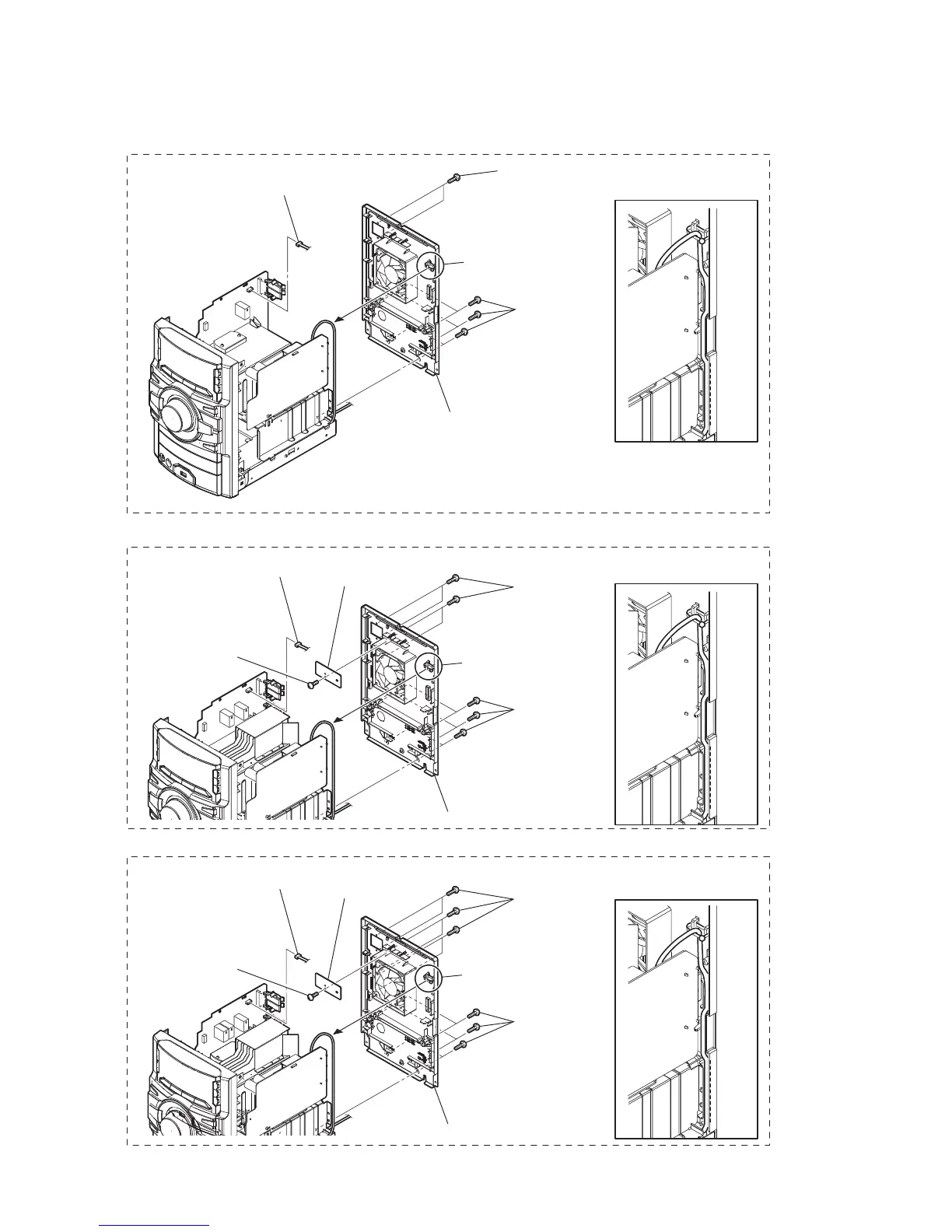
2-6. BACK PANEL SECTION
1 screw
(+BVTP 3 u10)
2 HOLD board
4 Cut the clamp.
Installation of the power cord
when assembling the set.
Installation of the power cord
when assembling the set.
Installation of the power cord
when assembling the set.
4 Cut the clamp.
7 back panel section
3 CN701 (3P)
5 four screws
(+BVTP 3 u10)
3 two screws
(+BVTP 3 u10)
6 six screws
(+BVTP 3 u10)
1 CN701 (3P)
2 Cut the clamp.
4 six screws
(+BVTP 3 u10)
5 back panel section
EX8/EX8T
EX6/EX6T
1 screw
(+BVTP 3 u10)
2 HOLD board
7 back panel section
3 CN701 (3P)
5 six screws
(+BVTP 3 u10)
6 six screws
(+BVTP 3 u10)
EX9/EX9T

Related product manuals