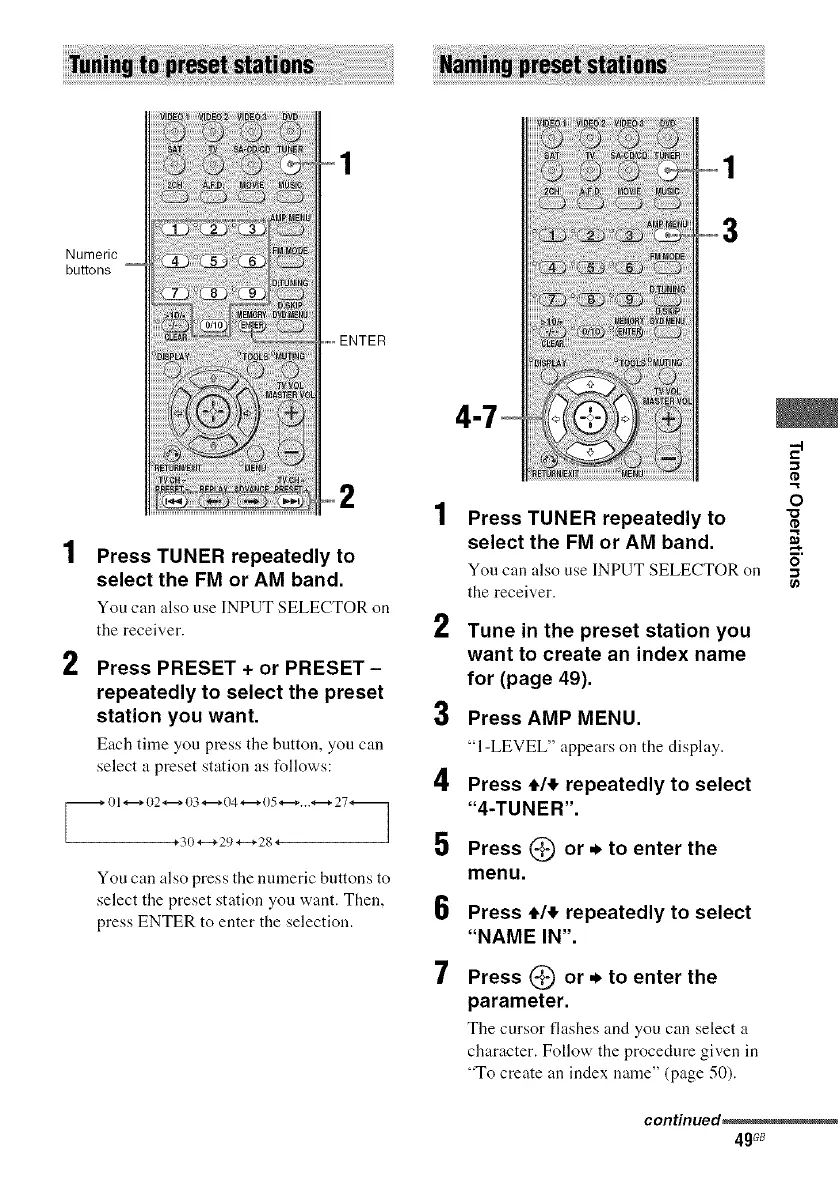
Numeric
buttons
2
Press TUNER repeatedly to
select the FM or AM band.
You can also use INPUT SELECTOR on
the receiver.
Press PRESET + or PRESET -
repeatedly to select the preset
station you want.
Each time you press tile button, you can
select a preset station as follows:
_ 01 *-* 02 _;i,;21)c7_i );7 .... 27_
You can also press the turmeric buttons to
select the preset station you want. Then,
press ENTER to enter the selection.
3
2
3
4
5
6
7
Press TUNER repeatedly to
select the FM or AM band.
You can also use INPUT SELECTOR on
the receiver.
Tune in the preset station you
want to create an index name
for (page 49).
Press AMP MENU.
"1-LEVEL" uppeurson the displuy.
Press 4,1,!,repeatedly to select
"4-TUNER'.
Press (_ or * to enter the
menu.
Press 4,1,!,repeatedly to select
"NAME IN".
Press @ or. to enter the
parameter.
The cursor flushes und you can select a
character. Follow the procedure given in
"To create an index name" (page 50).
.,1
o
continued_
4gG8



 To Next Page