Descriptionandlocationof parts
Front panel
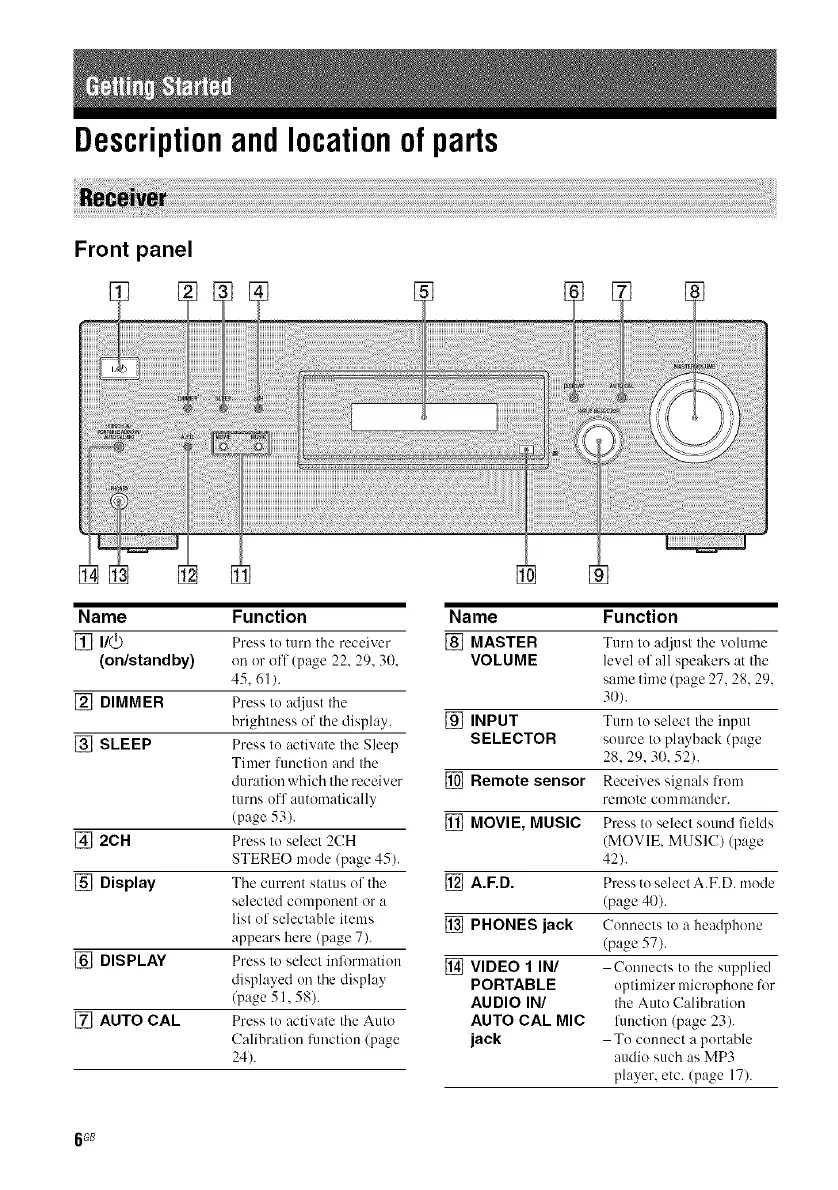
[]
Name Function
[] I/(_) Press to turn tim receiver
(on/standby) on or off (page 22. 29.30.
45.61 ).
[] DIMMER Press to adjust the
brightness of the display.
[] SLEEP Press to activate the Sleep
Timer function and the
duration which the receiver
turns off automatically
(page 53).
[] 2CH Press to select 2CH
STEREO mode (page 45).
[] Display The current status of the
selected component or a
list of selectable items
appears here (page 7).
[] DISPLAY Press to select information
displayed on the display
(page 51,58).
[] AUTO CAL Press to activate the Auto
Calibration hmction (page
24).
Name Function
[] MASTER Turn to adjust the volume
VOLUME level of all speakers at the
same time (page 27.28.29.
3{)).
[] INPUT Turn to select the input
SELECTOR source to playhack (page
28.29.30. 52).
[] Remote sensor Receives signals fi'om
rmnote coul ulauder.
[] MOVIE, MUSIC Press to select sound fields
(MOVIE. MUSIC) (page
42).
[] A.F.D. Press to select A.F.D. mode
(page 40).
[] PHONES jack Comlects to a headphone
(page 57).
[] VIDEO 1 IN/ Connects to the supplied
PORTABLE optimizer microphone li)r
AUDIO IN/ the Auto Calibration
AUTO CAL MIC fimction (page 23).
jack To connect a portable
audio such as MP3
player, etc. (page 17).
6 G8



 To Next Page