Presettingradio stations
You can preset up to 30 FM stations and 30
AM stations. Then you can easily tulle ill the
stations yon often listen to.
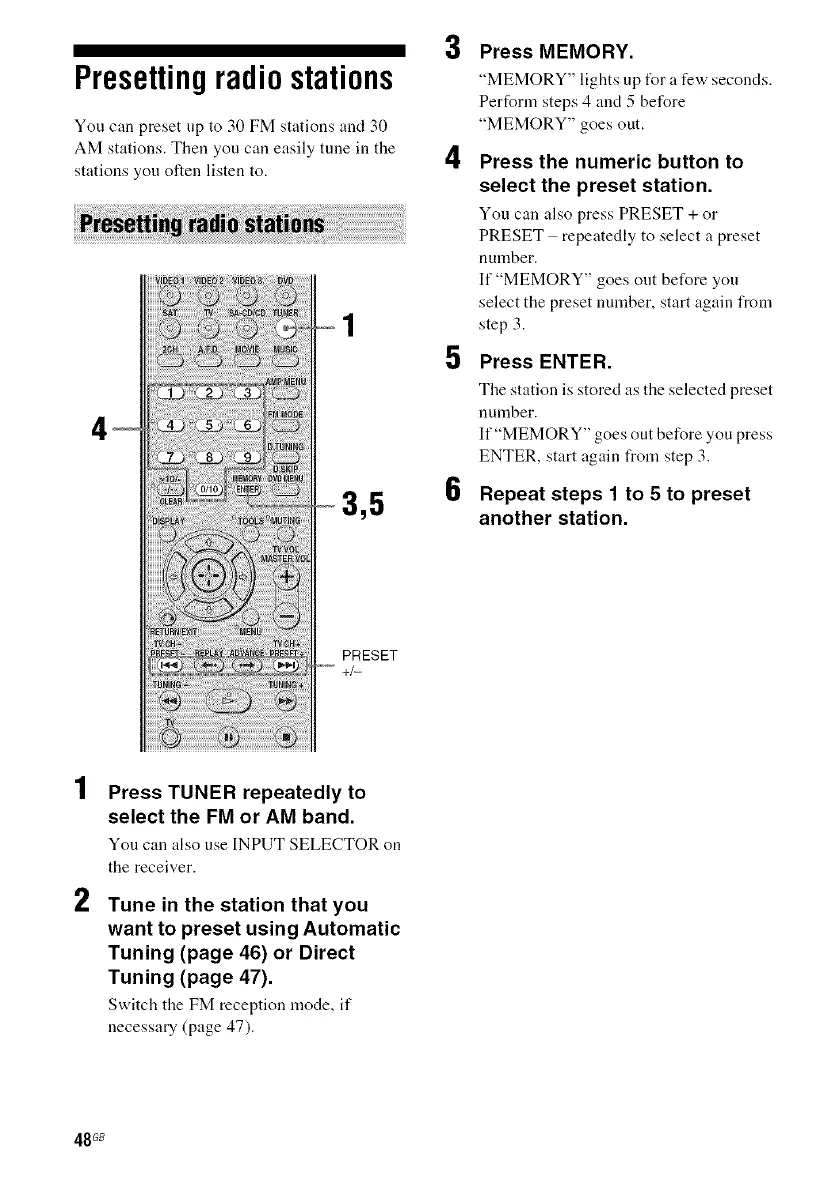
3,5
3
4
5
6
Press MEMORY.
"MEMORY" lights up t_r a few seconds.
Perform steps 4 and 5 before
"MEMORY" goes out.
Press the numeric button to
select the preset station.
You can also press PRESET + or
PRESET repeatedly to select a preset
number.
If "MEMORY" goes out before you
select the preset number, start again from
step 3.
Press ENTER.
Tile station is stored as tile selected preset
nunlber,
If "MEMORY" goes out before you press
ENTER, start again from step 3.
Repeat steps 1 to 5 to preset
another station.
PRESET
+/-
2
Press TUNER repeatedly to
select the FM or AM band.
You can also use INPUT SELECTOR on
the receiver.
Tune in the station that you
want to preset using Automatic
Tuning (page 46) or Direct
Tuning (page 47).
Switch the FM reception mode, it"
necessary (page 47).
48G8



 To Next Page