11
GB
Getting Started
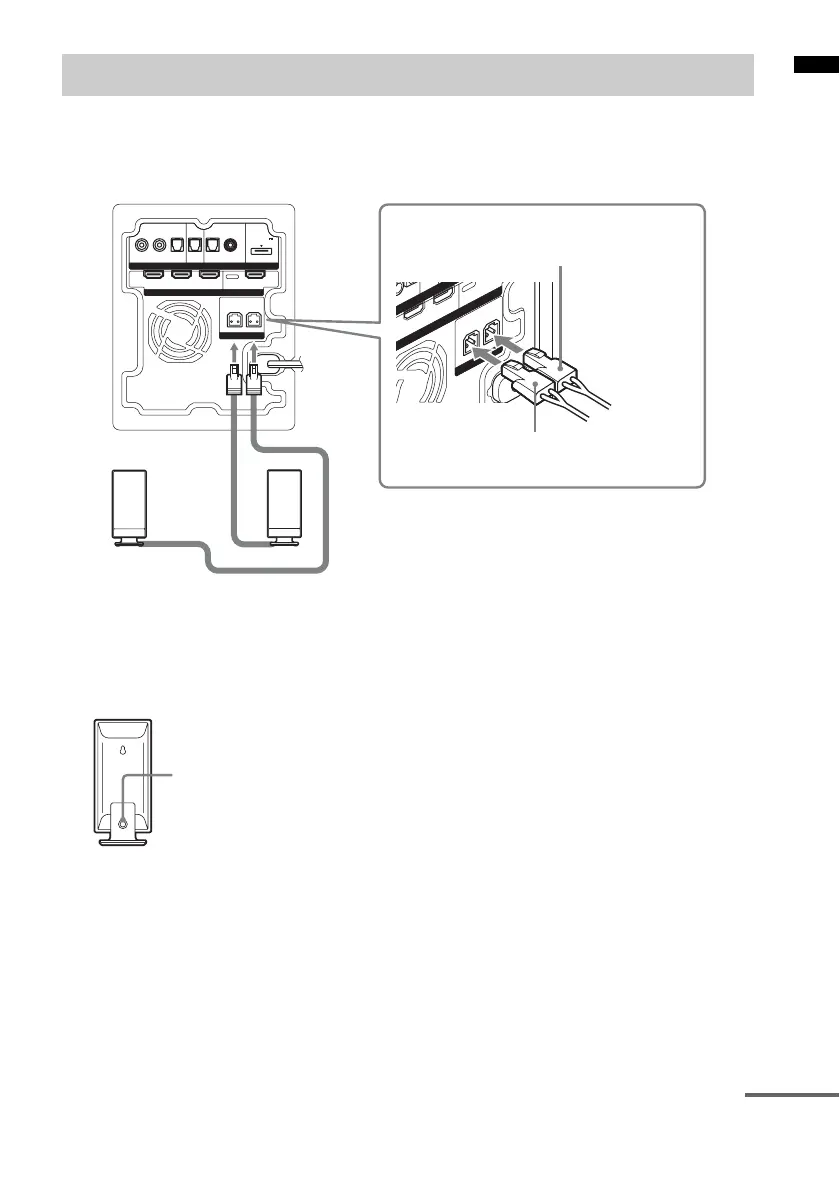
Insert the speaker connector of the left speaker into the L jack, and insert the speaker connector of the
right speaker into the R jack on the rear of the active subwoofer.
To set the speakers at an angle
You can select the angle for the speaker: 0° and 10°. (The speakers are set to an angle of 0° at shipping.)
1 Remove the screw (pre-installed) at the rear of the speaker.
2 Detach the speaker stand.
Connecting the speakers
INPUTINPUT
HDMI
RL
OPT OPT OPT
COAX
DC 5V
0.7A MAX
DVD SAT DMPORTTV
BD IN DVD IN SAT IN TV OUT
SPEAKER
ONLY FOR SS-FS1
R
L
H
D
M
I
DVD IN SA
T IN
TV O
SPEAKER
O
N
L
Y
F
O
R
S
S
-F
S
1
R
L
White (Speaker (L))
Red (Speaker (R))
Speaker (L)
Speaker (R)
Rear of the active subwoofer
Screw (pre-installed)
continued



 To Next Page